Top entourage CAD blocks architects need for renders
People, vehicles and trees give a render scale and life. Here is the entourage kit to download free, how to place figures, and how to avoid clones.
Sumana KumarUpdated 28 June 20264 min read

Entourage is what makes a drawing feel inhabited
A façade with no people, no cars and no planting reads as a technical diagram. Add a few figures walking past, a parked car for scale, a street tree or two, and the same elevation suddenly reads as a place — somewhere with a size you can feel and a life you can imagine. That layer of human and contextual content is called entourage, and it is the cheapest, highest-impact upgrade you can make to a presentation drawing.
Entourage is also how you communicate scale honestly. A person is a universal ruler: drop a 1.7-metre figure beside a doorway and anyone, trained or not, instantly reads how big the door is. No scale bar communicates size as immediately as a human body standing next to the thing being measured.
This post is the entourage kit worth downloading before your next presentation set: people in plan and elevation, vehicles, and trees. Everything is on cadblockdwg.com, free in DWG with no signup and free for commercial use, so you can build the kit once and reach for it on every render. A small, well-chosen set beats a sprawling library you have to search every time.
People — the universal scale ruler
Figures are the backbone of entourage. In elevation, a standing adult reads at roughly 1.7 to 1.8 metres tall, and placing one beside a door, a window or a flight of steps lets the viewer calibrate every other dimension on the sheet. In plan, people appear as small top-down ovals that show occupancy and circulation — useful on furnished layouts to prove a space is not overcrowded.
The Human Figure Plan 1 block is a clean plan-view occupant for exactly this; pair it with elevation figures from the People category for face-on views, and you have both halves of the scale story covered. Keeping a plan kit and an elevation kit means you are never tempted to lay an elevation figure flat on a plan, which reads as a mistake instantly.
The trick with figures is restraint and variety. A few well-placed people do more than a crowd, and they should be doing different things at different scales — someone close, someone further back, someone seated. Vary the figures so they do not all face the same way at the same height, which immediately reads as stamped clip art. Place them where a real person would plausibly be: on paths, near entrances, around seating, not floating in the middle of a road or hovering off the ground line.
Vehicles and trees fill out the context
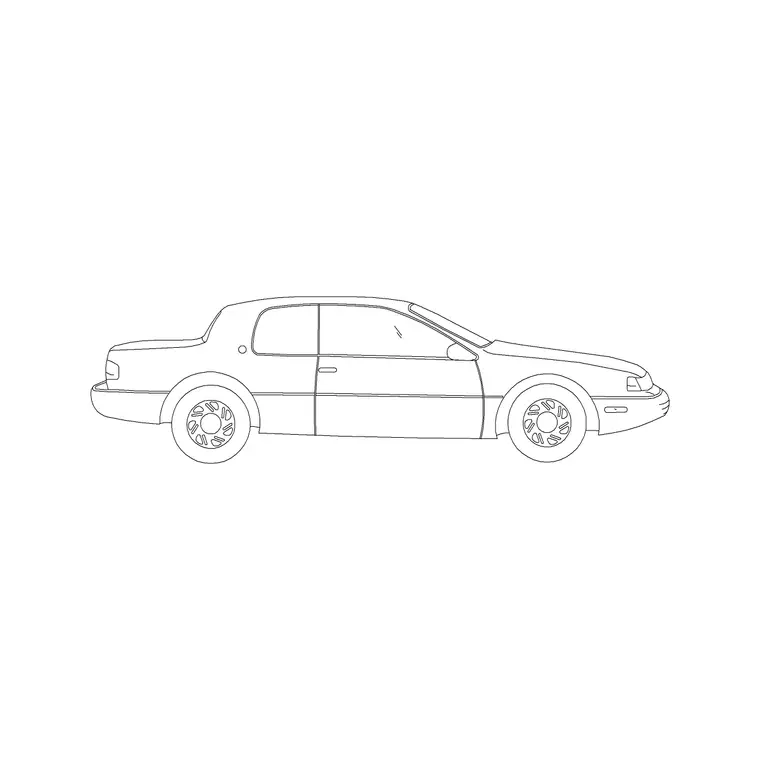
Vehicles do double duty in entourage: they set scale and they signal that a space is a real, used street or forecourt. A car is about 4.5 by 1.8 metres, instantly readable, so a single parked vehicle in elevation or plan tells the viewer the building sits in the world, not in a vacuum. The 2 Door Sedan Car block is a clean elevation car for exactly this; pull it and maybe one larger vehicle from the Vehicles category, and place them parked or moving where the drawing's logic puts traffic.
Trees complete the picture by adding height, softness and a sense of season. For renders and elevations you want elevation trees — the side silhouette — to sit in front of and beside the building, breaking up hard lines and giving the eye something organic. A coniferous block like the Pine Plan 1 family has a matching elevation form for street views; keep their canopy spread honest so they do not dwarf or undersell the architecture.
People, vehicles and trees together are the three legs of believable entourage. With a small kit of each you can dress almost any presentation drawing, and because each family also pulls its weight as a scale reference, the same blocks that make a render feel alive also make it measurable.
Place, layer and avoid the clone army
The fastest way to ruin entourage is repetition — the same figure, same car, same tree stamped over and over, the clone-army look that screams fake. Mirror and rotate instances, mix two or three different figures and vehicles, and vary their sizes slightly with the SCALE command to suggest depth, with closer entourage a touch larger than distant. Even small variation reads as a populated scene rather than a copy-paste.
Keep all entourage on its own layer — or a few layers for people, vehicles and trees — so you can dim it back behind the architecture or freeze it entirely for a clean technical issue of the same drawing. Blocks built on layer 0 inherit whichever entourage layer you insert them onto, so set that layer current first, then insert with the INSERT command at scale 1.
Snap figures to the ground line so they do not appear to float, snap cars to the road edge or a bay, and place people where a person would actually stand. Get those few things right and your presentation drawings will read as inhabited, correctly scaled places rather than empty geometry — and the same drawing can be stripped back to a clean technical sheet in seconds by freezing the entourage layers.
Questions
Frequently asked
What is entourage in architectural drawing?+
Entourage is the people, vehicles, trees and contextual elements added to a drawing or render to convey scale and make the scene feel inhabited and real rather than purely technical.
How tall should a scale figure be in elevation?+
A standing adult reads at roughly 1.7 to 1.8 metres tall in elevation. Placing one beside a door or steps lets the viewer calibrate every other dimension on the sheet.
Where can I download free entourage blocks?+
The People, Vehicles and Trees & Plants categories on cadblockdwg.com have figures, cars and trees as free DWG downloads, no signup, free for commercial use.
Free downloads from this article

Free CAD block library
Download the blocks from this article — free, no signup
