How to insert a downloaded chandelier block in AutoCAD
Place a free chandelier DWG in a ceiling plan or elevation — centring it over a room, setting the right hanging height, and keeping it on a lighting layer.
Sumana KumarUpdated 15 March 20264 min read
Pick a chandelier and know its view
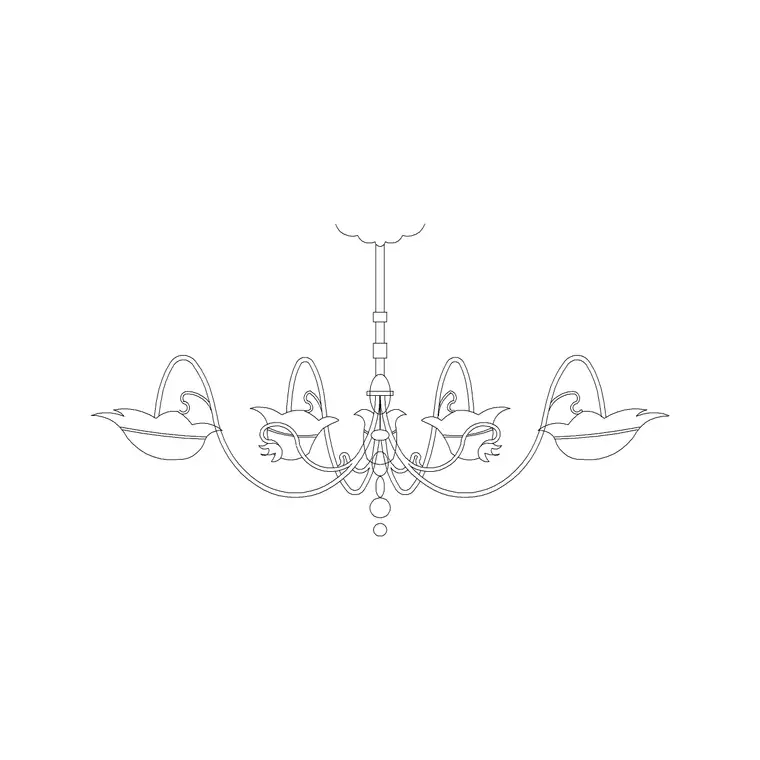
Lighting blocks are mostly used in two places: a reflected ceiling plan (RCP), seen from below looking up, and an interior elevation or section, seen from the side. The Lighting category has suspended and metal chandeliers, and many are drawn in elevation — the side profile showing the drop, the arms and the bulbs — which is ideal for showing a fixture hanging over a dining table on a section.
Download the chandelier you want as a DWG; it is free, no account needed, and fine for commercial drawings. If your block is an elevation view but you need a plan symbol for an RCP, you can still place the elevation block on an elevation/section sheet and use a simpler circular light symbol on the ceiling plan. Knowing which view you have keeps the fixture reading correctly on whichever sheet you drop it into.
Insert and centre it over the room
Open your drawing, type I, Enter, Browse to the chandelier DWG and select it. A chandelier almost always wants to be centred — over a dining table, a stairwell, the middle of a room — so its placement point matters. Turn on snaps (F3) and, to find a true centre, you can snap to the midpoint of a diagonal or use the Geometric Center snap on a rectangular room outline.
Leave scale at 1 to start; chandeliers are drawn at real size, and a typical dining chandelier might be 600 to 900mm across. Click to place it centred on the table or room. If you are working on a reflected ceiling plan, remember the RCP is a mirror of the floor plan, so left and right are flipped — place the fixture accordingly so it lands where it actually hangs.
Set the hanging height in elevation
On an elevation or section, the chandelier's vertical position is the whole point of the drawing — it communicates how low the fixture hangs. After inserting, move the block vertically so the bottom of the chandelier sits at the right height above the floor or the surface below it. Over a dining table the underside is commonly around 750 to 850mm above the tabletop, so it lights the table without blocking sightlines across it.
Use object snaps to set this precisely: snap the ceiling-fixing point of the block to your ceiling line, and the chandelier hangs the correct drop below it. If the drop is wrong for your ceiling height, you can stretch the suspension portion of the block with STRETCH, leaving the decorative body unchanged, so the fixture reaches the height you want without distorting its proportions.
Scale, rotate and duplicate
If the chandelier is the wrong size for the space, scale it — but check units first, because a fixture that comes in absurdly large or invisible is the usual millimetre-versus-metre mismatch rather than a design choice. Set INSUNITS consistently, or run SCALE with 0.001 / 1000 as needed, then confirm with a quick DIST across the body that the diameter looks right for the room.
For a row of identical pendants over a long table or kitchen island, place one chandelier, then COPY or ARRAY it at even spacing — say three pendants at 600mm centres. Because it is a block, every copy is identical and you can restyle them all by redefining the block once. Rotate with ROTATE only if the fixture is asymmetric and needs orienting to the room.
Keep it on a lighting layer
Lighting belongs on its own layer — or a small set, such as lighting and lighting-switched — so the reflected ceiling plan can be turned on and off independently of the furniture and architecture. Blocks built on layer 0 inherit the current layer, so set your lighting layer current before you insert and the chandelier adopts it automatically.
This separation is what lets you produce a clean RCP for the electrical package without the floor furniture cluttering it, and lets you dim the lighting on a general arrangement plan so it does not compete with the walls. A correctly centred, correctly scaled chandelier on its own layer reads as a deliberate design decision — which, over a dining table or in an entrance hall, is exactly the impression the drawing should give.
Coordinate the fixture with the room below
A chandelier is not placed in isolation — it relates to whatever sits beneath it. Over a dining table it should centre on the table, not the room, if the table is off-centre; over a stairwell it should clear the stair flight and the head height of anyone walking under it; in an entrance hall it should sit on the entry axis. So before you fix the position, bring the furniture layer back on, see where the table or feature actually is, and align the fixture to that.
This is where keeping lighting and furniture on separate layers pays off twice: you turn the furniture on to coordinate the chandelier's position, then turn it off again to present a clean ceiling plan. Check, too, that the fixture does not clash with a ceiling beam, a fan or an air grille in the same zone — a quick look with the structure and services layers visible catches conflicts before they reach site. A chandelier that lines up perfectly with the table below, clears the structure above, and sits at the right drop is the small detail that makes an interior drawing feel genuinely resolved.
Questions
Frequently asked
How high should a chandelier hang over a dining table?+
Commonly around 750 to 850mm above the tabletop, so it lights the table without blocking sightlines. In elevation, move the block vertically to set this and snap its fixing point to the ceiling line.
Can I use an elevation chandelier block on a reflected ceiling plan?+
Not directly — an RCP needs a plan symbol seen from below. Use the elevation chandelier on sections and elevations, and a simple circular light symbol on the ceiling plan, both on the lighting layer.
How do I add a row of matching pendants?+
Place one chandelier or pendant, then COPY or ARRAY it at even centres (for example 600mm). As blocks they stay identical and can all be restyled by redefining the block once.
Free downloads from this article

Free CAD block library
Download the blocks from this article — free, no signup