Free dishes & crockery DWG files (and how to use them)
Find free dishes, plates and crockery DWG blocks, how a place setting is drawn, and how table-setting blocks bring a dining or kitchen plan to life.
Sumana KumarUpdated 25 February 20264 min read
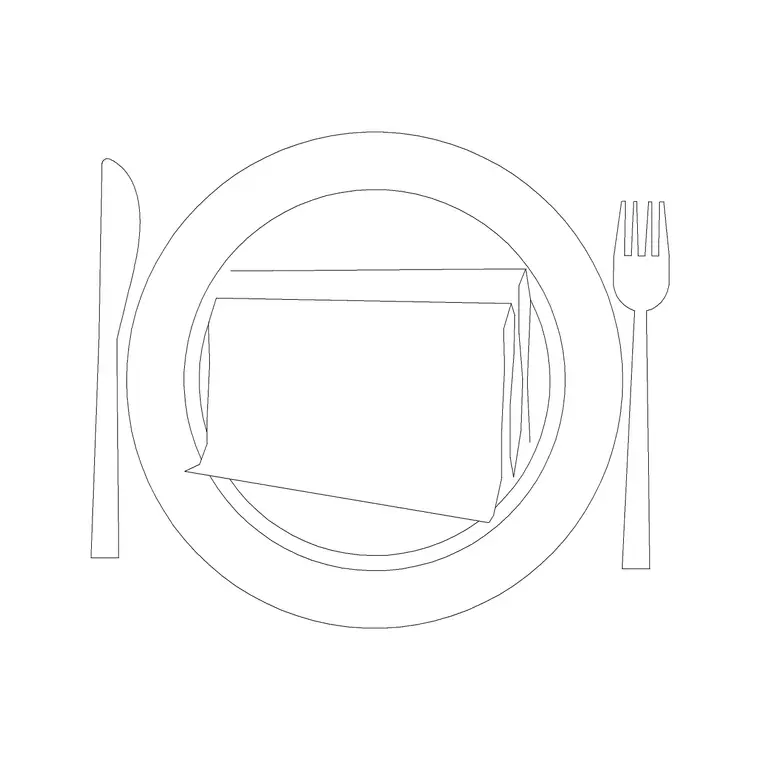
Finding the dishes block
Dishes and crockery blocks sit in the Kitchen category. Search 'dishes' to reach the tableware block, free to download as DWG with no signup and free for commercial use. These are the plates, bowls, cups and place-setting elements that dress a dining table or a kitchen worktop — small, recognisable circles and shapes whose job is to make a plan read as a set table rather than a bare surface.
Like utensils and small appliances, crockery is a prop family. You will not dimension a side plate. But a laid place setting on a dining table, or a stack of plates by the sink, communicates how a space is used with a clarity that no note achieves. On a presentation drawing for a kitchen-diner or a restaurant, well-drawn crockery is what tips the plan from technical to inviting. It pairs naturally with the kitchen accessories and dining-furniture blocks, so a single setting can be copied around any table you have already placed.
How a place setting is drawn
A standard place setting in plan is a vocabulary of circles and lines you can rely on. The dinner plate is a circle around 250–280mm in diameter; a side plate sits to the upper left at about 180mm; a bowl may nest on the dinner plate. Cutlery flanks the plate — fork to the left, knife and spoon to the right — drawn as slim shapes, with a glass at the upper right, roughly 70–80mm across. Allow about 600mm of table width per setting so diners are not crammed.
That per-setting allowance is the genuinely useful number. When you lay settings around a dining table block, spacing them at roughly 600mm centres tells you honestly how many people the table seats — and whether the six-seater the client asked for actually fits six settings with elbow room, or only comfortably seats four. The crockery is decorative, but the spacing it forces is a real planning check.
Dressing a dining table
Start with your dining table block, then lay place settings around it. Insert the dishes block, position one setting centred on each seat at about 600mm centres, and copy it around the table. Rotate each setting so it faces inward toward a diner, and snap the settings a consistent distance in from the table edge so they line up neatly — an untidy scatter of plates reads worse than no crockery at all.
Mirror and rotate so settings on opposite sides face each other correctly. Add a centrepiece — a serving dish or a bowl in the middle — if the drawing benefits from it, but keep it restrained. As with all props, the goal is a table that looks considered and usable, not one buried under tableware. A clean, correctly spaced set of settings does far more for the drawing than a crowded one. For a round table, array the settings evenly around the centre rather than copying in a line, so they fan out at consistent spacing and the table reads as properly laid.
Using crockery in the kitchen, not just the dining room
Crockery is not only for the dining table. A stack of plates draining by the sink, mugs beside the kettle, or bowls on an open shelf all add life to a kitchen plan and reinforce the story of how the space works. A few plates on the drainer next to your sink-counter block instantly read as a working kitchen rather than a showroom.
Use these touches sparingly and logically — crockery near the sink and the dishwasher where washing-up happens, mugs near the kettle, serving ware on the island. The same restraint that governs utensils applies here: two or three well-placed groupings, not a worktop covered in plates. Combined with the dining-table settings, a single dishes DWG dresses both the eating and the working zones of an open-plan kitchen-diner. Open shelving is a good place for a neat row of plates or bowls if the design has any, since it shows the crockery off and reinforces that the kitchen is in everyday use.
Scale, layers and finishing
Because crockery is small, check the scale after downloading — a dinner plate should read around 250–280mm, not 0.25 (metres) or a giant 2500mm. If it imports wrong, set INSUNITS to millimetres in both files or SCALE by 1000 or 0.001 as needed. The pieces are small enough that a scale error is easy to overlook, so it is worth a deliberate measure across the dinner plate before you copy a setting around the table.
Keep all the crockery on a props or accessories layer so you can freeze it for the dimensioned setting-out drawing and thaw it for the presentation. The blocks here are built on layer 0, so make the props layer current before inserting and the whole table service lands on it — one toggle then hides or shows every plate at once. With correct scale, sensible spacing and its own switchable layer, a dishes block is the finishing touch that makes a dining or kitchen plan feel ready for guests rather than empty and unused.
Questions
Frequently asked
How is a place setting drawn in CAD?+
A dinner plate is a 250–280mm circle with a side plate (~180mm) upper-left, cutlery flanking it and a glass upper-right. Allow about 600mm of table width per setting.
How do crockery blocks help plan a dining table?+
Spacing settings at roughly 600mm centres shows honestly how many diners the table actually seats with elbow room — a real planning check disguised as decoration.
Should dishes be on a separate layer?+
Yes. Keep crockery on a props layer so you can freeze it for the technical setting-out drawing and thaw it for the client presentation with one toggle.
Free downloads from this article
Free CAD block library
Download the blocks from this article — free, no signup


