12 best free paving & hardscape CAD blocks to download 2026
Twelve free paving and hardscape DWG blocks and patterns for 2026 — setts, slabs, brick bonds and edging — to fill external surfaces fast and honestly.
Sumana KumarUpdated 11 June 20264 min read
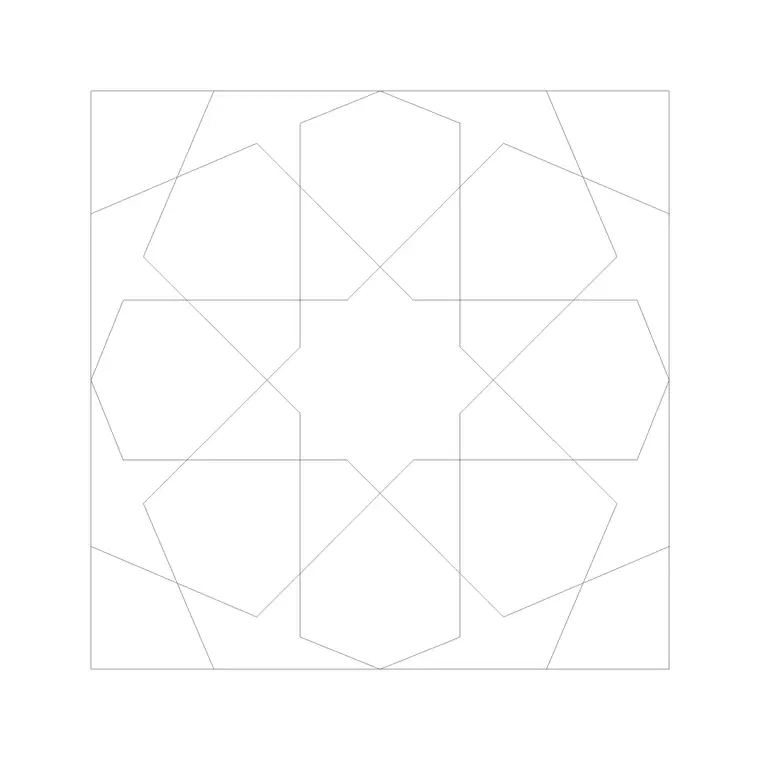
Paving is pattern, and pattern is hatch
Hardscape is where a lot of drawings go vague — a grey blob labelled 'paving' that tells a contractor nothing. Done properly, paving is a real pattern at a real module: setts at 100 by 200mm, slabs at 600 by 600mm, a brick bond with a defined direction. A good paving library gives you those patterns as blocks or hatches you can drop in and fill an area honestly. Everything in this roundup is free, available as DWG, needs no signup, and cleared for commercial use.
The 12 below are grouped by surface type: unit paving (setts, blocks and slabs), patterned and decorative paving, edging and kerb details, and the special surfaces. Browse them in the paving category. The paving-block pattern here is a clean, repeatable unit you can array or hatch across an area. The discipline that makes a hardscape drawing useful is to set the pattern out at its real module so the contractor can read the bond, the joint width and the setting-out point directly from your drawing.
Unit paving — setts, blocks and slabs (1–5)
Unit paving is the backbone of external works, laid in modular pieces with a defined bond. Concrete block paving (block paviors) is commonly 200 by 100mm laid in stretcher or herringbone bond; concrete or stone slabs come at 450, 600 and 900mm squares; granite setts run smaller at around 100 by 100mm. The block you want here is a single unit you can array, or a ready-made hatch of the bond so a whole area fills in one move.
Five blocks cover unit paving: a block-pavior unit, a herringbone-bond fill, a 600-square slab fill, a stretcher-bond brick paving fill, and a random/coursed stone fill. The paving-block pattern here drops straight into an external surface. Set the hatch out from a real setting-out point — a building corner or a kerb line — so the pattern aligns with the architecture rather than floating, and the drawing reads as a buildable surface with an honest module.
Patterned and decorative paving (6–8)
Feature areas — entrances, plazas, courtyards — call for patterned paving that signals importance. A circular or fan pattern marks a focal point; a banded or ribbon layout in two colours leads the eye along a route; a basketweave or radial bond adds texture to a courtyard. These patterns do design work, directing movement and marking thresholds, so they want to be drawn deliberately rather than dropped in at random.
Three blocks cover the decorative patterns: a circular/fan paving feature, a two-tone banded pattern, and a basketweave fill. Place the circular feature on a focal axis — the centre of a courtyard, the approach to an entrance — and run banded paving along the line you want people to follow. Because these patterns carry intent, set them out carefully against the geometry of the space so the design reads, rather than letting the hatch origin fall wherever it lands.
Edging, kerbs and thresholds (9–11)
Every paved area needs an edge, and the edge details are what make a hardscape drawing complete. A kerb line separates carriageway from footway; an edging or restraint contains a paved field and stops it spreading; a drainage channel or threshold strip marks where surfaces and levels change. These linear details are quick to draw but easy to forget, and their absence leaves a paving plan that looks finished but cannot be built.
Three blocks cover edges and thresholds: a kerb/edge profile, a drainage channel run, and a threshold/level-change strip. Draw these as the containing lines around your paved fields, and the plan suddenly reads as a real, drained, contained surface rather than an unbounded hatch. Snapping the paving hatch to these edge lines also keeps the pattern tidy at the boundary, which is exactly where a sloppy fill betrays itself.
Special surfaces and downloading the set (12)
Round the set out with a special surface — a gravel or resin-bound fill, drawn as a stippled hatch, for paths, parking overspill or informal areas. One block brings the collection to 12 and covers the softer hard surfaces that unit paving does not, letting you distinguish a gravel path from a slabbed terrace on the same drawing.
To download any pattern, open the paving category, click the block, and grab the DWG or DXF free with no signup. Insert or apply as a hatch, set the scale so the module reads at real size, and set the origin from a building corner or kerb so the pattern aligns. One practical tip: if a hatch slows the drawing down over a large area, set it to a non-associative fill or draw the pattern over a bounded region so it does not constantly recompute — heavy hatches are a common cause of a sluggish external-works sheet. Keep all paving on a hardscape layer so you can isolate it for an external-works sheet, and remember that a fall of around 1 in 60 to 1 in 80 across paved areas for drainage is set by your levels, not the pattern. With these 12 patterns you can fill any external surface honestly — unit paving, feature areas, edges and special surfaces — instead of leaving a contractor to guess at a grey blob.
Questions
Frequently asked
What module should I draw block paving at?+
Concrete block paviors are commonly 200x100mm in stretcher or herringbone bond; slabs at 450, 600 or 900mm squares. Set the pattern out at its real module from a building corner or kerb so the bond reads correctly.
How do I apply a paving pattern over an area in AutoCAD?+
Insert the unit block and array it, or apply the supplied hatch and set its scale so the module reads at real size, with the origin snapped to a setting-out point like a corner or kerb so it aligns with the architecture.
Where can I download free paving and hardscape CAD blocks?+
The paving category on CADBlockDWG has setts, slabs, brick bonds and edging patterns free in DWG and DXF, no signup, with commercial use allowed.
Free downloads from this article

Free CAD block library
Download the blocks from this article — free, no signup

