Top door & window CAD blocks every architect needs
Doors and windows appear in every plan. Here are the blocks worth downloading free, the swings and widths to check, and how to host them in a wall.
Sumana KumarUpdated 20 March 20264 min read
The most-inserted blocks in the building
No block family gets placed more often than doors and windows. A single residential plan can carry a dozen doors and twice as many windows, and every one needs the right width, the right swing and the right host wall. Because they are so repetitive, doors and windows are exactly the blocks where a clean, pre-vetted kit saves the most time — you are not designing each one, you are placing a trusted component over and over.
This post is that kit for an architect: single and double doors, sliding and pocket leaves, casement and sliding windows, in the widths you actually specify. Everything is in the Doors category and the matching window sets on cadblockdwg.com, free in DWG with no signup and free for commercial use.
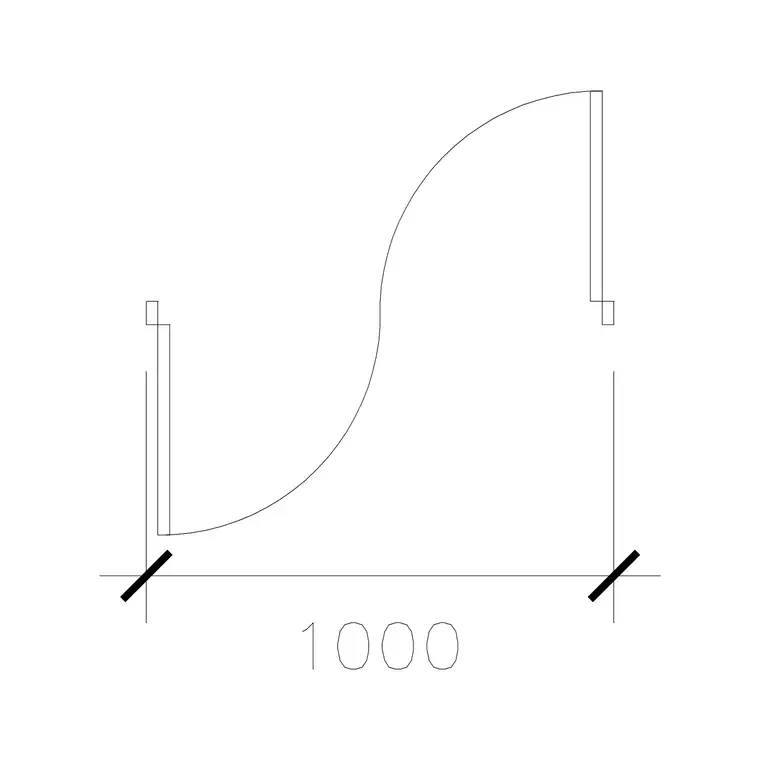
The 1000 Mm Door Type 1 block is a clean, real-width single-leaf plan door that drops straight into a 1000mm structural opening, swing arc and all. Keep it and a 900mm leaf as your two everyday doors, add a double and a sliding leaf for the cases that need them, and most of a residential plan's doors are covered by four trusted blocks you never have to draw again.
Get the widths and swings right
Door width is a functional decision before it is an aesthetic one, so check it on every block. A standard internal door leaf is around 900mm, a generous one 1000mm, a narrow utility or WC door 700 to 800mm, and an accessible door 900mm clear. The plan block should show the leaf and its swing arc, because the arc is what proves the door can actually open without fouling furniture, a wall or another door — a clash you want to catch on the plan, not on site.
Double doors and French doors read as two leaves and two arcs; pocket and sliding doors show the leaf disappearing into a wall cavity or sliding across a track, with no swing to clear. Pick the leaf type to match how the space is used: swings where you have room, sliders and pockets where you do not, because a door that cannot open is worse than no door at all.
The swing arc earns its keep against furniture. Drop a seating block such as the Sofa Set Plan 1 outline near a doorway and the arc instantly shows whether the door clears it, which is the kind of conflict that is trivial to fix on the plan and expensive to fix once a wall is built. Measure the leaf on any downloaded block, too, and reject anything where a standard door measures 700mm or 1200mm unless you genuinely intended it.
Windows — sills, openings and what the plan shows
On a plan, a window reads as a break in the wall poché with the glazing line and frame shown in the opening; the type — casement, sliding, fixed, awning — is conveyed by how the opening is drawn. Common widths run from around 600mm for a small WC window up to 1800mm or more for a living-room run, in modules that suit the structural openings above. The window blocks here drop into the wall break cleanly so the opening reads correctly without manual trimming.
Remember that the plan only tells half the window story — sill height and head height live on the elevation and section. A window that looks fine in plan can still be wrong vertically: too low to be safe, too high to see out of, or clashing with a worktop or a stair. So keep an elevation window kit alongside your plan kit and confirm that the plan opening width matches the elevation.
An architect who keeps both views consistent produces drawings a builder can set out from without ringing up to ask which window goes where. That consistency — same width in plan and elevation, sill and head fixed on the section — is what turns a set of windows from a source of site queries into a part of the drawing nobody has to think twice about.
Host them in the wall, don't float them
A door or window only works if it sits in a real opening. Before you insert, break the wall at the opening — trim the two wall lines and cap the reveal — so the door or window block lands in a genuine hole rather than floating over an unbroken wall. Snap the block's insertion point to the opening edge or centreline with object snaps so it anchors exactly, then check the swing direction and mirror the block if it opens the wrong way.
Bring each block in with the INSERT command, keep scale at 1 since they are drawn at real size, and have your doors-and-windows layer current so well-built blocks inherit it. If a door comes in wildly oversized, that is a units mismatch, not a faulty block — correct it with SCALE rather than redrawing the leaf by hand.
A human figure such as the Human Figure Plan 1 block placed in a doorway is a quick sanity check on width: if the opening looks tight against a person, it probably is. A handful of trusted door and window blocks on a Tool Palette, plus the habit of breaking the wall first and checking the swing against furniture and figures, turns the most repetitive task in plan work into a few confident clicks per opening.
Questions
Frequently asked
What is a standard door width to check on a CAD block?+
Around 900mm for a standard internal door, 1000mm for a generous one, 700–800mm for a WC or utility door, and 900mm clear for an accessible door. Measure the leaf on the block to confirm.
Where can architects download free door and window blocks?+
The Doors category on cadblockdwg.com has single, double, sliding and pocket doors plus matching window sets as free DWG downloads, no signup, free for commercial use.
Should the door block include the swing arc?+
Yes — a plan door block should show the leaf and its swing arc so you can confirm the door opens without clashing furniture, a wall or another door before it goes on site.
Free downloads from this article


Free CAD block library
Download the blocks from this article — free, no signup

