Office desk & workstation dimensions explained (free)
Standard desk, workstation and conference table sizes, plus chair and circulation clearances — and where to download free DWG office blocks at real scale.
Saumyajit MaityUpdated 24 February 20264 min read
Why workstation dimensions drive an office plan
Office layouts are dimension-driven in a way living spaces are not: a single workstation that is 100mm too wide, multiplied across a floor of fifty desks, blows the whole plan. So getting desk, workstation and circulation sizes right from accurate blocks is the difference between a floor plate that takes its target headcount and one that quietly comes up short.
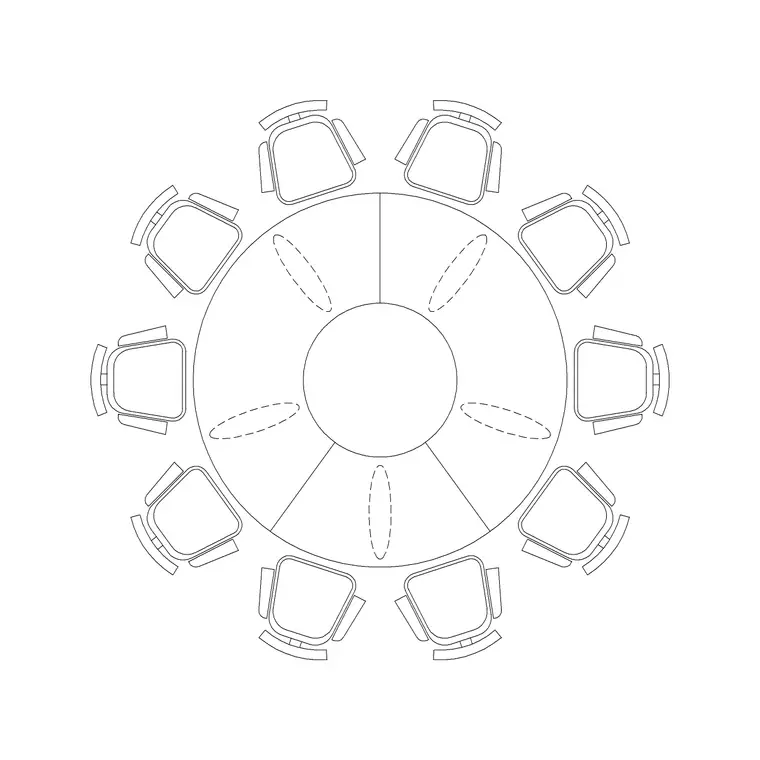
The Office category carries the full range — single desks, multi-seat workstation clusters, manager and director tables, and conference tables from two up to twenty seats. The 10P Round Table (a ten-seater) is one example of the meeting-table family. When you plan an office, you are really tiling the floor with workstation modules and then carving circulation and meeting space out of what remains, so the module size is the number everything else depends on.
Standard desk and workstation sizes
Keep these footprints as your scale reference:
- Single desk: 1200-1600mm wide x 600-800mm deep. 1400 x 700mm is a common all-round size; 1600 x 800mm is generous. - Compact / bench desk: 1200 x 600mm, used in dense open-plan layouts. - Workstation with return (L-shape): about 1600 x 1600mm overall, giving a main run plus a return for a second monitor or paperwork. - Manager / director desk: 1800-2000mm wide, often with a side return or a small meeting extension. - Desk height: about 720-750mm (fixed) or adjustable for sit-stand, shown only in elevation.
The critical add-on is chair space: allow about 600mm of depth behind the desk edge for the chair and for someone to sit, and another margin to push back and stand. A desk block without that allowance looks fine but leaves no room to actually work.
Workstation clusters and circulation
Open-plan offices rarely place desks singly; they group them into clusters that share circulation. Common arrangements are pods of 4, 6 or 8 desks pushed back-to-back and side-to-side, and the Office category includes multi-seat workstation blocks (2-, 3-, 4-, 5- and 6-seater) drawn as ready-made clusters so you do not assemble them desk by desk.
The circulation between clusters is where standards bite: a primary walkway through an office wants about 1200-1500mm clear, a secondary route between desk rows about 900-1000mm, and the gap behind a seated person to the next desk back at least 1000mm so chairs can move and people can pass. Because the cluster blocks carry their true footprint, you can tile them across the floor plate and immediately see how many fit with compliant circulation — which is exactly the sum an office layout lives or dies on.
Meeting and conference tables
Meeting space is the other half of an office plan, and conference tables scale with seat count in a predictable way. As a rule of thumb, allow about 600-700mm of table edge per person. So:
- 4-seater: about 1200 x 1200mm or 1400 x 800mm. - 6-seater: about 1800 x 1000mm. - 8-seater: about 2400 x 1100mm. - 10-seater: about 3000 x 1200mm (rectangular) or around 1500mm diameter for a round table like the 10P Round Table. - 12-20 seater: 3600mm and up; the catalogue includes a 20-seater conference block.
Around any meeting table, leave at least 900-1000mm clear on every side so chairs pull out and people can walk behind seated colleagues. Round and curved tables suit smaller, more collaborative rooms; long rectangular tables suit formal boardrooms. Place the conference block, check the surrounding clearance, and the meeting room is set out in a single insertion.
For the meeting room as a whole, a useful rule is to add the table footprint, a 900-1000mm chair-and-circulation zone all round, and then any credenza or screen wall, to get the real room size. An 8-seater at 2400 x 1100mm therefore wants a room of roughly 4200 x 2900mm before it feels comfortable; squeeze it into anything smaller and chairs scrape the walls. The same addition works for workstations: when a brief sets a target headcount, the honest way to test it is to tile the actual desk-plus-chair-plus-aisle module across the floor plate, not to divide the floor area by a rule-of-thumb square metres per person, which routinely overstates how many people really fit.
Downloading and inserting office blocks
Open the Office category, pick the desk, workstation cluster or conference table you need, and download the free DWG (no signup; DXF where supported). Insert the block and snap it into the grid — desks aligned to a planning module, conference tables centred in their rooms. Rotate clusters to suit the floor plate and the window lines.
These blocks are drawn at real-world size, so insert at scale 1 in a millimetre drawing, or set INSUNITS / scale by 0.001 in a metre drawing. Verify by dimensioning a desk width (about 1400mm) or a conference table length. Put office furniture on a "Furniture" or "FF&E" layer; the blocks are built on layer 0, so set that layer current before inserting and they inherit it, letting you dim the furniture for a services or structural plan from the same file.
Questions
Frequently asked
What is a standard office desk size?+
1200-1600mm wide x 600-800mm deep; 1400 x 700mm is a common all-round size. Allow about 600mm behind the desk for the chair and for someone to sit.
How big is a conference table for 10 people?+
About 3000 x 1200mm rectangular, or around 1500mm diameter for a round 10-seater. Allow roughly 600-700mm of table edge per person and 900-1000mm clear all around for chairs.
Are the office furniture blocks free?+
Yes — desks, workstations and conference tables in the Office category are free DWG downloads (often DXF too), no signup, free for commercial use.
Free downloads from this article


Free CAD block library
Download the blocks from this article — free, no signup


