How to download free awning window CAD blocks for AutoCAD
Free awning window DWG blocks: where to download them, how the top-hung sash reads in elevation and section, and how to place them in AutoCAD.
Sumana KumarUpdated 31 January 20264 min read
What an awning window is
An awning window is hinged at the top and pushes open at the bottom, so the sash swings outward and upward like a little awning over the opening. That geometry has a real advantage: because the open sash slopes outward with its high edge fixed, rain runs off it and away, letting you keep an awning window open during a shower without water coming in. It is a favourite for bathrooms, kitchens, and anywhere you want background ventilation in changeable weather.
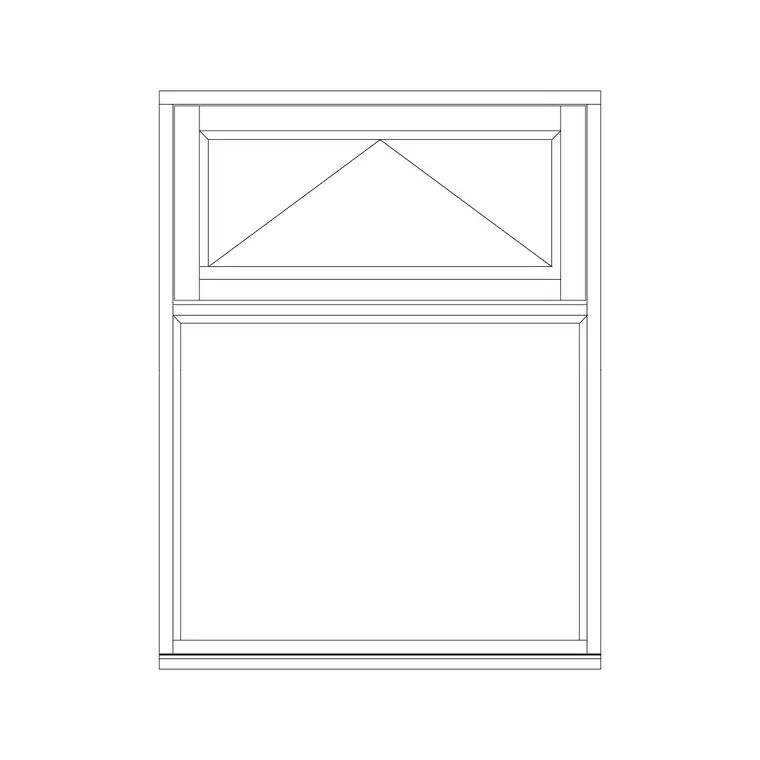
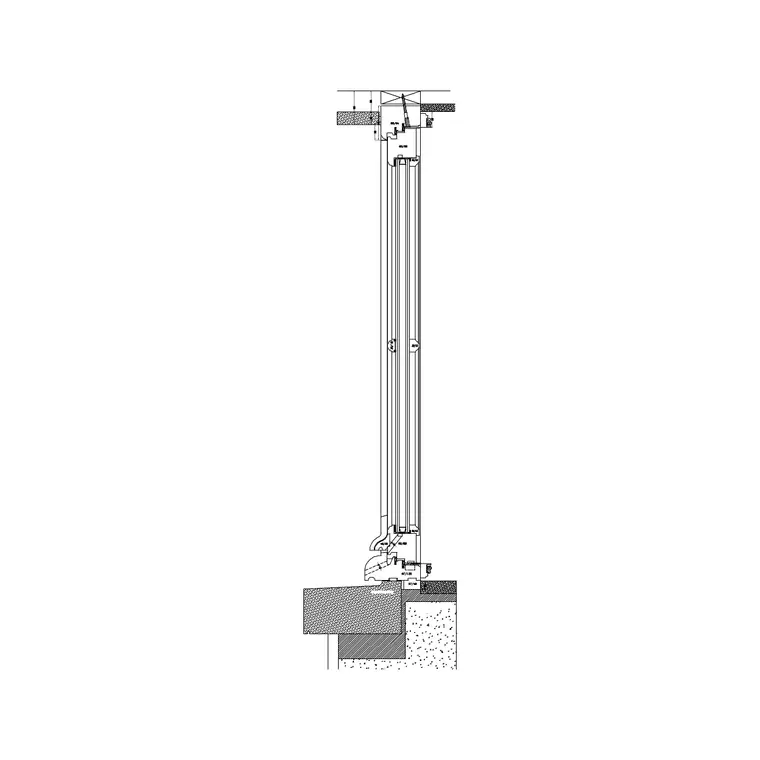
The characteristic view for an awning window is the side — a section or side elevation showing the sash hinged at the top and angled out at the bottom. In a front elevation it reads as a window with the top-hung opening marked, and in plan it appears as a frame in the wall like any window, since the action happens in the vertical plane. The side view is what communicates the awning behaviour clearly.
Downloading awning window blocks
Find the awning window in the Windows category. It is free, downloads as a DWG, and needs no signup — click and it saves to Downloads. The block gives you the awning window's profile so you can show the top-hung opening on your drawings.
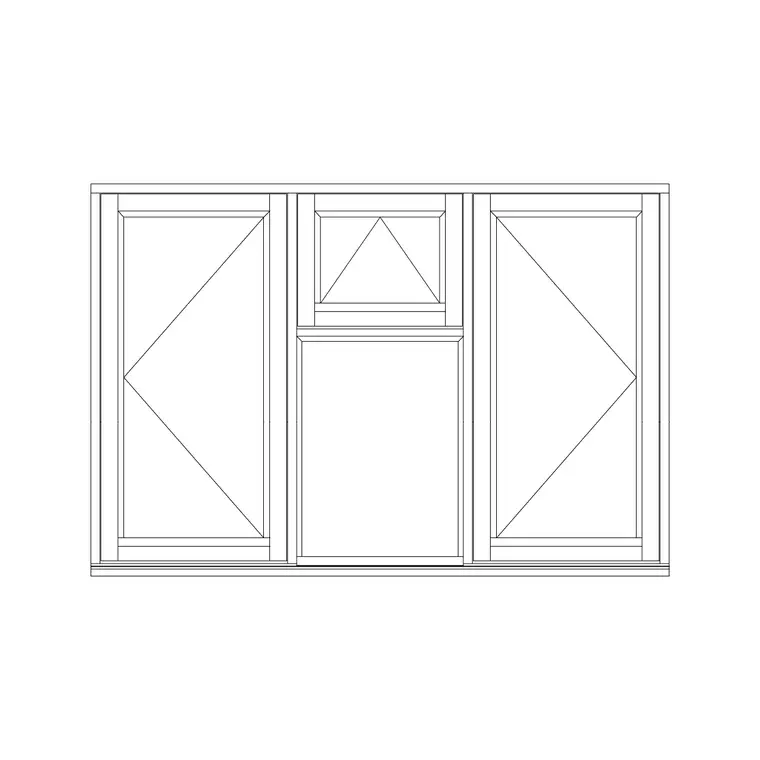
Awning windows are often combined with fixed lights below or stacked in banks, so once you have the single awning block you can array or copy it to build a composition — a fixed picture window with an awning vent above is a very common arrangement. Place the awning unit where it will actually serve ventilation (typically high on the wall, where warm air escapes) and use a fixed light for the viewing portion below, matching how these windows are really configured.
Placing an awning window
Insert the DWG with INSERT (I, Enter) or by dragging it onto the canvas, scale 1, rotation 0. For a front elevation, snap the frame to the opening and align it to the correct sill and head heights. For the side view or section that shows the awning action, place that geometry on your section sheet and confirm the sash hinges at the top and projects outward at the bottom — MIRROR it if your section looks the other way along the building so the projection points outdoors.
In plan, snap the frame into the wall opening with object snaps (F3) as for any window. Because the awning sash projects outward when open, check on the section that it does not foul anything outside — an overhang, a sign, a higher walkway — though awnings project less than a full casement, which is part of their appeal in tight spots.
Scale, units and the projection
Set INSUNITS to millimetres in both files for auto-scaling, or SCALE by 0.001 to take a millimetre block into a metre drawing if it lands oversized. Dimension the opening width to confirm the frame matches your wall.
The detail worth drawing for an awning window is the open-sash projection on the section. The sash swings out by an amount set by the opening restrictor or the hinge, and showing that angle lets you confirm clearance and the rain-shedding behaviour. High-level awning windows above a kitchen worktop or in a bathroom are often the cleanest way to ventilate a room you cannot put an outward casement on — the section is where you prove that the open sash sheds water and clears the head of anyone below.
Putting awning windows to work
Keep awning windows on the Windows layer for clean isolation in a ventilation review. Their weather-tolerant opening makes them the go-to for wet rooms and rainy climates, and for high-level vents in otherwise sealed facades, so they tend to appear where a casement would be impractical.
If a facade repeats the awning unit, save it to a Tool Palette and record the type (top-hung awning) and any opening restrictor in the window schedule, since the projection and ventilation area depend on it. Drawn in section with the sash angled out, an awning window communicates exactly why it was chosen — ventilation that keeps the rain out — which a plain elevation symbol alone cannot convey.
Awning versus hopper, and stacking with fixed lights
An awning window has a close cousin worth distinguishing: the hopper, which hinges at the bottom and opens inward at the top — the inverse arrangement. Awnings shed rain outward and are common high on a wall or above a worktop; hoppers are often used low down, in basements or below a fixed light, and tilt in for ventilation. They look similar in elevation but behave oppositely in section, so confirm you have the awning (top-hung, outward) and not a hopper if rain-shedding is the goal.
Awning lights are frequently stacked with a fixed picture window below or arranged in a horizontal band, so the operable awning sits high for ventilation while the fixed glazing gives the view. When you build that composition, place the fixed light for the outlook and the awning for the airflow, and count only the awning toward your opening area. Showing the configuration clearly — which light is fixed, which is the operable awning, and the open-sash angle in section — lets both the supplier and the ventilation check read the window correctly.
Questions
Frequently asked
What is an awning window?+
A window hinged at the top that pushes open at the bottom, projecting outward like an awning. The sloped open sash sheds rain, so it can stay open in light showers — ideal for bathrooms and kitchens.
Which view best shows an awning window?+
The side view or section, which shows the top hinge and the sash angled outward at the bottom. A front elevation marks it as top-hung but doesn't show the projection.
Is the awning window DWG free to download?+
Yes — it's in the Windows category, free in DWG with no signup, for personal and commercial use.
Free downloads from this article
Free CAD block library
Download the blocks from this article — free, no signup


