12 best free human-figure blocks for elevations (free)
Twelve free DWG human-figure blocks to add scale and life to elevations and sections — standing, walking, seated and accessible figures, drawn to real height.
Saumyajit MaityUpdated 25 June 20264 min read

People are how a drawing earns its scale
An elevation without people is just lines; add a few human figures and it becomes a place you can read at a glance, because everyone knows how tall a person is. Scale figures (sometimes called entourage) give a façade or an interior elevation instant, intuitive scale, show how the space will be used, and make a presentation drawing feel alive rather than clinical. They are one of the highest-impact, lowest-effort additions you can make.
The twelve blocks below are free DWG downloads from the People category here — no signup, free for commercial use. Most figure blocks are elevation (front or side profile) for use on elevations and sections; there are also plan-view figures, like our Human Figure Plan 1, for showing occupancy on a floor plan. Draw figures to a real height — about 1700-1800mm for an adult — so the scale they imply is honest.
1–4: Standing adult figures
Start with the staples: standing adults, front and side view, in relaxed poses. A handful of these placed along an elevation immediately establish the height of doors, windows and storey levels against a known human scale. Keep four or five different standing figures so the same person does not appear repeatedly down a street elevation, which reads as artificial.
Mix genders, builds and poses — one with a bag, one with hands in pockets, one checking a phone. Variety is what makes entourage read as a real crowd rather than a stamped symbol. Place them on the ground line of the elevation, not floating, and at the front of the scene so they set the foreground scale clearly.
5–7: Walking and active figures
Movement brings an elevation to life. Walking figures, mid-stride, suggest circulation and animate a street scene or a public space far better than a row of static people. Keep a couple of walkers facing each direction plus one or two more active poses — someone gesturing, someone carrying something.
The trick with active figures is to point them along the natural lines of movement in the drawing: toward an entrance, along a pavement, across a plaza. Done well, they guide the viewer's eye through the scene and make the space feel inhabited and purposeful rather than empty.
8–10: Seated and grouped figures
Interiors and public spaces need people sitting as well as standing. Seated figures suit café elevations, waiting areas, auditoria and any drawing where furniture is meant to be used — a seated figure at a 450mm-high seat confirms the ergonomics read correctly. Grouped figures (two or three together) suggest social use of a space.
Keep a few seated profiles and a small group. Placing a seated figure at a table or on a bench in an interior elevation does two jobs at once: it adds life and it proves the seat height and table height work for a real person. That quiet verification is part of why entourage is more than decoration.
11–12: Accessible and child figures
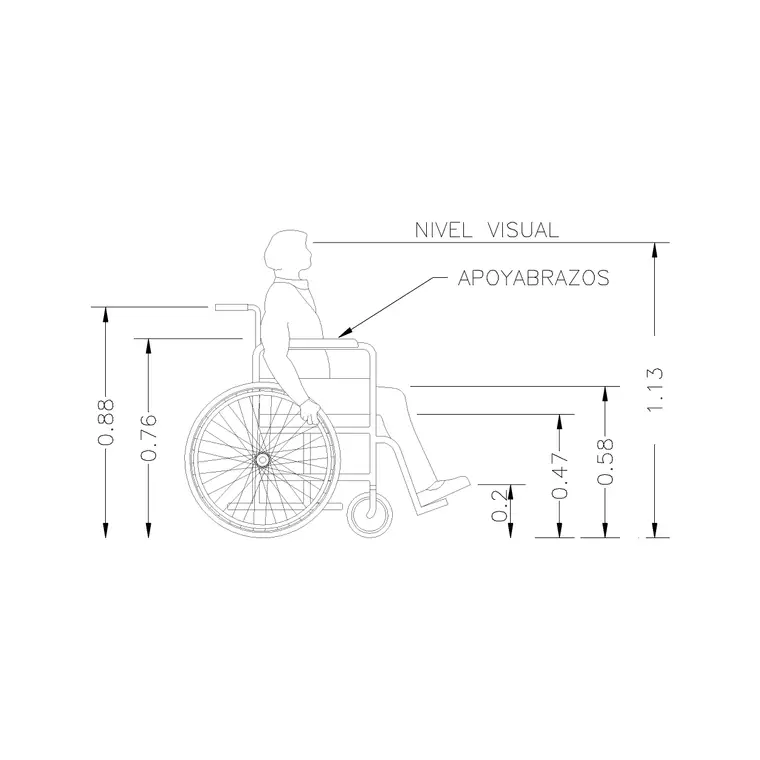
Finish with two for inclusive, honest drawings. A wheelchair-user figure, like our Human Figure Disable 1 block, belongs in any drawing showing accessible routes, counter heights and clear widths — it demonstrates inclusive design rather than just asserting it, and confirms heights work from a seated eye line. Child figures add scale variety and suit schools, play spaces and family environments.
With these twelve in your People folder you can populate any elevation or section honestly: standing adults to set the scale, walkers to animate the scene, seated and grouped figures for interiors and public space, and accessible and child figures for inclusive, true-to-life drawings. Download what each scene needs, draw every figure to real height on the ground line, and vary the poses so the crowd reads as real.
How to download and place scale figures
Each figure downloads as a single DWG from the People category — one click, no signup, free for commercial work. Insert with the INSERT command (type I, Enter, browse to the file) and snap each figure's feet to the ground line of your elevation so it stands on the floor rather than floating. Put entourage on its own layer so you can switch the people off for a technical issue and back on for the presentation set.
If a figure inserts at the wrong size it is a units mismatch — these are millimetre blocks, so set INSUNITS or scale by 0.001 for a metre drawing. A quick sanity check: an adult figure should measure roughly 1700-1800mm against a dimension.
A presentation tip specific to figures: vary and overlap them the way a real crowd stands. Put one or two larger figures in the foreground to set the scale, smaller ones further back for depth, and never repeat the same pose twice in one view — a row of identical clones is the fastest way to make an elevation look fake. Used well, figures do double duty: a wheelchair-user block at a reception desk does not just add life, it proves the counter height works from a seated eye line, which is exactly the kind of honest detail that wins trust in a drawing.
Questions
Frequently asked
How tall should a human-figure block be in an elevation?+
About 1700-1800mm for an adult, so the scale the figure implies is honest. Children and seated figures are correspondingly shorter.
Should scale figures go in plan or elevation?+
Most belong on elevations and sections as front or side profiles to set vertical scale. There are also plan-view figures for showing occupancy on a floor plan.
Are these human-figure blocks free to use?+
Yes. Every figure DWG in the People category here is free for personal and commercial use with no signup or attribution.
Free downloads from this article
Free CAD block library
Download the blocks from this article — free, no signup


