10 best free sofa CAD blocks every designer should grab
Ten free DWG sofa blocks for living-room floor plans — two-, three- and corner seaters with the real plan dimensions to look for before you place them.
Saumyajit MaityUpdated 7 February 20265 min read

Why a good sofa block is worth keeping on hand
The sofa is usually the first thing you place in a living room and the piece that decides whether the rest of the layout works. Get it right and the coffee table, circulation route and TV wall fall into place around it; get the footprint wrong and every clearance downstream is off. That is why a small set of trusted plan-view sofa blocks earns its place in your library — you stop redrawing the same arm-and-cushion outline and start laying out rooms in seconds.
Everything in this roundup is a free DWG you can download from the Furniture category here with no signup and no email wall, free for commercial as well as personal work. They are 2D plan symbols drawn from above, which is exactly the view a floor plan needs. Before you rely on any of them, draw a quick dimension across the block and confirm it reads at real size — the numbers below are the figures a correctly scaled sofa should measure.
1–3: The everyday two- and three-seaters
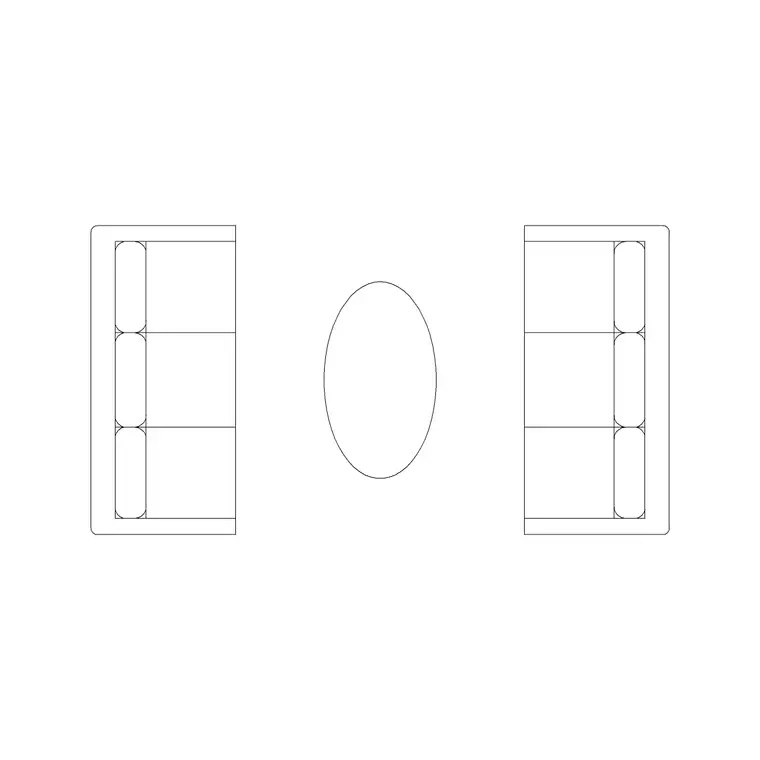
Start with the workhorses. A two-seater sofa sits at roughly 1500 by 900mm in plan, and a three-seater around 2100 by 900mm. These two cover the vast majority of residential living rooms, so they are the first blocks to add. Our Sofa Set Plan 1 and Sofa Set Plan 10 are clean top-down outlines with the seat cushions and arms indicated, which is enough detail to read as a sofa on a plan without cluttering it.
A third variant worth holding is a compact loveseat at about 1300 by 800mm for smaller rooms, studios and snugs. Keep all three and you can furnish almost any straight-wall seating arrangement. When you insert, snap the back of the sofa to the wall line so the depth reads honestly — a sofa floating 200mm off the wall is a common giveaway that the block was dropped in carelessly.
4–6: Corner units and L-shapes
Open-plan living rooms increasingly want a corner sofa, so it is worth keeping a couple of L-shaped blocks. A typical corner unit runs about 2400 by 2000mm overall, with the return leg around 1600mm. The key thing an L-shape tests on your plan is the turning space at the open end — leave at least 900mm between the front of the sofa and the nearest obstacle so people can walk past comfortably.
Grab both a left-hand and a right-hand version, or simply mirror one block to flip the orientation, so the chaise lands on whichever side the room needs. Because these blocks are larger, they are the ones most likely to expose a circulation problem early — exactly when it is cheapest to fix by nudging a wall or a door.
7–8: Armchairs and accent seating
A living room is rarely just a sofa. A pair of armchairs at around 850 by 850mm anchors a reading corner or fills the fourth side of a conversation group, and they pair naturally with the three-seaters above. Keep one squared-off block and one with a softer rounded outline so your rooms do not all look identical.
These smaller blocks are also handy for testing clearance around a coffee table: with the sofa, two armchairs and a 1100 by 600mm coffee table in place, you can immediately see whether the group reads as intimate or stranded in the middle of the floor. That is the kind of judgement a furnished plan lets you make at a glance.
9–10: Sofa-beds and modular seating
Round out the set with two specialists. A sofa-bed block shown in its closed position is the same footprint as a standard two- or three-seater, but it is worth noting on the plan where it would extend to when opened — roughly an extra 1100mm of floor — so you can confirm a guest room or studio actually works in sleep mode. A modular block, drawn as a single seat unit you can copy and butt together, lets you build any length of bench seating to fit a bay or a long wall.
With these ten in your Furniture folder you can furnish the social heart of any residential plan from trusted, correctly scaled pieces. Download the ones you need, snap them to your wall lines, and check the 900mm circulation gaps — and a flat plan turns into a room a client can read instantly.
Downloading and placing a sofa block in AutoCAD
Getting these into your drawing takes about a minute. Open the sofa you want from the Furniture category, hit download, and the DWG lands in your Downloads folder — no account, no waiting. From there, the cleanest way to bring it in is the INSERT command (type I and press Enter), browse to the file, leave the scale at 1 and place it with object snaps so the back of the sofa locks onto your wall line.
If a sofa comes in absurdly large or vanishes, that is a units mismatch, not a broken block: these are drawn in millimetres, so a metre-based drawing needs INSUNITS set correctly or a SCALE factor of 0.001. Set your furniture layer current before inserting so the block inherits it, and from then on the sofa recolours and dims with the rest of your furniture from the Layer Manager.
One interior-design tip worth the extra few seconds: once the sofa is placed, drop in the coffee table and any armchairs straight away and eyeball the conversation distance. A sofa and chairs more than about 2.5m apart stop feeling like one seating group — placing the companion pieces immediately is how you catch that while it is still a quick nudge rather than a redrawn room.
Questions
Frequently asked
What size is a sofa CAD block in plan?+
A two-seater is about 1500x900mm and a three-seater about 2100x900mm in plan view. Measure any downloaded block against these before relying on it for clearances.
Are these sofa blocks free for commercial use?+
Yes. Every sofa DWG in the Furniture category here is free for personal and commercial projects, with no signup and no attribution required.
Do the blocks come in plan or elevation view?+
These are plan-view (top-down) sofa blocks, which is the view a floor plan needs. Match the block view to your drawing.
Free downloads from this article
Free CAD block library
Download the blocks from this article — free, no signup


