15 best free door CAD blocks to download in 2026
Fifteen free door DWG blocks for 2026 — single, double, sliding and pocket doors with swings — sized to standard leaf widths for clean, code-correct plans.
Sumana KumarUpdated 4 May 20264 min read
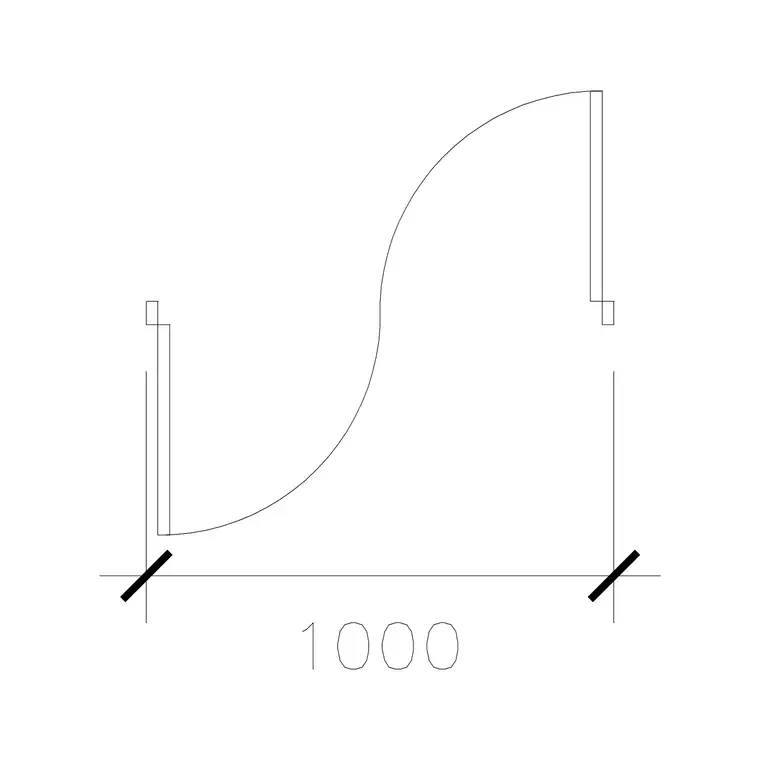
A door block is a swing, not just a leaf
The reason door blocks matter is the swing arc. A door drawn without its swing tells you nothing about whether it fouls a wall, a fixture or another door; a door drawn with its arc instantly shows the clear opening and the space it sweeps. So the blocks worth keeping are the ones that carry the leaf, the frame and the 90-degree swing as one object. Everything in this roundup is free, downloads as DWG, needs no signup, and is cleared for commercial use.
The 15 below are grouped by door type the way a plan gets populated: single swing doors at the standard widths, double doors, sliding and pocket doors, and the specials. Browse them in the doors category. Standard leaf widths in plan are roughly 600, 700, 800, 900 and 1000mm — the 1000mm door block here is a clean, ready-to-place example — and you should confirm the width by measuring the block before you trust the opening it implies.
Single swing doors at standard widths (1–7)
Single doors are the bulk of any plan, and they come in a tight set of standard leaf widths: 600 and 700mm for cupboards and cloakrooms, 800mm as a common internal door, 900mm for accessible and main internal doors, and 1000mm for wider entrances. Each block should show the leaf at 90 degrees with the quarter-circle swing arc so the plan reads the clear opening and the swept space at a glance.
Seven blocks cover the single-door range: 600, 700, 800, 900 and 1000mm leaves, plus a left-hand and a right-hand variant so you do not have to mirror on the fly. Insert each into the wall opening, snapping the hinge side to the jamb, and the swing immediately tests the layout — does it foul a basin, a light switch reach, another door? Getting handing and width right at this stage is what stops a door clash surfacing late, when it is expensive to move a wall.
Double and French doors (8–11)
Double doors handle wider openings and grander entrances. A pair of leaves at 800 or 900mm each gives a 1600 to 1800mm opening; French doors add glazing bars and usually open outward to a garden or balcony. Both are drawn with two swing arcs, and the plan should show whether they open in or out, because that decides the space swept and which side stays clear.
Four blocks cover this: a standard double door, a French double door, an unequal-leaf pair (a wide active leaf plus a narrow fixed one), and a double door with sidelights. Place these at the main entrances and openings between large rooms, and check both arcs against the furniture and circulation. Double doors are exactly where an undrawn swing causes trouble, so the arc is doing real work here — it shows you instantly whether the leaves clear the dining chairs or the sofa behind them.
Sliding and pocket doors (12–14)
When a swing cannot be afforded, sliding and pocket doors save the floor. A sliding door runs across the face of the wall, drawn as the leaf offset to one side with a track line; a pocket door disappears into the wall cavity, drawn with the leaf shown dashed inside the wall. Both are invaluable in tight plans — an ensuite, a utility, a wardrobe run — where a conventional swing would eat the room.
Three blocks cover the sliding family: a surface sliding door, a pocket door, and a bypass (two-panel) sliding door for a wide wardrobe or closet. Insert these where clearance is at a premium and you will often recover the exact space a swing would have stolen. On the plan, show the track or cavity clearly so the builder understands the mechanism, and keep the door on the same layer as your other openings for consistent control.
The specials and downloading the set (15)
Round the set out with a special: a bifold door (folding leaves for a wide opening onto a garden or between rooms), which brings the collection to 15 and covers the openings the standard swings and slides do not. Bifolds are drawn as a concertina of short leaves with their fold points marked, and they are increasingly common on the rear of a house opening to a terrace.
To download any door, open the doors category, click the block, and grab the DWG or DXF free with no account. Insert with INSERT at scale 1, snap the frame to the wall opening, and the swing or track lands in place. A small detail that keeps a plan honest: where a door must be accessible, check that the clear opening width — the leaf width less the door stop and the open leaf itself — gives you the effective clear width the brief requires, not just the nominal leaf size. If a door comes in the wrong size it is a units mismatch — match INSUNITS or scale by 0.001 or 1000 — and a 900mm leaf will read 900mm. With these 15 blocks, every opening on a plan can carry an honest swing or slide, and door clashes get caught on the drawing rather than on site, where moving a wall is expensive.
Questions
Frequently asked
What are the standard door leaf widths for CAD plans?+
Roughly 600 and 700mm for cupboards and cloakrooms, 800mm for common internal doors, 900mm for accessible and main internal doors, and 1000mm for wider entrances. Measure the block to confirm before relying on the opening.
Why should a door block include the swing arc?+
The swing arc shows the clear opening and the space the leaf sweeps, so you can check at a glance whether the door fouls a wall, fixture or another door. A leaf drawn without its arc hides those clashes.
Where can I download free door CAD blocks with swings?+
The doors category on CADBlockDWG has single, double, sliding and pocket doors with swing arcs, free in DWG and DXF, no signup, with commercial use allowed.
Free downloads from this article

Free CAD block library
Download the blocks from this article — free, no signup


