Block landing · wine glass cad block
Free wine glass CAD block in DWG and DXF
By Saumyajit Maity · Published 4 Apr 2025 · Updated 19 May 2026
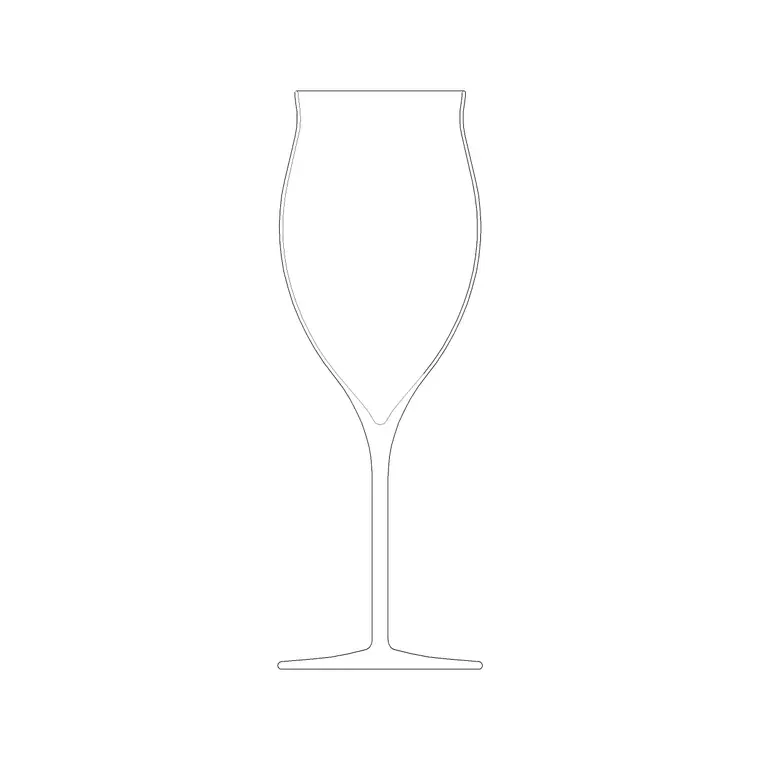
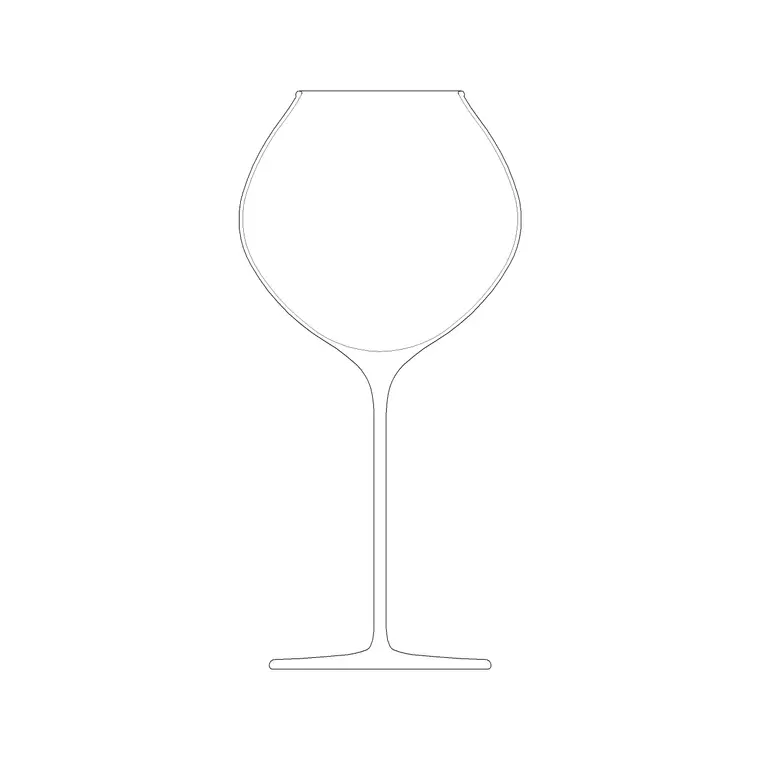
A wine glass is a small block with a big job: it is the detail that makes a bar elevation, a restaurant table setting or a dining-room presentation read as occupied and human. This page offers a free wine glass CAD block in DWG and DXF, including the everyday red-wine shape and the broader burgundy bowl, drawn at true stemware proportions so it looks right beside a plate, a bottle or a place mat. The download is free for personal and commercial work, with no signup or watermark.
Interior designers and architects use a wine glass block to dress table layouts, bar counters and event plans, while product and presentation drawings borrow it to suggest scale on a worktop. Because it is drawn to scale, it sits convincingly next to cutlery, crockery and the bottle it is poured from.
What is in a good wine glass block
A convincing wine glass block captures the three parts that make stemware recognisable: the bowl, the slender stem and the flat foot. The elevation profile is where this shows — the curve of the bowl tapering into the stem is the silhouette a reader recognises instantly. A standard red-wine glass has a narrower, taller bowl, while a burgundy glass has a wider, rounder bowl to open up the aroma, and the two profiles read differently in elevation.
The block is clean single-layer linework, so you can recolour it to a faint furniture grey, copy it around a table, or explode it if you need to edit the bowl curve for a specific glass.
Elevation and plan: which view to place
Stemware lives in elevation. For a bar elevation, a table-setting elevation or a presentation board, the side profile is the view that communicates a wine glass at a glance, so that is the one you will reach for most. Drop it on the counter line or the place setting and it instantly tells the story.
The plan view — the circular top of the bowl seen from above — is what you use on a table layout or an event plan, where it marks each cover's glassware position alongside the plate and cutlery. A single round footprint per glass keeps a banquet plan legible. Many downloads ship both views in one DWG so you can place whichever the drawing needs.
Typical wine glass dimensions to design around
Use these ranges as a guide rather than a fixed spec. A standard red-wine glass stands roughly 200–230 mm tall with a bowl diameter around 80–95 mm; a burgundy or large-bowl glass is a touch taller and noticeably wider in the bowl. The foot is usually a little narrower than the widest part of the bowl, in the region of 70–80 mm.
For table layouts, the figure that matters is the foot diameter and the position above the plate, because that governs how the place setting is spaced. Treat the glass as one element of a cover and allow generous clearance so glasses do not visually collide on a tightly packed banquet plan.
How to insert and scale the wine glass
The block is drawn full size in millimetres. In a millimetre drawing, run INSERT, browse to the DWG and place at scale 1 for real size. In a metre template insert at 0.001; in an imperial drawing set INSUNITS to millimetres so AutoCAD rescales the glass automatically and you avoid a thimble-sized or oversized result.
For a table setting, pick the centre of the glass foot as the insertion point so it snaps to the place-setting position, then copy it around the table. Because each glass is a single block reference, a banquet of identical settings can be arrayed in seconds, and a later edit to the block definition updates them all together.
Where wine glass blocks are used
Wine glass blocks appear in restaurant and bar fit-outs, hotel banqueting and event layouts, dining-room interiors, and any presentation drawing that wants a dressed table. Pair the glass with the wine rack, bottle and crockery blocks in the accessories category to build a complete bar or table scene, or scatter a few across a residential dining plan to suggest use.
Because the file is free and licence-clear, it is ideal for student hospitality projects, mood boards and quick concept renders. The same small block carries from an early sketch to a finished presentation without ever being redrawn.
Dressing a scene with the glass block
A wine glass earns its keep as set dressing, so treat it like one. On a bar elevation, vary the glasses slightly — a couple filled, a couple empty, mixed red and burgundy bowls — so the row does not look stamped from a single copy. On a table plan, keep the glassware on its own dressing layer above the furniture so you can toggle a clean technical layout and a fully styled presentation from the same drawing.
If you are producing a banquet or event drawing, group one full cover — plate, cutlery, glass — as a single block and array the cover around the table. That keeps the setting consistent and makes a 200-cover ballroom plan a quick array rather than a tedious copy job.
Free download
Browse the full library — DWG & DXF, no signup.
Questions
Frequently asked
Is the wine glass CAD block free to use commercially?+
Yes. It downloads free in DWG and, where available, DXF, with no signup, no watermark and no attribution. You can use it on paid client and hospitality projects.
What is the difference between the red-wine and burgundy glass blocks?+
The standard red-wine glass has a narrower, taller bowl; the burgundy glass has a wider, rounder bowl to open up aroma. The two read differently in elevation, so pick the one that matches the setting you are drawing.
Which view should I place on a table layout?+
Use the plan view — the circular top of the bowl — on table and event layouts to mark each cover's glassware. Use the elevation profile on bar elevations and presentation boards where the side silhouette reads as stemware.
Will the file open in free DWG viewers?+
Yes. The DWG targets AutoCAD 2004 and later, so it opens in AutoCAD, AutoCAD LT, BricsCAD, DraftSight and free online DWG viewers.
Related downloads
Blocks for this guide
Popular blocks to download
Related categories
Related guides
Block landing
Wine Rack CAD Block DWG — Free Download
Download a free wine rack CAD block in DWG and DXF — bottle storage drawn in plan and elevation for kitchens, bars and cellars. AutoCAD 2004+, no signup.
Block landing
Cement Planter Pot CAD Block DWG — Free
Download a free cement planter pot CAD block in DWG and DXF — concrete-finish planter drawn in plan and elevation for interiors and terraces. AutoCAD 2004+.
Block landing
Carved Planter Pot CAD Block DWG — Free
Download a free carved planter pot CAD block in DWG and DXF — decorative carved-finish planter in plan and elevation for interiors and entrances. AutoCAD 2004+.