Block landing · triangular office table cad block dwg
Triangular office table CAD block in DWG and DXF
By Saumyajit Maity · Published 8 Dec 2023 · Updated 2 Feb 2026
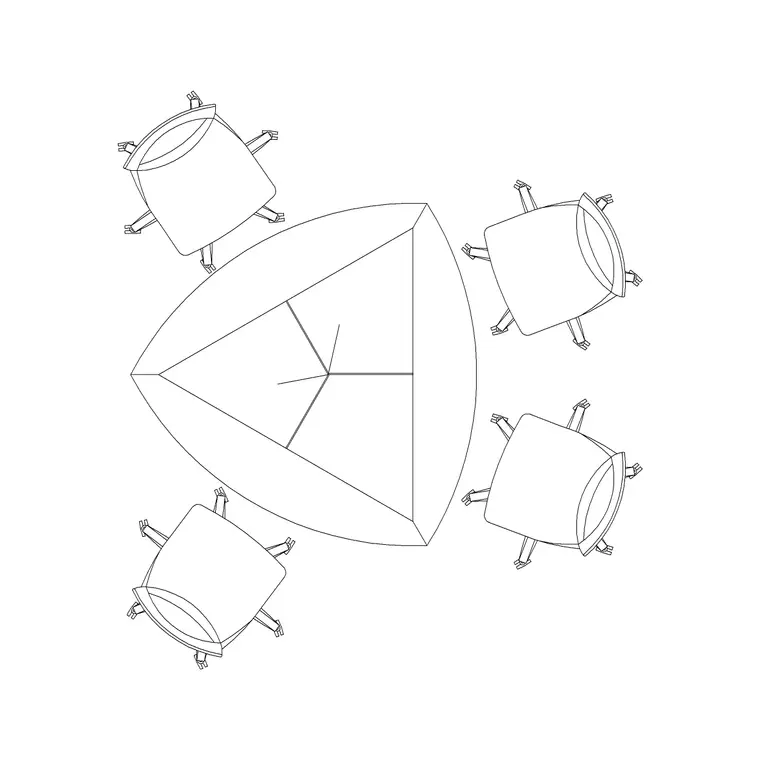
A triangular office table is a clever space-saver. Its three-sided form tucks neatly into a corner, suits small huddle and consultation rooms, and seats a compact group around a shape that fits where a rectangle would waste floor. This triangular office table CAD block is drawn at true millimetre dimensions in plan view, ready for AutoCAD 2004 or later, and free for personal and commercial work with no signup and no watermark.
The triangle is the whole reason to reach for this block. Its angled sides let it sit against two walls in a corner or cluster with other triangular tables into hexagonal or star arrangements for flexible meeting layouts. Because the shape changes how chairs space out and how the table fits a room, a scaled triangular block lets you plan those compact and clustered layouts correctly rather than forcing a corner with a rectangle.
What the triangular table block contains
The plan view shows the three-sided table top — typically an equilateral or near-equilateral triangle, often with softened or truncated corners so the points don't catch — together with the seat positions along the sides. The block keeps the table outline and the chair positions on separate layers so the seating can be frozen or recoloured independently.
A triangular table usually seats one to two people per side, with the truncated corners keeping knees and elbows clear of the points. The block is drawn to the true triangular outline, so when you insert it you are placing a realistic three-sided arrangement, and you can see immediately how it sits against walls or clusters with neighbours rather than approximating the angles by eye.
Typical sizing to design around
Use these ranges as a guide. A triangular meeting table is commonly drawn with sides somewhere around 1200 to 1800 mm long, giving a compact top that seats roughly four to six people depending on the side length and how many sit per side. The truncated corners trim the extreme points, so the usable seating edge is a little shorter than the full side.
For the room, allow around 900 to 1100 mm of clear floor for chairs to pull out along the open sides, and remember that placing the table in a corner means two of the three sides may sit against walls, concentrating the seating and circulation on the open side. These are typical planning ranges rather than fixed specifications; triangular tables vary by design, so confirm the side lengths and corner treatment against the manufacturer data before fixing the layout.
How to insert and cluster the table
The block is full size in millimetres. Insert at scale 1 in a millimetre drawing, 0.001 in a metre drawing, or set INSUNITS to millimetres on an imperial template so AutoCAD rescales on insertion. Run INSERT or drag the DWG from a tool palette, pick an insertion point, and rotate to align a side with the wall or the cluster.
The triangle's strength is clustering. Copy and rotate the block to butt several triangles together: two make a rhombus, three make a trapezoid, and six rotated around a point make a hexagonal table for a larger flexible meeting. Because each table is a single block reference, you can build and rearrange these clusters quickly, and an edit to the block definition with BEDIT updates every triangle in the arrangement at once.
Where triangular tables are used
Triangular tables suit small huddle rooms, consultation and interview rooms, breakout corners, training spaces that need reconfigurable layouts, and tight floor plans where a corner would otherwise go unused. Their clustering ability makes them popular in agile and activity-based working environments where the same room must serve several group sizes.
Because the block is free and licence-clear it carries from concept to construction. Use it to show how a compact room or an unused corner can become a usable meeting point, then keep the same geometry as you coordinate any power and data and the furniture schedule. The triangle that solved the awkward corner is the one that gets specified and installed.
Layout and reconfiguration coordination
Because triangular tables are often chosen for flexibility, it helps to draw both the single-table layout and one or two cluster arrangements so the room's reconfigurations are documented. Keep the table, chairs and any services on separate layers so each arrangement reads cleanly, and use the same block throughout so the geometry stays consistent across every configuration.
If power and data are needed, place the socket or floor-box blocks where they suit the most common arrangement, and note in the drawing that the tables move. Tag each table with a block attribute capturing its size, and the count drops into the furniture schedule. When a preferred cluster is settled, WBLOCK that arrangement as a reusable assembly for repeat rooms.
Free download
Browse the full library — DWG & DXF, no signup.
Questions
Frequently asked
How big is a triangular office table?+
Sides are commonly around 1200 to 1800 mm, giving a compact top that seats roughly four to six depending on the side length. Truncated corners trim the points, so confirm the exact side lengths against the model you specify.
Is the triangular office table block free for commercial use?+
Yes. It downloads free in DWG, with DXF where available, and is cleared for commercial projects with no signup, no watermark and no attribution requirement.
Can I cluster several triangular tables together?+
Yes, that is a key advantage. Copy and rotate the block to butt triangles into a rhombus, trapezoid or hexagon for larger flexible layouts. Each table is a single block reference, so clusters are quick to build and rearrange.
What software opens the file?+
The DWG targets AutoCAD 2004 and later, opening in current AutoCAD, AutoCAD LT, BricsCAD, DraftSight and free DWG viewers. DXF is provided where available for other CAD tools.
Related downloads
Blocks for this guide
Related categories
Related guides
Block landing
Free Office Chair CAD Blocks — DWG Download
Download free office chair CAD blocks in DWG and DXF — task chairs, swivel chairs and executive seats drawn in plan and elevation, AutoCAD 2004+, no signup.
Block landing
Free Lighting Fixtures CAD Blocks — DWG Download
Download free lighting fixtures CAD blocks in DWG and DXF — chandeliers, wall lights, downlights and pendants in plan and elevation for AutoCAD.
Block landing
Free Office Desk CAD Blocks — DWG Download
Free office desk CAD blocks in DWG and DXF — straight desks and desk-with-chair units in plan and elevation for AutoCAD. No signup, commercial OK.