Block landing · lighting fixtures cad blocks
Free lighting fixtures CAD blocks for AutoCAD
By Sumana Kumar · Published 18 Apr 2026 · Updated 6 May 2026
Lighting fixtures sit on two kinds of drawing — the reflected ceiling plan that locates them and the interior elevation that shows them on the wall — so a good lighting block needs to read in both. This page collects free lighting fixtures CAD blocks in DWG and DXF: chandeliers, pendants, downlights, wall lights, spotlights and decorative fittings, drawn in plan and elevation and ready to insert into AutoCAD 2004 or later. Everything is free for personal and commercial work, with no signup, no watermark and no attribution.
Use these blocks to populate reflected ceiling plans, set out wall and feature lighting on interior elevations, and dress presentation drawings with believable, scaled luminaires. Because they are drawn to sensible sizes, a chandelier reads as a feature and a downlight as a discreet point, so the lighting layout looks right the moment it lands rather than after a round of rescaling.
Lighting blocks bridge the gap between the electrical engineer's lighting symbols and the interior designer's specified fittings. Where the electrical layout uses schematic light points to show what is wired, the lighting fixtures here show the actual luminaire — the spread of a chandelier, the form of a wall light — so the design intent reads on the drawing. Keeping the fixtures on their own layer lets the same plan serve as a clean reflected ceiling plan and a richly-dressed presentation drawing, depending on what is switched on.
What's in a good lighting fixture block
A useful lighting block is drawn for the view it serves. A reflected-ceiling-plan block shows the fitting as seen looking up at the ceiling — a chandelier as its plan spread, a downlight as a small circle, a linear fitting as its true length — positioned in the ceiling grid. An elevation block shows the luminaire face-on at its real proportions, which is what a wall light or a pendant needs for an interior elevation.
The blocks here carry the fitting at a sensible drawn size so a feature chandelier reads as a feature and a recessed downlight stays discreet, and they sit on a lighting layer separate from the architecture. That separation lets you toggle the lighting on for a presentation or ceiling plan and off for a plain structural drawing, all from one file.
Plan, reflected ceiling plan and elevation
Lighting lives across three views, and it helps to know which block goes where. The reflected ceiling plan (RCP) is the main lighting drawing: it shows the ceiling as if reflected in a mirror on the floor, so the fittings appear in their true plan positions across the grid. Use the plan-view luminaire blocks here to set out downlights, pendants and chandeliers on the RCP.
Interior elevations show the wall face-on, where wall lights, sconces and the lower part of a pendant or chandelier appear at their real heights — use the elevation blocks for these. A few feature fittings, like a large chandelier, are worth showing in both views so the RCP locates it and the elevation conveys its character. Many blocks ship both views in one DWG so a single download covers the ceiling plan and the elevation.
Typical lighting fixture sizes to design around
Lighting fixtures vary enormously, so a sense of typical sizes keeps a layout believable. Recessed downlight: a small point, often 70 to 150 mm in diameter on the ceiling. Pendant: the fitting itself is modest but it hangs into the room, so the drop matters more than the plan size. Wall light or sconce: typically 100 to 400 mm across, set at eye level or above on the elevation.
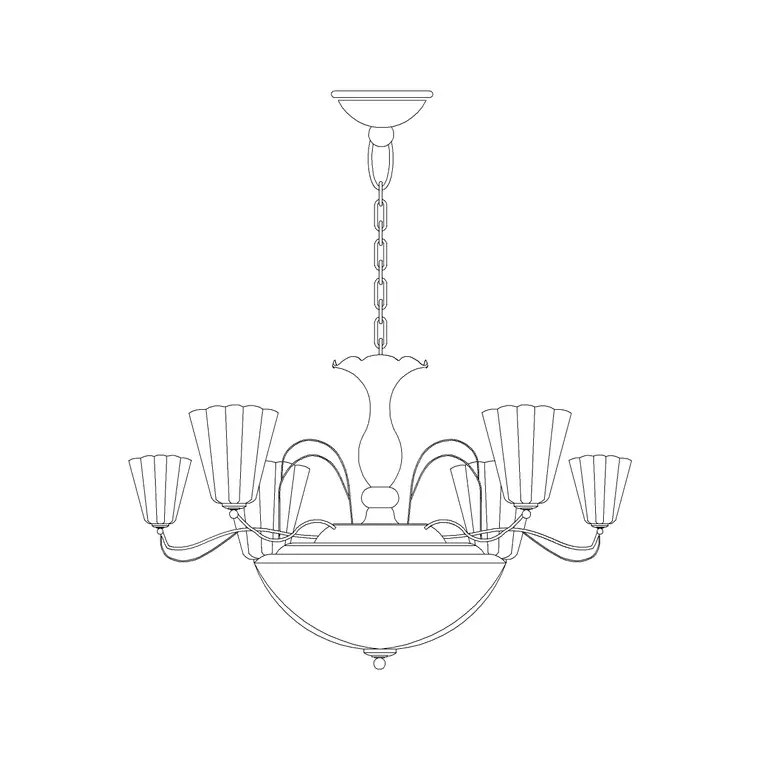
Chandeliers and feature fittings span the widest range — a compact fitting might be 400 to 600 mm across, a statement chandelier over a stair or dining table 800 mm to well over a metre. Scale the block to the actual fitting where you know it, and keep the proportion sensible where you do not. These are typical ranges, not specifications — always set the block to the real luminaire when it is chosen.
How to insert and scale the block
Lighting blocks are drawn full size in millimetres. Insert at scale 1 in a millimetre drawing, 0.001 in a metre template, or set INSUNITS to millimetres so AutoCAD rescales on insertion. Use INSERT or drag the DWG from a tool palette, place the insertion point at the centre of the fitting (the natural handle for a ceiling fitting), and rotate to suit a directional fitting like a wall-mounted spotlight.
If a feature fitting needs to match a known size, insert it and use SCALE from its centre to bring it to the right spread — a factor of 1.5 to take a 600 mm chandelier block to 900 mm, say. Keep the fittings on a lighting layer so they can be frozen for a structural plan. Because each fitting is a block reference, an edit to the definition updates every instance, and an array sets out a regular grid of downlights in seconds.
Where lighting fixture blocks are used
Lighting fixture blocks appear on reflected ceiling plans, interior elevations and presentation drawings across residential, hospitality, retail and commercial projects. Interior designers use them to communicate the lighting design — which fitting goes where, and what it looks like — to clients and to the electrical contractor. Architects use them to dress ceiling plans and elevations with believable luminaires.
Electrical designers use them alongside the schematic lighting symbols so the wiring layout and the specified fittings stay coordinated. Students use them for studio and portfolio work where scaled, licence-clear fittings matter. Pair these blocks with the lighting category for the full range of luminaires, the office and building-symbols categories for the electrical symbols and switches, and the furniture categories to complete an interior scheme.
Coordinating lighting with the ceiling and the wiring
A lighting layout is only as good as its coordination with everything else in the ceiling, so the blocks earn their keep on the reflected ceiling plan. Overlay the luminaires on the same ceiling grid the mechanical diffusers, sprinklers and access panels use, and the competition for ceiling space becomes visible — a downlight landing on a grid line or fouling a diffuser is obvious when both are drawn to scale on one RCP. Keeping the fittings as scaled blocks on their own layer is what makes that overlay readable.
Link the fittings back to the electrical design by keeping the specified luminaire blocks alongside the schematic light-point symbols, so the wiring plan and the fixture schedule agree on how many fittings of each type the job carries. Attribute the fittings with a type reference and you can extract a luminaire schedule straight from the drawing — the same blocks that show the designer's intent on the ceiling plan also count the fittings for the order, all from one consistent, free library.
Free download
Browse the full library — DWG & DXF, no signup.
Questions
Frequently asked
What lighting fixtures are available as CAD blocks?+
Chandeliers, pendants, recessed and surface downlights, wall lights and sconces, spotlights and decorative feature fittings — drawn in plan for reflected ceiling plans and in elevation for interior elevations and presentation drawings.
What's the difference between a lighting symbol and a lighting fixture block?+
A lighting symbol is a schematic mark on the electrical drawing showing where a light is wired. A lighting fixture block shows the actual luminaire — its real spread and form — for the reflected ceiling plan, interior elevation and presentation drawing, so the design intent reads.
Do the lighting blocks include plan and elevation views?+
Many do. Feature fittings like chandeliers often ship both a plan view for the reflected ceiling plan and an elevation for the interior elevation in the same DWG. Insert the view you need and freeze or explode the rest — the views share an insertion point.
Are the lighting fixture CAD blocks free for commercial use?+
Yes. Every fitting downloads free in DWG and DXF with no signup, no watermark and no attribution requirement, and they are cleared for commercial lighting, ceiling-plan and interior-elevation drawings.
Related downloads
Blocks for this guide
Related categories
Related guides
Curated pack
Free MEP CAD Block Pack — DWG & DXF Download
Free MEP CAD block pack in DWG and DXF — electrical, mechanical and plumbing symbols, fixtures and equipment for AutoCAD services drawings. No signup.
Curated pack
Free Electrical Symbols CAD Block Pack — DWG
Free electrical symbols CAD block pack in DWG and DXF — sockets, switches, light points, data outlets and distribution boards for AutoCAD layouts.
Curated pack
Free HVAC CAD Block Pack — DWG & DXF Download
Free HVAC CAD block pack in DWG and DXF — fan-coil units, AHUs, grilles, diffusers, ductwork fittings and radiators for AutoCAD mechanical drawings. No signup.