Block landing · spiral staircase plan cad block
Free spiral staircase plan CAD block in DWG
By Sumana Kumar · Published 26 Mar 2023 · Updated 20 May 2026
A spiral staircase is the most space-efficient way to connect two floors, winding its treads around a central column so the whole stair fits inside a tight circular footprint. On a floor plan it is also one of the more awkward things to draw accurately, because every tread is a wedge radiating from the centre. A ready-made spiral staircase plan CAD block solves that, and this page offers one free in DWG.
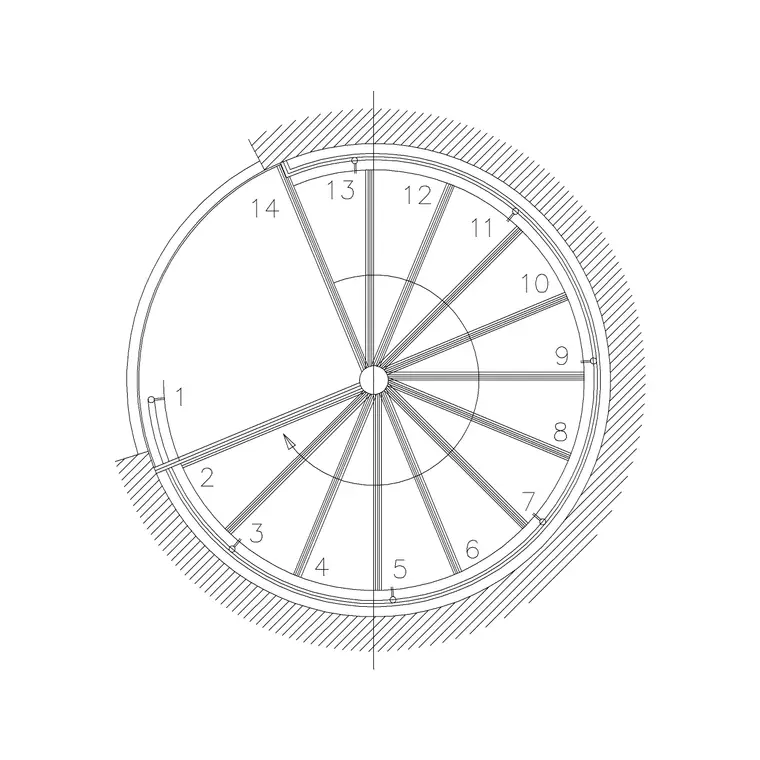
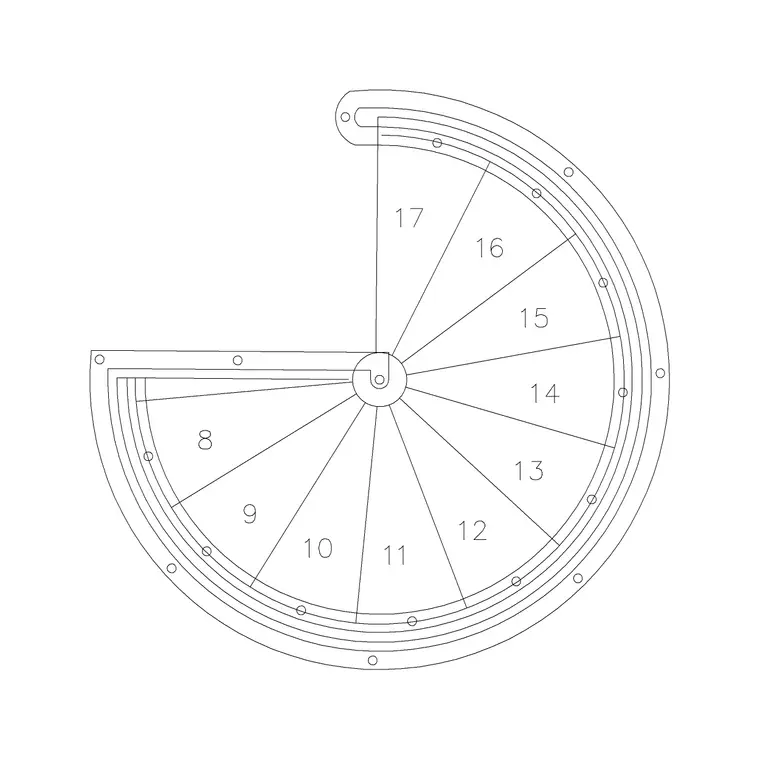
The block shows the stair in true plan view — the radial treads, the centre column and the circular outer edge — set out to a believable diameter so it reads correctly when you scale it into a floor plan. Use it to place a space-saving stair in a mezzanine, a loft conversion or a compact dwelling, and crosslink to the stairs category for elevations and other stair types. It is free for personal and commercial use, with no signup or watermark.
What a spiral staircase plan block shows
In plan, a spiral stair reads as a circle filled with wedge-shaped treads fanning out from a central column. The block draws those treads, the column, the outer circle and the up-arrow that shows the direction of travel, plus the landing or opening where the stair meets the upper floor. Because the treads are radial, getting the geometry right by hand is genuinely tedious, which is the whole point of a pre-drawn block.
The download is a flat 2D plan on its own layer so you can recolour, freeze or set the lineweight to match your stair convention. The centre of the column gives you a clean snap point for positioning, and the outer circle is the footprint you check against the surrounding walls and balustrade.
Diameter, tread count and the circular footprint
Spiral stairs are defined by their outer diameter, and that single figure governs how comfortable they are to climb. A small-diameter spiral fits a very tight space but gives narrow, steeply tapering treads suited only to occasional or secondary access; a larger diameter gives wider, more usable treads and a gentler climb. The number of treads per turn and the going at the walking line follow from the diameter.
Because comfort and code-compliance depend on these figures, treat the block as a starting geometry and confirm the diameter, tread count and headroom against your local building regulations and the actual product before finalising. The CAD block is drawn to a believable diameter so the footprint reads sensibly the moment it lands on the plan.
Plan view versus elevation
For floor plans and space planning you work in plan: the circular footprint, the radial treads and the up-arrow tell you whether the stair fits and how it lands on each level. The plan is also where you check the clear opening in the floor above, the swing of any door near the foot of the stair, and the circulation around the stair on each storey.
For sections, presentation drawings and to verify headroom you switch to elevation, where the helix and the rise per tread are drawn from the side. Many drawing sets pair a spiral plan with a matching elevation; this page focuses on the plan, and the stairs category holds spiral elevation blocks you can bring in alongside it.
How to insert and place the stair in AutoCAD
The block is drawn in millimetres. Insert at scale 1 in a millimetre drawing, 0.001 in metres, or set INSUNITS so AutoCAD rescales on insertion. Use INSERT and snap the centre of the column to the point on your plan where the stair is to sit, then rotate the block so the up-arrow and the floor opening face the way you want to arrive on the upper level.
If your project uses a different diameter, scale the block about the column centre so the footprint stays a true circle. Once placed, draw the surrounding walls or balustrade up to the outer edge, mark the floor opening on the level above, and add the up-arrow label if your stair convention requires it.
Where spiral staircase plans are used
Spiral stairs appear wherever floor area is precious: loft and attic conversions, mezzanines and galleries, compact apartments and studios, secondary or escape access to a roof terrace, and feature stairs in retail and hospitality interiors. They are also common in industrial settings for access to tanks, platforms and plant.
Pair the plan block with the floor, wall, door and balustrade blocks around it so the stair reads as part of a real circulation route, and bring in a matching elevation from the stairs category when you need a section. On a plan, a correctly-scaled spiral immediately answers the question every reviewer asks of a tight scheme: does the stair actually fit?
Layering and reuse
Put the stair on a dedicated stairs or circulation layer rather than layer 0, so you can freeze it for a structural plan or thaw it for a fully detailed one. Keeping the up-arrow and any text on a separate annotation layer means the geometry and the labels can be controlled independently.
Because a spiral footprint is the same shape wherever it appears, it is a strong candidate for your project library: once you have placed and scaled one to a diameter you trust, WBLOCK it so the next mezzanine or loft starts from a known-good stair rather than a fresh set-out. Recording the diameter and tread count on the drawing keeps the design intent legible for whoever details the stair later.
Free download
Browse the full library — DWG & DXF, no signup.
Questions
Frequently asked
Is the spiral staircase plan block free for commercial use?+
Yes. It downloads free in DWG with no signup, no watermark and no attribution requirement, and it is cleared for commercial project work.
Is the block in plan or elevation?+
This block is the plan (top) view — the circular footprint, radial treads, centre column and up-arrow. The stairs category holds matching spiral elevation blocks for sections and presentation drawings.
Can I change the diameter of the stair?+
Yes. Scale the inserted block about the centre of the column so the footprint stays a true circle. Confirm the resulting diameter, tread count and headroom against your building regulations and the actual product before finalising.
Will the spiral stair meet building regulations?+
Treat the block as a starting geometry, not a compliance check. Spiral-stair comfort and code limits depend on diameter, going at the walking line, rise and headroom, so verify those against your local regulations and the chosen product.
Related downloads
Blocks for this guide

Related categories
Related guides
Block landing
Free Spiral Staircase CAD Blocks — DWG Download
Download free spiral staircase CAD blocks in DWG and DXF — plan and elevation, drawn to real tread radii for AutoCAD. No signup, free for commercial use.
Block landing
Free Circular Staircase CAD Blocks — DWG Download
Download free circular staircase CAD blocks in DWG and DXF — curved stairs in plan and elevation, drawn to scale for AutoCAD. No signup, commercial-use OK.
Block landing
Free Metal Staircase CAD Blocks — DWG Download
Download free metal staircase CAD blocks in DWG and DXF — steel stairs in plan and elevation with stringers and balustrade. No signup, commercial OK.