Block landing · circular staircase cad block
Free circular staircase CAD blocks for AutoCAD
By Saumyajit Maity · Published 5 Mar 2023 · Updated 10 Apr 2026
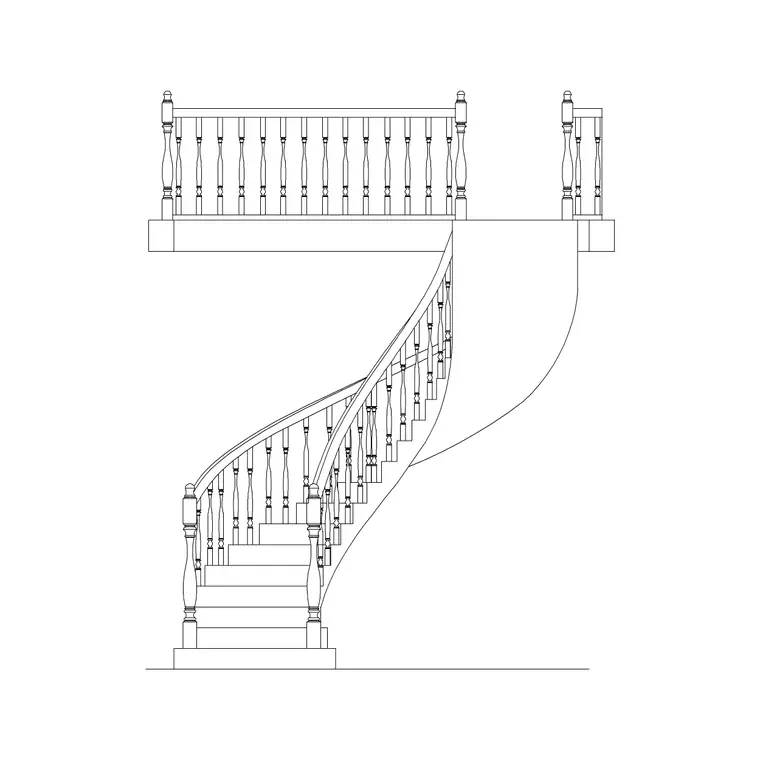
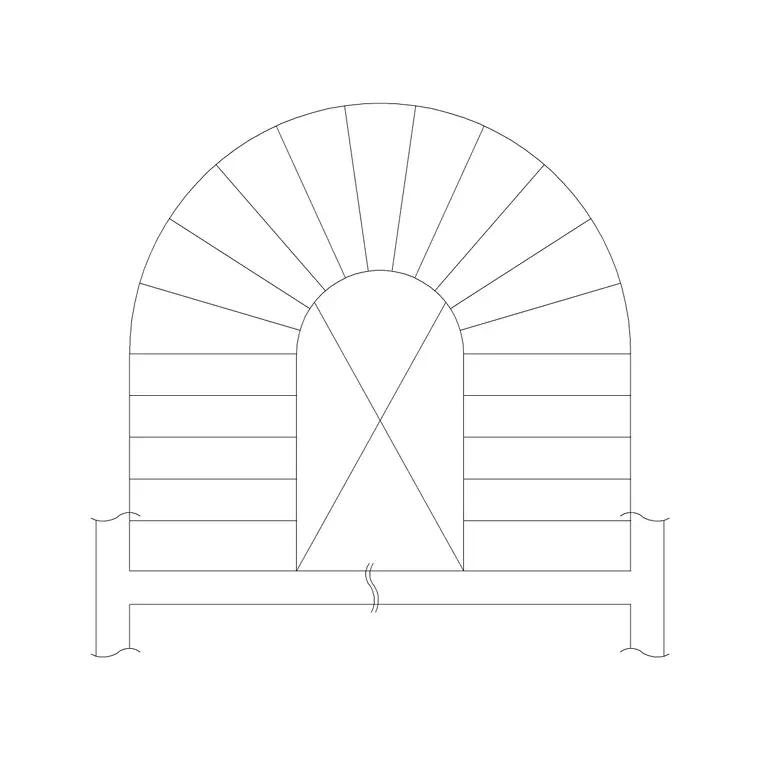
A circular staircase is the architectural statement of a stair set — a curved sweep of treads that hugs a wide radius rather than winding tightly around a pole. This page gathers free circular staircase CAD blocks in DWG and DXF, drawn in plan as a graceful arc of treads and in elevation as the curving balustrade, ready to insert into AutoCAD 2004 or later. Everything is free for personal and commercial work, with no signup and no watermark.
Where a spiral squeezes a climb into the smallest possible footprint, a circular stair spends floor area to buy comfort and presence. The blocks here are drawn to a real, generous radius so the curve you place reads correctly against the room around it — the sweep into a double-height hall, the entry and exit points on the curve, and the clearance to the surrounding walls all come straight from the geometry the moment the block lands.
Circular versus spiral: drawing the difference
The two are easy to confuse on a download page, so it helps to be precise. A spiral stair turns tightly around a central column with wedge treads meeting at a point; a circular stair sweeps along a larger radius, often with no central pole at all, so the treads are wider and the walking experience is closer to a normal flight that happens to curve.
That distinction changes what the block has to show. A circular stair block carries a wider inner and outer rail line, a longer arc of treads, and frequently a landing or a sweeping start at the bottom. In plan it looks like a portion of a large circle or an oval rather than a tight pinwheel. Choosing the circular block over a spiral matters when the brief wants an elegant, easy-to-use stair as a centrepiece rather than a compact access route.
Views and what's included
Circular stair downloads here generally pair a plan with an elevation, and some include a section through the curve. The plan sets out the radius, the start and finish of the curve, and the tread arrangement along the arc; it is the view you place into the floor layout and check against the surrounding walls and the floor opening above.
The elevation shows the curving balustrade and the rise of the flight, which is where the stair's character lives in a presentation drawing. A section, where included, exposes the structure under the curve — useful when the architectural drawing has to hand off to a structural or joinery detail. Keep the views on separate layers so each can sit on the right sheet without dragging the others along.
Typical circular staircase dimensions
Circular stairs are set out by their radius and the width of the flight, and both run larger than a spiral. The inner radius (to the inside rail) and outer radius (to the outside rail) together define the tread width — a comfortable circular stair keeps a usable going across most of the tread rather than pinching to a point, which is why the radius is generous.
Rise per tread sits in the normal comfortable stair band, and the number of treads is driven by the floor-to-floor height. Because the stair curves, the plan footprint is an arc or part-circle that can be a substantial part of a room, so the surrounding clear space and the floor void above are sized to suit. Treat the dimensions on any one block as a starting range, set the radius to suit your room, and confirm rise, going and headroom against your local building regulations — a feature stair still has to be safe and compliant.
Inserting and setting out the curve
The blocks are drawn full size in millimetres. Insert at scale 1 in a millimetre drawing, 0.001 in a metre drawing, or rely on INSUNITS set to millimetres so AutoCAD rescales on insertion. Because a circular stair is defined by its radius, the most useful insertion point is the centre of the setting-out arc — placing there lets you swing the whole stair to align its start with the hall or landing.
Once placed, ROTATE about that centre to point the bottom step toward the entrance, and MIRROR if the handedness of the curve needs to flip for the room. Keep the stair on a dedicated stair layer, and if the block carries the balustrade on a separate layer you can show or hide the rail independently for a structural versus a presentation drawing.
Where circular staircase blocks are used
Circular stairs are specified where the stair is meant to be seen and enjoyed: hotel and reception lobbies, double-height entrance halls, large residences, retail and showroom interiors, and civic or cultural buildings. They are as much a piece of design as a means of access, so they appear early in concept drawings and carry right through to the detailed joinery and balustrade drawings.
Architects and interior designers use the blocks to test the sweep against the space and to present the stair convincingly; structural engineers use the section to coordinate the support. Because the blocks are free and licence-clear, they suit a fast concept that needs a believable feature stair as much as a developed scheme. Pair them with the other stair blocks in the stairs category when a building needs a grand circular stair plus simpler runs elsewhere.
Coordinating the stair with the floor opening
A circular stair lives in two storeys at once, so the block earns its keep during coordination with the floor above. The curve has to pass cleanly through the opening in the upper floor with enough headroom under the soffit at every point of the climb, and the landing at the top has to give somewhere safe to step off. Placing the scaled plan block lets you draw the floor void around it and check both at once.
Keeping the stair as a single block reference means a change to the room — a wall moved, the opening enlarged — is easy to test by nudging the block and re-checking the clearances, rather than redrawing the whole curve. When the layout settles, the same coordinated plan and section feed the structural drawing for the support and the joinery drawing for the treads and balustrade, so the feature stair stays consistent across every sheet that shows it.
Free download
Browse the full library — DWG & DXF, no signup.
Questions
Frequently asked
What's the difference between a circular and a spiral staircase block?+
A spiral stair winds tightly around a central column with wedge treads; a circular stair sweeps along a larger radius with wider, more usable treads and often no central pole. Use the circular block for a comfortable feature stair and the spiral for a compact access route.
Do the circular staircase blocks include plan and elevation?+
Most pair a plan with an elevation in the same DWG, and some add a section through the curve. Place the view you need on the right sheet and keep the others on their own layers. Each download page lists the views included.
Are the circular staircase CAD blocks free for commercial use?+
Yes. Every block downloads free in DWG and DXF with no signup, no watermark and no attribution requirement, and they are cleared for commercial project work.
How do I set out the curve when I insert the block?+
Insert with the centre of the setting-out arc as the insertion point, then ROTATE about that centre to aim the bottom step at the entrance, and MIRROR if the handedness needs to flip. The blocks are drawn full size in millimetres.
Related downloads
Blocks for this guide

Related categories
Related guides
Block landing
Free Spiral Staircase CAD Blocks — DWG Download
Download free spiral staircase CAD blocks in DWG and DXF — plan and elevation, drawn to real tread radii for AutoCAD. No signup, free for commercial use.
Block landing
Free Metal Staircase CAD Blocks — DWG Download
Download free metal staircase CAD blocks in DWG and DXF — steel stairs in plan and elevation with stringers and balustrade. No signup, commercial OK.
Block landing
Free Dog-Leg Staircase CAD Blocks — DWG Download
Download free dog-leg staircase CAD blocks in DWG and DXF — half-turn stairs with a mid-landing in plan and elevation for AutoCAD. No signup, commercial OK.