Block landing · spiral staircase cad block
Free spiral staircase CAD blocks in DWG and DXF
By Saumyajit Maity · Published 22 May 2026 · Updated 16 Jun 2026
A spiral staircase is the block you reach for when a plan is tight and the only way up is around a single point. This page collects free spiral staircase CAD blocks in DWG and DXF — drawn in plan with the radiating treads and central column, and in elevation where the helix winds upward — ready to insert into AutoCAD 2004 or later. Every file is free for personal and commercial work, with no signup, no watermark and no attribution required.
Because a spiral stair earns its place by saving floor area, the block has to be drawn to a believable radius before it helps you. The plan blocks here are set out around a real centre pole with wedge-shaped treads fanning out, so the footprint you drop on the page is the footprint the stair actually occupies. That lets you test whether the stair clears the surrounding walls, leaves room to step off at the landing, and lands its head-height the way the design needs.
What a spiral staircase block shows
In plan, a spiral staircase reads as a circle divided into pie-slice treads radiating from a central column, usually with a direction-of-travel arrow and the up/down annotation. The block should show the central pole, the outer handrail line, the going of each tread at the walking line, and the break line where the stair passes the floor it serves. Those elements together let a reader understand the rotation and the headroom at a glance.
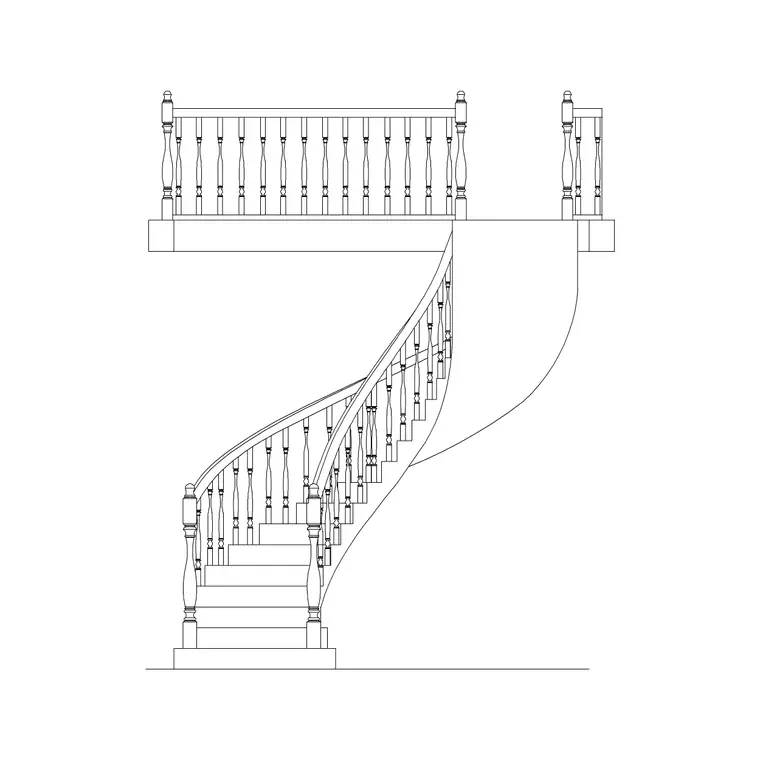
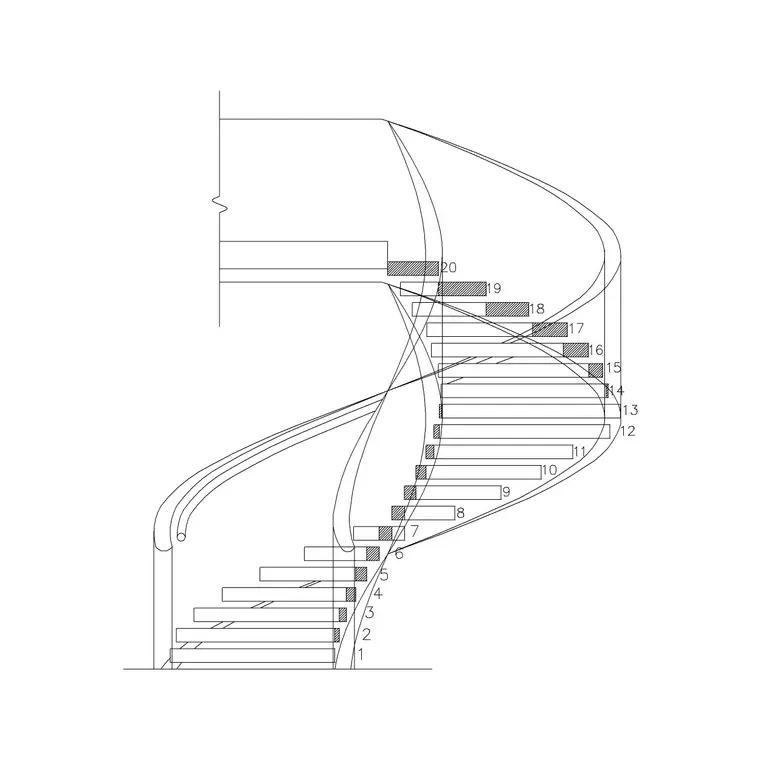
In elevation the same stair appears as the recognisable winding helix — treads stacked at a constant rise, the balustrade following the curve, and the central support running floor to floor. Drawing the elevation alongside the plan is what proves the headroom: it is the only view where you can see the underside of the treads above clearing a person's head as they climb.
Plan and elevation: what's included
Most spiral stair downloads here ship a plan block and a matching elevation in the same DWG, because a spiral really needs both to be coordinated. The plan governs the floor footprint and the entry/exit positions; the elevation governs the rise, the number of treads in a full turn, and the headroom under the floor opening above.
Keep the two views on their own layers so you can place the plan into a floor layout and reserve the elevation for the section or the stair detail sheet. Where a block also carries a section cut, that view shows the structural connection of the treads to the column — useful when you move from the architectural layout into a fabrication or structural drawing.
Typical spiral staircase dimensions to design around
Spiral stairs are sized by diameter, and the diameter sets everything else. Common residential spirals fall in a roughly 1200–1600 mm overall diameter band, with compact access spirals going smaller and generous feature spirals going larger. The central column is typically a slim 100–150 mm pole. Treads radiate at a constant angle so that a full 360-degree turn is split into an equal number of risers.
Going (tread depth) is measured at a walking line set back from the centre, because the inner edge of a wedge tread is too narrow to stand on — that walking line is usually taken a few hundred millimetres in from the outer rail. Rise per tread sits in the usual comfortable band for stairs. Headroom is the figure to watch: as you climb past the floor opening above, you need clear height under the soffit, so the floor void around the stair is sized to suit. Treat these as ranges to design within and always check the figures against your local building regulations rather than a single block.
How to insert and rotate the block
These spiral stair blocks are drawn full size in millimetres. In a millimetre drawing, run INSERT and place at scale 1; in a metre drawing insert at 0.001, or set INSUNITS to millimetres so AutoCAD rescales the block automatically on insertion and you avoid a stair that lands either microscopic or building-sized.
Pick the insertion point at the centre of the column — that is the natural pivot for a spiral — so you can rotate the block to align the bottom step with the doorway or corridor it serves. Because the whole stair is one block reference, a single ROTATE around the column swings the entry to wherever the plan needs it without disturbing the geometry. Put the stair on its own stair layer so you can freeze it for a clean shell plan and thaw it for the furnished drawing.
Where spiral staircase blocks are used
Spiral stairs turn up wherever floor area is precious or a sculptural stair is wanted: loft conversions, mezzanine and gallery access, small apartments, garden studios, libraries with upper stacks, and as secondary or fire-escape stairs in larger buildings. Architects use them to squeeze a second route between floors; interior designers specify them as a feature; services drawings show them so the floor void and the structure around the opening are coordinated.
Because they are free and licence-clear, the same blocks suit a quick concept layout, a student mezzanine project, or a coordinated set where the stair has to read consistently across the plan, section and detail. Pair them with the other stair types in the stairs category when a scheme needs a main stair plus a compact spiral for a secondary route.
Spiral versus other compact stairs
A spiral stair is not the only way to climb in a small footprint, and the block you choose should reflect the trade-off. A spiral wins on plan area and on drama, but the wedge treads make it harder to carry furniture up and slower to use than a straight or dog-leg run. Where a little more floor is available, a tight circular or winder stair gives easier treads at the cost of a larger footprint.
Thinking of it that way helps you pick the right block at concept stage: drop in the spiral when the brief is genuinely tight or the stair is meant to be seen, and reach for a circular or dog-leg block when comfort and moving large objects matter more than saving the last square metre. Because every stair block here is editable, you can swap one type for another early without redrawing the surrounding plan.
Free download
Browse the full library — DWG & DXF, no signup.
Questions
Frequently asked
Are these spiral staircase CAD blocks really free?+
Yes. Every spiral staircase block downloads free in DWG and, where available, DXF, with no signup, no watermark and no attribution requirement. They are cleared for commercial project use.
Do the spiral stair blocks include both plan and elevation?+
Most do. The plan and elevation usually ship in the same DWG so the footprint and the helix stay coordinated — place the one you need and freeze or explode the other. Each download page lists the views included.
What diameter are the spiral staircase blocks drawn at?+
They are drawn full size in millimetres, with the central column as the natural insertion point. Residential spirals typically sit in a 1200–1600 mm overall diameter band; treat the figure as a starting range and check it against your local building regulations.
How do I rotate a spiral stair to face a doorway?+
Insert with the central column as the insertion point, then run ROTATE about that point. Because the whole stair is a single block reference, one rotation swings the bottom step to align with the door or corridor without distorting the treads.
Related downloads
Blocks for this guide

Related categories
Related guides
Block landing
Free Circular Staircase CAD Blocks — DWG Download
Download free circular staircase CAD blocks in DWG and DXF — curved stairs in plan and elevation, drawn to scale for AutoCAD. No signup, commercial-use OK.
Block landing
Free Metal Staircase CAD Blocks — DWG Download
Download free metal staircase CAD blocks in DWG and DXF — steel stairs in plan and elevation with stringers and balustrade. No signup, commercial OK.
Block landing
Free Dog-Leg Staircase CAD Blocks — DWG Download
Download free dog-leg staircase CAD blocks in DWG and DXF — half-turn stairs with a mid-landing in plan and elevation for AutoCAD. No signup, commercial OK.