Block landing · reading person figure cad block
Free reading person figure CAD block for interiors
By Sumana Kumar · Published 12 Jun 2023 · Updated 17 Mar 2026
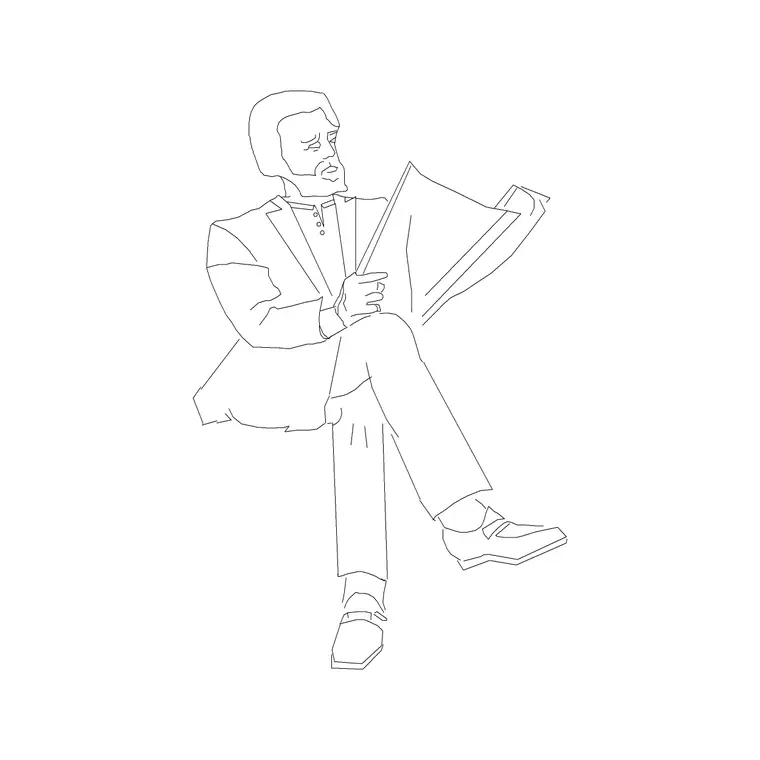
A reading figure does something a plain seated figure cannot: it shows not just that someone is sitting, but what they are doing there, and that turns a furniture elevation into a scene of use. The reading person figure is a seated human holding a book or device, drawn to test reading-posture ergonomics and to animate the quiet spaces a building is built around. This page offers a free reading person figure CAD block in DWG and DXF, ready to drop into AutoCAD 2004 or later, free for personal and commercial use with no signup or watermark.
Where this figure earns its keep is in the spaces designed for staying put — a library, a study, a reading nook, a lounge chair by a window. A reading person seated in a chair shows the seat height, the lap and forearm position, and the relationship to a side table or task light, all in one recognisable pose. For interior designers and library or workplace planners, it is a scale figure that also documents an activity.
What the reading person figure shows
The block is a seated adult in elevation with the upper body and arms angled into a reading posture — head slightly inclined, forearms raised to hold a book or device at lap-to-chest height. It is drawn as a clean side-on silhouette so it sits over a chair or sofa elevation as a recognisable act of reading rather than a generic seated shape. Like other seated figures it carries no chair of its own and is placed over the seat you have already drawn.
Because it is a single block reference, one instance reads correctly on a lounge chair, a library carrel, a window seat or a sofa. As a block it never needs redrawing, and a single edit to the master updates every reading figure on the sheet, keeping a library or reading-room elevation consistent.
Libraries, studies, lounges and reading nooks
The reading figure belongs wherever staying and reading is the point. In a library or study it animates carrels, lounge seating and window benches while checking the seat and table relationship. In a residential interior it brings a reading nook, a window seat or a lounge chair to life and shows the lighting and side-table position being used. In workplace and breakout spaces it reads as someone settling in to focus, exactly the atmosphere those areas are meant to offer.
The figure also quietly documents ergonomics. With the reading posture shown, you can read the forearm height against a side table, the eye line against a task light, and the seat depth against the body, which is the kind of relationship that gets specified loosely and goes wrong on site. One reading figure per key seat turns a furniture layout into a usability check.
Reading posture and seat dimensions
The figure is at adult scale in a seated posture, so the key relationships are to the seat below it. As a design-stage guide, a comfortable lounge or reading seat height is commonly in the region of 380 to 450 mm, seat depth around 450 to 550 mm for a relaxed recline, and a side table for reading materials commonly around 500 to 650 mm high; treat all of these as ranges to check the figure against rather than fixed values, and confirm against the actual furniture.
Keep the figure full size and do not stretch it to fit an unusually high or low seat — if the posture looks wrong against the seat, that is a finding about the furniture, not the figure. Set INSUNITS to millimetres so AutoCAD rescales on insertion if the block was built in other units, and mirror the whole block when the seat faces the other way.
Placing the reading figure in AutoCAD
Draw or insert the chair first, then INSERT the reading figure and snap its hip to the seat with the feet landing on your floor line, using endpoint OSNAPs so nothing floats. Check the forearm height against any side table or armrest and the eye line against a reading light, and adjust the furniture if the posture and fittings do not agree. If the feet do not reach the floor, the seat is too high — a real finding the figure has surfaced.
Keep the reading figure on a dedicated scale-figure layer, screened or non-plotting for presentation-only use, so it appears in client PDFs but drops out for construction. Maintain one master block for consistency, mirror it with MIRROR when needed, and avoid stretching it so the reading posture stays believable.
Mixing reading and other seated figures
A reading figure works well in a mix of activity. Combine it with a plain seated figure, a standing figure browsing shelves, and a child reading at a lower table to populate a library or study scene with believable variety. For a busier interior, add a couple or a small group nearby so the space reads as used rather than posed.
The full people category collects seated, standing, walking and group figures so you can assemble a varied, consistent cast. Keep the reading figure in the same drawing as your other people so they share insertion scale and layer conventions, and the finished interior reads as a coherent scene of people using the space.
Free download
Browse the full library — DWG & DXF, no signup.
Questions
Frequently asked
How is this different from a plain seated figure?+
The arms and head are posed in a reading position holding a book or device, so it documents the activity, not just the act of sitting. That makes it ideal for libraries, studies and reading nooks where reading is the point of the space.
Can it check the side table and task light heights?+
Yes. Read the forearm height against a side table and the eye line against a reading light off the elevation. If they don't line up, adjust the furniture or lighting — the figure has flagged the mismatch.
Is it drawn in elevation or plan?+
This is an elevation (side) view, which is where seating and reading posture are judged. For a top-down layout use plan-view people kept on their own block so the two views stay separate.
Is the reading figure free for commercial work?+
Yes. The DWG and DXF download is free for personal and commercial use with no signup, watermark or attribution, so it can go straight into library, lounge and workplace drawings.
What if the feet don't reach the floor over my chair?+
That means the seat is too high for the figure — a genuine ergonomic finding. Lower the seat or choose a more suitable chair rather than stretching the figure, which would hide the problem.
Related downloads
Blocks for this guide
Popular blocks to download
Related categories
Related guides
Block landing
Human Figure Plan CAD Blocks — Free DWG
Download free human figure plan-view CAD blocks in DWG — people seen from above, drawn to scale for floor plans and circulation. AutoCAD 2004+, no signup.
Block landing
Human Figure Elevation CAD Blocks — Free DWG
Free human figure elevation CAD blocks in DWG — people drawn front-on and in profile to scale your sections and streetscapes. AutoCAD 2004+, no signup.
Block landing
Standing Person Scale Figure CAD Blocks (Free)
Free standing person scale figure CAD blocks in DWG — clean, true-height figures to set the scale of plans, sections and elevations. AutoCAD 2004+, no signup.