Block landing · portrait frame cad block
Free portrait frame CAD block in DWG and DXF
By Saumyajit Maity · Published 11 Mar 2023 · Updated 25 May 2026
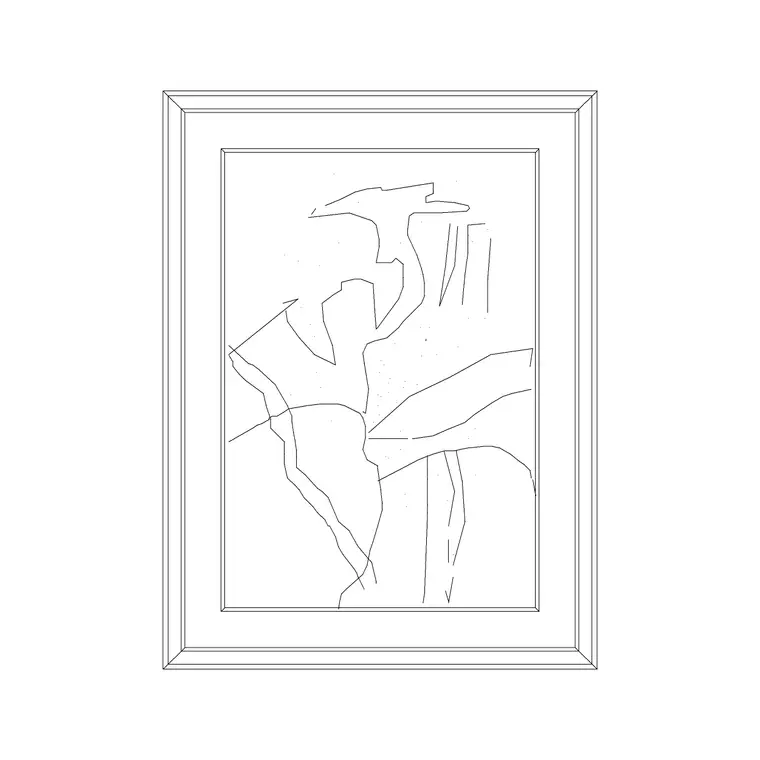
A portrait frame — taller than it is wide — is the orientation you reach for over a narrow pier, beside a doorway or in a stacked gallery grouping, and a ready-made portrait frame CAD block lets you hang that vertical artwork without drawing the moulding each time. This page offers a free portrait frame CAD block in DWG and DXF, drawn as an upright framed panel so it reads as wall art on any interior elevation. It is free for personal and commercial use, with no signup, watermark or attribution.
The portrait orientation does a specific job in a layout: it suits tall, narrow wall surfaces and balances vertical elements like a doorway or a floor lamp. Because the block is drawn to scale, you can immediately judge whether the proportion suits the wall and whether the hang height relates to the furniture below.
What a portrait frame block contains
A portrait frame block is a vertical framed panel: a rectangular moulding taller than it is wide, with an artwork or image area inside. The frame is drawn with a visible border width so it reads as moulding, and the internal area can be left plain or carry a simple motif. The upright proportion is the defining trait — it is what distinguishes a portrait frame from the wider landscape version.
Like all framed art it is an elevation element, built as clean single-layer linework. You can recolour the frame, simplify the inner area for small-scale plots, or explode it to adjust the proportion for a specific piece. As a single block reference it copies neatly into a stacked or gridded gallery arrangement.
When to use a portrait orientation
Reach for the portrait frame where the wall is tall and narrow, or where you want to reinforce verticality. A single portrait piece works well over a console between two windows, beside a door, or above a tall sideboard. In a gallery wall, portrait frames are mixed with landscape ones to create rhythm — a run of all-landscape art can feel monotonous, and a portrait or two breaks it up.
Because it is an elevation block, you place it on interior elevations and presentation boards. The orientation choice is part of the composition: matching the frame proportion to the wall and the furniture below is what makes the elevation feel considered.
Typical portrait frame sizes
Use these as guide ranges. A portrait frame commonly sits in the 300–600 mm width and 400–900 mm height band, the taller-than-wide proportion being the point. A large statement portrait piece can climb beyond a metre tall for a double-height wall or a stairwell, while small portrait frames in a gallery grid might be only 200–300 mm wide. The moulding border is typically a slim 20–50 mm.
The placement figure that matters is the hanging centre height, conventionally around eye level — often taken near 1500 mm from the floor — adjusted up when the piece sits above furniture so it relates to what is beneath it. Draw the frame to scale and set its centre at that height for a correct elevation.
How to insert and scale the portrait frame
The block is drawn full size in millimetres. In a millimetre drawing, INSERT at scale 1 for real size; in a metre template insert at 0.001; in an imperial drawing set INSUNITS to millimetres so AutoCAD rescales the frame on insertion and you avoid a stamp-sized or wall-sized result.
Pick the centre of the frame as the insertion point and snap it to a guide line at your chosen hanging height so the art lands level every time. Because the frame is a single block reference, a vertical stack of two or three portrait pieces is built from copies aligned on a shared centre line, and editing the block definition updates every instance together.
Where portrait frame blocks are used
Portrait frames appear in living and bedroom elevations, hotel rooms and corridors, stairwells and double-height halls, reception and lobby walls, and any furnished interior where a tall, narrow piece suits the wall. Pair the portrait frame with the abstract and landscape art frame blocks in the accessories category to build a balanced gallery wall, and with console, mirror and wall-clock blocks to dress a full elevation.
Because the file is free and licence-clear, it suits interior student projects, mood boards and concept elevations. The same block carries from a styling sketch to a finished presentation board without the frame being redrawn.
Composing with portrait frames
In a gallery grouping, alternate portrait and landscape frames and vary their sizes, but anchor the cluster to a shared baseline, centre line or grid so it reads as deliberate. A symmetrical pair of portrait frames flanking a console or a mirror is a reliable composition; mirror one block to make the pair, then nudge it so it does not look mechanically reflected.
Keep all artwork on a dedicated dressing or art layer so you can freeze it for a clean technical elevation and thaw it for the styled version. At small plot scales, simplify the inner area so the frame reads as a panel. If a corridor repeats a hanging rhythm, group the frame with its guide and array it, then edit the master definition to tune the whole run.
Free download
Browse the full library — DWG & DXF, no signup.
Questions
Frequently asked
Is the portrait frame CAD block free for commercial use?+
Yes. It downloads free in DWG and, where available, DXF, with no signup, watermark or attribution, and is cleared for paid client projects.
When should I use a portrait frame instead of a landscape one?+
Use the portrait orientation on tall, narrow walls — over a console, beside a door, in a stairwell — or to break up a run of landscape art in a gallery wall and reinforce verticality.
What is a typical portrait frame size?+
Portrait frames commonly sit in the 300–600 mm width and 400–900 mm height range, with statement pieces over a metre tall and gallery-grid frames as small as 200–300 mm wide.
Will the block open in older AutoCAD and free viewers?+
Yes. The DWG targets AutoCAD 2004 and later, so it opens in AutoCAD, AutoCAD LT, BricsCAD, DraftSight and free DWG viewers.
Related downloads
Blocks for this guide
Popular blocks to download
Related categories
Related guides
Block landing
Wine Rack CAD Block DWG — Free Download
Download a free wine rack CAD block in DWG and DXF — bottle storage drawn in plan and elevation for kitchens, bars and cellars. AutoCAD 2004+, no signup.
Block landing
Wine Glass CAD Block DWG — Free Download
Download a free wine glass CAD block in DWG and DXF — red and burgundy stemware in elevation and plan for bar and table settings. AutoCAD 2004+, no signup.
Block landing
Cement Planter Pot CAD Block DWG — Free
Download a free cement planter pot CAD block in DWG and DXF — concrete-finish planter drawn in plan and elevation for interiors and terraces. AutoCAD 2004+.