Block landing · medical wash basin cad block dwg
Free medical wash basin CAD block in DWG
By Sumana Kumar · Published 18 Feb 2024 · Updated 1 Apr 2026
A medical wash basin is a small fixture with an outsized role in infection control, which is why its position is one of the more closely governed decisions in a clinical room. This page offers a free medical wash basin CAD block in DWG, drawn at true millimetre size so you can place a clinical hand-wash basin into a consulting room, a ward or a treatment bay and set it at the right point near the door and the working zone. It is free for personal and commercial work, with no signup or attribution.
Unlike a domestic basin, a clinical hand-wash basin is specified to support good hand hygiene — its position, the splash zone around it and the space for a clinician to wash without contaminating surfaces all matter. Drawing it to scale, in both plan and elevation, lets you place it correctly and coordinate it with the taps, the soap and towel dispensers and the wall finishes.
What the medical wash basin block represents
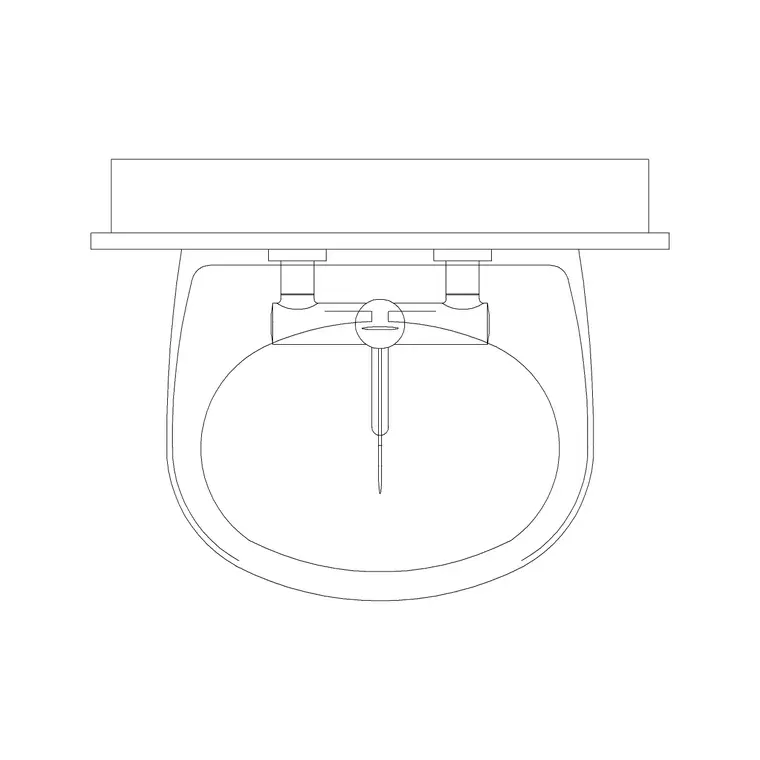
The block stands in for a clinical hand-wash basin — the bowl, the back to the wall and the tap position — in plan and elevation. The plan shows the basin outline projecting from the wall, which is what you locate near the room entrance and the working zone. The elevation shows the basin at its mounting height with the tap and, where included, the splash-back and dispenser positions.
A good block keeps the bowl, the tap and any dispensers on separate layers so you can show a simple fixture for a room layout or a fuller sanitary elevation for the wet-zone coordination. As a single block reference it inserts and copies as one object, which keeps repeated rooms consistent.
Views and what is included
A clinical basin is needed in both plan and elevation, and this block is built for both. Use the plan to locate the basin near the door and to check it does not foul the swing or the circulation; use the elevation to set the rim height and coordinate the tap, the splash-back and the soap and towel provision on the wall.
Keep the basin on its own sanitary layer so you can freeze it for a clean architectural plan and thaw it for the sanitary and wet-zone drawing, and so it reads distinctly from the couch, the desk and the worktop.
Typical sizing to design around
Use these as planning ranges. A clinical hand-wash basin is roughly 400–600 mm wide and 350–500 mm front to back, projecting that depth from the wall. The rim is commonly set around 800–850 mm above the floor, though heights vary with the standard and the user group. Clinical basins are often specified without an overflow or plug to suit infection-control practice.
The space that matters is the standing and splash zone: a clear area in front of the basin for a clinician to wash, kept away from clean surfaces and stored items so splashes do not contaminate them. Tap type and the position of soap and paper-towel dispensers are part of the same hygiene picture. Confirm the exact figures against the healthcare guidance — the scaled block makes the placement and clearance a visual check.
How to insert and place the basin
The block is full size in millimetres. Insert at scale 1 in a millimetre drawing, 0.001 in a metre drawing, or set INSUNITS to millimetres so AutoCAD rescales automatically. In plan, snap the back of the basin to the wall near the room entrance; in elevation, set the rim at the mounting height your guidance specifies so the tap and dispensers land at the right levels.
Move the basin onto a sanitary layer, then check the standing space in front and keep clean storage out of the splash zone. For repeated rooms, COPY the basin to the same position relative to the door so hand hygiene is consistent and the plumbing runs line up between rooms.
Where the medical wash basin block is used
Medical wash basin blocks belong in consulting and examination rooms, ward bays and single rooms, treatment and minor-procedure rooms, dental surgeries, and clinic and outpatient layouts. They pair with the patient couch, the clinician's desk, the worktop and the broader medical library to complete a clinical room, and they sit in the sanitary and plumbing coordination alongside the WCs and sluices.
Because the file is free and licence-clear, it suits concept clinic plans and feasibility studies as well as coordinated production drawings. The same basin block carries from an early room layout through to a sanitary elevation without being redrawn.
Placing the basin for hygiene
A clinical room works when the wash basin is placed for actual use — near the entrance so staff wash on the way in and out, within reach of the working zone, and with a splash zone that keeps clean surfaces clean. Keep the basin on a sanitary layer with its standing space shown, then position the soap and towel dispensers in elevation so the whole hand-hygiene station reads as one.
If you attribute the basin with a fixture reference, a sanitary schedule can list basin type and count straight from the drawing for the plumbing package. When a room is settled, WBLOCK a basin-plus-dispensers station so the next room reuses a tested, hygienic hand-wash arrangement with the dispensers already coordinated.
Free download
Browse the full library — DWG & DXF, no signup.
Questions
Frequently asked
Is the medical wash basin CAD block free for commercial use?+
Yes. It downloads free in DWG with no signup, no watermark and no attribution, and it is cleared for commercial clinical, ward and sanitary drawings.
Does the block include plan and elevation?+
Yes. The plan locates the basin against the wall for room layout, and the elevation sets the rim height and coordinates the tap, splash-back and dispenser positions for the wet zone.
Where should a clinical hand-wash basin go?+
Commonly near the room entrance and within reach of the working zone, with a clear standing and splash area that keeps clean surfaces and stored items out of the splash. Confirm against your healthcare guidance.
What height is the basin drawn at?+
The rim is commonly set around 800–850 mm above the floor, though heights vary by standard and user group. Set the elevation to the mounting height your project guidance specifies.
Related downloads
Blocks for this guide
Related categories
Related guides
Block landing
Free Hospital Bed CAD Block — DWG & DXF Download
Download a free hospital bed CAD block in DWG and DXF — electric patient bed in plan and elevation with bedside clearances for ward layouts. No signup.
Block landing
Free Patient Stretcher CAD Block — DWG Download
Download a free patient stretcher CAD block in DWG and DXF — wheeled trolley/gurney in plan and elevation for A&E and recovery layouts. No signup.
Block landing
Free Medical Trolley CAD Block — DWG Download
Download a free medical trolley CAD block in DWG and DXF — dressing, treatment and crash carts in plan and elevation for clinical layouts. No signup.