Block landing · kitchen exhaust fan cad block
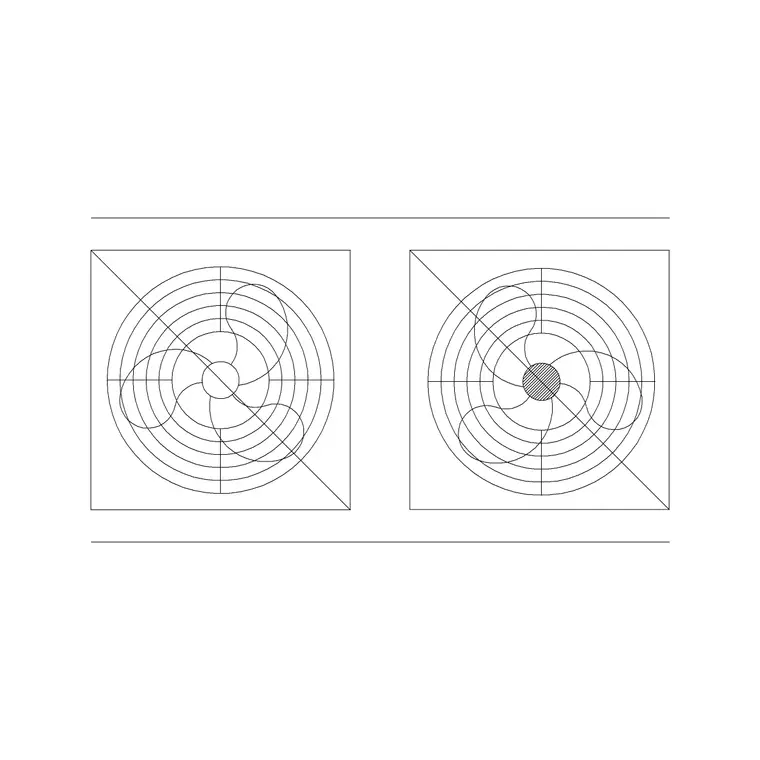
Free kitchen exhaust fan CAD block for AutoCAD
By Saumyajit Maity · Published 7 Feb 2024 · Updated 11 Apr 2026
Every kitchen has to get cooking moisture, grease and heat out of the room, and on the drawing that job is carried by the exhaust fan. This page offers a free kitchen exhaust fan CAD block — the extractor or hood fan drawn in plan so you can place it over the hob, tie it to a duct run, and show the mechanical ventilation on your layout. It downloads in DWG for AutoCAD 2004 and later, free for personal and commercial work, with no signup and no watermark.
Unlike a decorative cooker hood, the exhaust fan is fundamentally a services component: it represents air movement, an extract rate and a duct. Drawing it as a scaled block over the cooking position lets you coordinate the ventilation with the hob below and with whatever route the duct takes to an external wall or roof — the coordination that keeps a kitchen from steaming up its own windows.
Use it on a domestic kitchen plan, a tea-point or kitchenette, or a small commercial galley where you need to show extract over the cooking line.
What the exhaust fan block represents
In plan, the exhaust fan block reads as the fan body or hood footprint with the fan symbol inside it, sitting over the cooking position. It is the marker that says 'air is extracted here', and it is the anchor point a duct run connects to. On a coordinated drawing it sits directly above the hob block on the cooking wall.
Because it is a single block reference, you can move, copy and rotate it as one object, and snap it centrally over the cooker. Keep it on a mechanical or services layer so it reads as ventilation rather than as cabinetry — that separation is what lets the same drawing serve both the kitchen-fit-out plan and the M&E coordination plan.
Exhaust fan sizing and extract basics
The footprint of a kitchen extractor usually matches the appliance below it — a 600 mm fan over a 600 mm hob, a 900 mm unit over a wide range — so the extract covers the full cooking zone rather than missing the back burners. Wall and ceiling extract fans for a kitchen run smaller, often in the 100–150 mm spigot range for the duct itself.
What matters in design is that the extract is sized to the room: domestic kitchen ventilation is specified by air-change or extract rate, and the duct diameter follows from that. Rather than invent a figure, treat the block as the position marker and confirm the actual extract rate and duct size against the ventilation standard you are working to. The scaled block lets you draw the real duct diameter away from the fan toward the external termination.
Placing the fan and routing the duct
Insert the block full size in millimetres — scale 1 in a millimetre drawing, or set INSUNITS to millimetres so AutoCAD rescales automatically. Snap it centrally over the hob so the extract sits over the burners, then draw the duct as a polyline from the fan spigot to the nearest external wall or up to a roof terminal.
Keep the duct run as short and straight as you reasonably can on the plan — long, twisting runs with many bends are something to flag in coordination, and seeing the route drawn to scale makes a tortuous path obvious. Where the duct passes through a wall, mark the penetration so the builder and the M&E trades are working to the same point.
Exhaust fan vs cooker hood on the drawing
It is worth being clear about which block you actually need. A cooker hood is the visible canopy or chimney you draw in elevation on the cooking wall — it is as much a design element as a services one. An exhaust fan block is the plan-and-services representation of the extract itself: the fan and the duct connection.
On most kitchen drawings you use both: the hood appears on the elevation and in plan as a footprint, while the exhaust fan symbol carries the ventilation intent and the duct on the services layer. If you are only showing the mechanical extract — for instance on an M&E coordination plan — the exhaust fan block alone does the job.
Who uses the exhaust fan block
Architects and interior designers use it to show kitchen extract on residential and small-commercial plans. Building-services and M&E designers use it to coordinate the extract position and duct route with the structure and the other services. Kitchen specialists use it to confirm that ventilation lines up over the hob before the joinery is set out.
It sits naturally alongside the cooking range plan block below it and the wall-mounted or wall-hung hood blocks in the kitchen category. On a full house plan, pair it with the bathroom extract fans so all the mechanical ventilation reads consistently across the drawing set.
Layering and scheduling the ventilation
Put the exhaust fan and its duct on a dedicated mechanical or ventilation layer, distinct from the cabinetry and appliance layers. That lets you freeze the cabinetry to produce a clean services-only plan, or freeze the services to produce a clean kitchen-fit-out plan, from a single drawing — no duplicate geometry.
Tag the fan with an attribute for its extract rate or reference and you can pull a simple ventilation schedule straight from the plan, which is exactly what an M&E specification wants. When a kitchen layout repeats across units in a scheme, WBLOCK the fan-over-cooker arrangement so the extract position drops in coordinated every time.
Free download
Browse the full library — DWG & DXF, no signup.
Questions
Frequently asked
Is the exhaust fan block the same as a cooker hood block?+
Not quite. A cooker hood is the visible canopy drawn in elevation; the exhaust fan block is the plan-and-services representation of the extract — the fan and its duct connection. Most kitchen drawings use both, on different layers.
What size do I draw the kitchen exhaust fan at?+
Match the cooking zone below — typically a 600 mm fan over a 600 mm hob or a 900 mm unit over a wide range — so the extract covers the full hob. The duct spigot itself is usually in the 100–150 mm range. Confirm the extract rate and duct size against your ventilation standard.
How do I show the duct from the fan?+
Draw the duct as a polyline from the fan spigot to the nearest external wall or roof terminal, keeping the run short and with as few bends as possible. Mark the wall penetration so the builder and M&E trades work to the same point.
Is the exhaust fan CAD block free to use?+
Yes. It downloads free in DWG with no signup, no watermark and no attribution requirement, and it is cleared for commercial project use.
Related downloads
Blocks for this guide
Related categories
Related guides
Block landing
Free Bathroom Fixtures CAD Blocks — DWG Download
Download free bathroom fixtures CAD blocks in DWG and DXF — toilets, wash basins, bathtubs, showers and vanities drawn in plan and elevation. No signup, commercial OK.
Block landing
Free Gas Stove / Cooktop CAD Blocks — DWG
Free gas stove and cooktop CAD blocks in DWG and DXF — drawn in plan and elevation at true kitchen-module sizes for AutoCAD 2004+. No signup, commercial-use OK.
Block landing
Single Burner Hob CAD Block — Free DWG
Free single burner hob CAD blocks in DWG and DXF for compact kitchens and studios — plan and elevation, true sizing for AutoCAD 2004+. No signup, commercial OK.