How-to guide · how to insert a wash basin block in autocad
How to insert a wash basin block in AutoCAD
By Saumyajit Maity · Published 17 Nov 2024 · Updated 1 Feb 2026
A wash basin is a small fixture with an outsized influence on whether a bathroom feels usable, because it has to sit within easy reach of the WC and still leave standing room in front. It is also one of the bathroom fittings you draw in elevation almost as often as plan, since the rim height and the mirror above it matter for tiling and joinery. This guide covers inserting a wash basin block in AutoCAD, placing it sensibly relative to the toilet, and setting its mounting height.
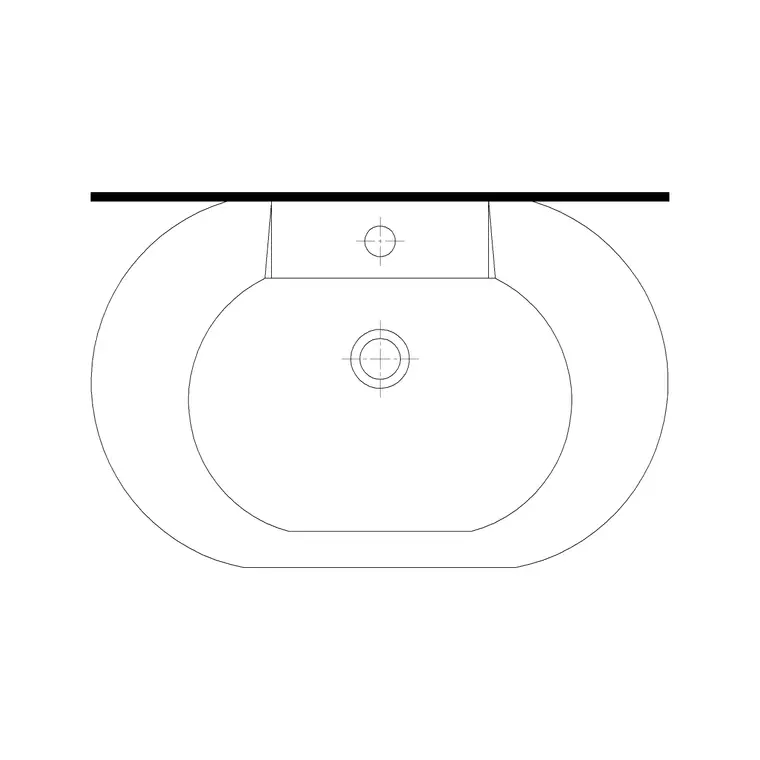
The worked example is a round countertop basin seen in plan — increasingly common in contemporary bathrooms — but the steps cover pedestal basins, wall-hung basins, semi-recessed basins and the small cloakroom basin too. Place a basin well and the bathroom reads as a designed space rather than a collection of fittings.
Step 1 — Choose the basin type and view
Download a wash basin block in DWG. For the bathroom layout you want the plan view; for tiling and joinery drawings you also want the elevation. Decide on the basin type, because the plan footprint differs: a round countertop basin sits on top of a vanity or shelf and shows as a circle; a pedestal basin shows the bowl with the pedestal below; a wall-hung basin shows just the bowl on the wall.
Typical footprints: a standard basin is 500–600 mm wide, a compact cloakroom basin around 400 mm. A round countertop bowl is often 350–450 mm in diameter. Save the DWG into your bathroom library; the blocks here are full size in millimetres.
Step 2 — Set units and insert
Confirm your insertion units before placing — type UNITS and set 'Insertion scale' to Millimeters so the basin arrives at true size. With INSUNITS correct, AutoCAD reconciles the block's units against the drawing's, so even a block drawn in different units rescales on insertion.
Run INSERT (or I), browse to the basin DWG, and place it against its wall with 'Specify On-screen' ticked for the insertion point. Leave the scale at 1. For a round countertop basin, the bowl needs a surface beneath it, so if your layout uses a vanity, place the vanity first and then drop the basin onto it. The basin lands as a single block reference.
Step 3 — Position the basin within reach of the WC
A basin belongs near the WC so you can wash your hands without crossing the room, but not so close that the two fixtures crowd each other. Place the basin on the wall beside or near the toilet, with its centreline far enough from the WC that the activity zones don't overlap. Snap the back of the basin (or the vanity it sits on) flush to the wall with a perpendicular snap.
Leave clear floor in front of the basin for someone to stand and lean in — around 600 mm of activity space, the same order as the WC. In a tight cloakroom the basin often tucks beside the door, but keep enough room that the door doesn't clout it on opening. Centre the basin on the space you have allotted so the tap and the mirror above line up symmetrically.
Step 4 — Set the rim height in elevation
The basin's mounting height is fixed in elevation, and it is the dimension a tiler and a plumber both need. A wash basin rim typically sits 800–850 mm above the finished floor for a standing adult; a basin for children or accessible use sits lower. Insert the elevation basin block and MOVE it vertically so the rim lands at the chosen height.
The elevation also positions the tap, the waste and the mirror or splashback above the basin, so it ties the fixture into the tiling. For a wall-hung or semi-recessed basin, the elevation shows the bracket or vanity that supports it. Keeping the rim-height dimension on the drawing, measured from the finished floor, tells the installer exactly where to fix the basin, which is the elevation's whole job.
Step 5 — Layer it and coordinate the tap and waste
Move the basin onto the sanitary layer so it freezes cleanly for an architectural plan and thaws for the setting-out drawing. Snap a centreline to the basin and dimension its position from a finished wall so the setting-out is unambiguous. If your block doesn't include the tap, add a tap block at the tap hole behind the bowl, on the same plumbing layer.
The basin's waste needs to reach the drainage, so on a coordinated drawing it helps to note the waste position relative to the WC and the soil stack. Tag the basin with a fixture reference if you are running a sanitary schedule. When the bathroom is finalised, you can WBLOCK a vanity-and-basin assembly so the bowl, the unit and the tap always move together.
Pitfalls when placing a wash basin
The units mismatch is first as ever — fix INSUNITS if the basin is the wrong size. The mistake specific to basins is placing them too close to the WC or jamming them into a corner with no elbow room; a basin you can't stand square to is uncomfortable, so protect the 600 mm activity zone in front. Watch the door swing too, since basins often sit near the door in small bathrooms.
A second issue is forgetting that a round countertop basin needs a supporting surface — placed in mid-air over nothing, it reads as a mistake, so the vanity or shelf must come first. Third, getting the rim height wrong in elevation: too high and it is awkward to use, too low and it is uncomfortable to lean over, so stick to the 800–850 mm range for a standing adult and adjust deliberately for children or accessible use.
Free download
Browse the full library — DWG & DXF, no signup.
Questions
Frequently asked
How high should a wash basin rim be?+
A standard wash basin rim sits 800–850 mm above the finished floor for a standing adult. Set that height in your elevation, measured from the finished floor, and lower it deliberately for children's or accessible basins. The dimension is what the installer fixes the basin to.
How far should the basin be from the toilet?+
Close enough to wash your hands without crossing the room, but far enough that the two fixtures' activity zones don't overlap. Keep around 600 mm of clear floor in front of the basin and make sure the WC's front clearance and the basin's don't fight each other.
Does a countertop basin need a vanity drawn first?+
Yes. A round countertop basin sits on a surface, so place the vanity or shelf first and then drop the basin onto it. A countertop bowl floating over nothing reads as a setting-out error, so the supporting unit comes first.
Do I need a separate tap block for the basin?+
Sometimes. Many plan-view basin blocks include the tap hole or a mixer symbol. If yours doesn't, add a tap block at the tap-hole position behind the bowl and keep it on the same plumbing layer as the basin.
Related downloads
Blocks for this guide
Popular blocks to download
Related categories
Related guides
How-to guide
How to Insert a Vanity Unit Block in AutoCAD
How to insert a vanity unit block in AutoCAD — download the vanity DWG, set units, run INSERT, fit it to the wall, centre the basins and set the counter height.
Curated pack
Free Plumbing Fixtures CAD Block Pack — DWG
Free plumbing fixtures CAD block pack in DWG and DXF — WCs, basins, sinks, valves, gullies and pipework symbols for AutoCAD layouts. No signup.
Block landing
Free Sanitary Fixtures CAD Blocks — DWG Download
Download free sanitary fixtures CAD blocks in DWG and DXF — WCs, wash basins, urinals and sinks in plan and section for AutoCAD sanitary plans.