How-to guide · how to insert a toilet block in autocad
How to insert a toilet or WC block in AutoCAD
By Sumana Kumar · Published 1 Mar 2024 · Updated 26 May 2026
The WC is the fixture that drives a bathroom layout, because its position is tied to the drainage. A toilet needs a soil connection, and a long horizontal run of large-bore waste is something every designer avoids, so the WC almost always lands against the wall carrying the soil stack. Place it first and the basin, bath and shower arrange themselves around it. This guide covers inserting a toilet block in AutoCAD and getting the drainage-driven position and the activity clearance right.
The worked example is a standard close-coupled, two-piece WC seen in plan — the most common toilet in residential work. The same steps cover wall-hung pans, back-to-wall units and the larger footprints used in accessible WCs, so once you can place one toilet you can lay out any bathroom.
Step 1 — Download the WC block you need
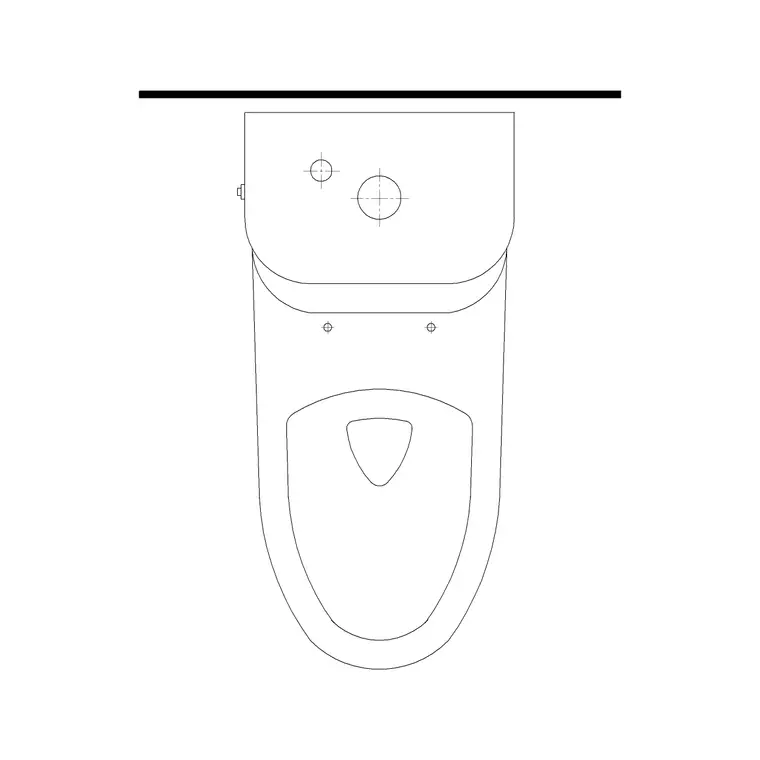
Download a WC block in DWG, choosing the plan view for layout work — drawn from above so the pan, the cistern and the seat read clearly. A two-piece close-coupled toilet shows the cistern boxed against the wall with the pan in front; a wall-hung pan shows just the bowl with a concealed cistern in the wall behind. Pick the type your specification calls for.
A standard WC footprint is roughly 360–400 mm wide and 600–700 mm deep from the wall. Accessible WCs sit in a much larger zone with the pan offset for a side transfer. Save the DWG into your bathroom library folder; the blocks here are full size in millimetres.
Step 2 — Set units, then insert
Type UNITS and confirm 'Insertion scale' is Millimeters so the WC arrives at true size — a toilet that turns up a thousand times too big is the classic INSUNITS error. With insertion units set correctly, AutoCAD reconciles the block's units against the drawing's automatically.
Run INSERT (or I), browse to the WC DWG, and place it near its wall with 'Specify On-screen' ticked for the insertion point. Leave the scale at 1 and the rotation at 0 for now. The toilet appears as a single block reference; you will seat it against the wall and check its clearance in the next steps.
Step 3 — Seat the WC against the soil-pipe wall
Push the cistern back flush against the wall that carries the soil stack, using a perpendicular or endpoint snap so the back of the cistern sits exactly on the wall line. The WC's whole position is governed by drainage: keeping it on the soil-stack wall means the waste connection is short and direct, which is what a sensible plumbing layout wants.
If the toilet sits on a side wall, run ROTATE first — pick a back corner of the cistern as the base point and rotate so the pan projects into the room. Centre the WC on the space allotted to it; a toilet jammed into a corner with no shoulder room is uncomfortable in reality, so leave clearance on at least one side of the pan.
Step 4 — Draw the activity zone in front
A WC needs clear space in front of and around the pan for use. Allow at least 600 mm of clear floor in front of the toilet and, conventionally, 200 mm or so of shoulder space to each side of the centreline. Draw or note that activity zone so it doesn't get colonised by a door swing, a basin or a radiator.
This is where the scaled block earns its keep: with the WC drawn at true size you can simply check that the 600 mm zone in front lands in clear floor and that the entry door doesn't swing into it. For an accessible WC the clearances grow substantially — a 1500 mm turning circle and a transfer space beside the pan — and the scaled block lets you draw those zones precisely around it.
Step 5 — Layer it, dimension it, schedule it
Move the WC onto a sanitary layer so the porcelain can be frozen for a clean architectural plan and thawed for a setting-out drawing. The setting-out dimensions a plumber actually works to are the distance from a finished wall to the centreline of the pan and the projection of the pan from the wall, so snap a centreline to the WC and dimension those.
Tag the WC with an attribute carrying a fixture reference if you are producing a sanitary schedule. Keep the pan outline, the centreline and the setting-out dimensions on sensible layers so the architectural plan, the sanitary-setting-out plan and the tiling drawing each read cleanly from the same block. When the bathroom is finalised you can WBLOCK a WC-and-cistern assembly for reuse across similar layouts.
Common mistakes placing a WC
The units mismatch leads as always — if the toilet is the wrong size, fix INSUNITS, not the scale. The mistake unique to WCs is ignoring the drainage: a beautifully placed toilet on the wall furthest from the soil stack forces a long horizontal waste run that is awkward to build and easy to block, so always start from the soil-pipe wall. If the design genuinely needs the WC elsewhere, flag the drainage implication rather than letting it surface on site.
The second common error is letting the door swing into the WC's activity zone — a door that opens onto someone seated on the toilet is both impractical and, in small cloakrooms, a real planning failure. Check the door swing against the 600 mm front zone. Third, in en-suites people often crowd the WC against the basin with no shoulder room; keep the clearance to each side of the pan so the fixture is genuinely usable.
Free download
Browse the full library — DWG & DXF, no signup.
Questions
Frequently asked
How much clearance does a WC need in front?+
Allow at least 600 mm of clear floor in front of the pan, plus around 200 mm of shoulder space to each side of the centreline. Keep door swings, basins and radiators out of that activity zone. Accessible WCs need much larger clearances and a 1500 mm turning circle.
Why should the toilet go on the soil-pipe wall?+
A WC needs a short, direct connection to the soil stack, because a long horizontal run of large-bore drainage is awkward to build and prone to blockages. Placing the toilet against the soil-stack wall keeps the waste run short, which is why the WC usually drives the bathroom layout.
What setting-out dimensions does a plumber need for a WC?+
The key dimensions are the distance from a finished wall to the centreline of the pan and the projection of the pan from the wall behind it. Snap a centreline to the WC block and dimension those so the installer can set out the toilet precisely.
Can the bathroom door swing toward the toilet?+
Avoid it. A door that opens into the WC's activity zone or onto someone using the toilet is impractical and, in tight cloakrooms, a planning failure. Check the door swing against the 600 mm front clearance and rehang or change the door if they clash.
Related downloads
Blocks for this guide
Popular blocks to download
Related categories
Related guides
How-to guide
How to Insert a Wash Basin Block in AutoCAD
How to insert a wash basin block in AutoCAD — download the basin DWG, set units, run INSERT, place it near the WC and set the rim height in elevation.
How-to guide
How to Insert a Bathtub Block in AutoCAD
How to insert a bathtub block in AutoCAD — download the bath DWG, set units, run INSERT, fit it along the longest wall and align the tap end to the plumbing.
How-to guide
How to Insert a Shower Block in AutoCAD
How to insert a shower block in AutoCAD — download the shower DWG, set units, run INSERT, fit the tray to a corner and set the drain and door swing clearance.