How-to guide · how to insert a bathtub block in autocad
How to insert a bathtub block in AutoCAD
By Sumana Kumar · Published 28 Feb 2023 · Updated 19 Apr 2026
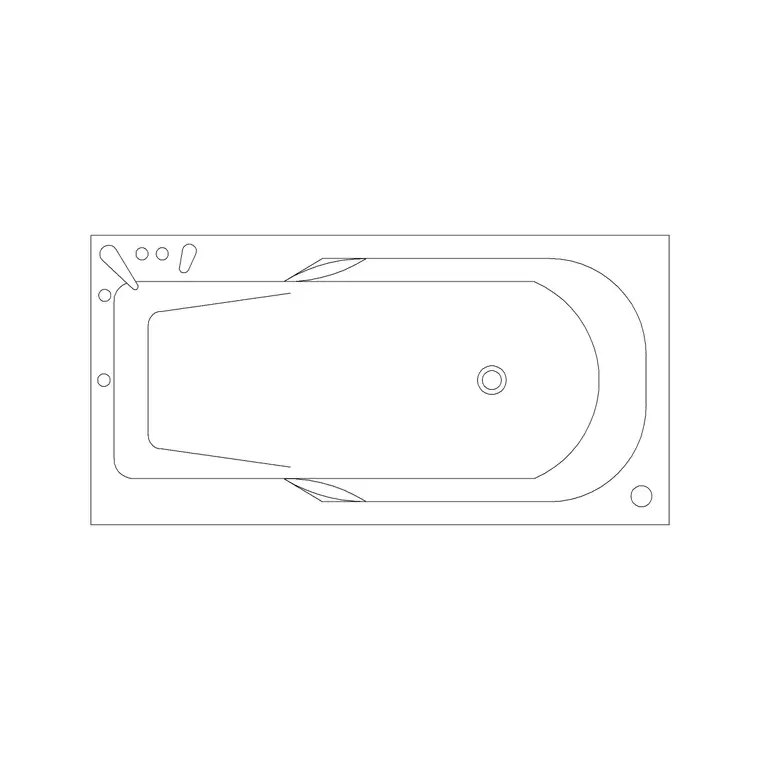
A bathtub is the largest fixture in most bathrooms, so it is the one that fits the room rather than the other way round. It almost always runs along the longest wall, often spanning wall to wall in a standard family bathroom, and its tap end has to land where the plumbing can reach. Get the bath placed and the WC, basin and any shower arrange themselves in the space that remains. This guide covers inserting a bathtub block in AutoCAD and fitting it cleanly to the room.
The worked example is a standard rectangular bath in plan, the 1700 mm length that fits a typical family bathroom, but the steps also cover compact 1500 mm baths, corner baths and freestanding tubs. Because a bath is so often shown in section for the tiling and the panel detail, we cover the section view alongside the plan.
Step 1 — Pick the bath that fits the room
Download a bathtub block in DWG, choosing the plan view for the layout and, if you need it, the section for tiling and panel details. Match the bath to the room: the classic rectangular bath is 1700 × 700 mm and fits between two walls in a standard bathroom; a compact bath runs 1500 × 700 mm for a tight space; a corner bath fills a corner with a triangular or quadrant footprint; a freestanding tub sits clear of the walls as a feature.
Note which end carries the tap, because that drives the plumbing position. Save the DWG into your bathroom library folder; the blocks here are full size in millimetres so they fit the room at true dimensions.
Step 2 — Set units and insert
Confirm your insertion units — type UNITS and set 'Insertion scale' to Millimeters so a 1700 mm bath arrives at 1700 mm. With INSUNITS correct, AutoCAD reconciles the block's units against the drawing's automatically, which avoids the usual out-of-scale surprise on such a large object.
Run INSERT (or I), browse to the bath DWG, and place it roughly along its intended wall with 'Specify On-screen' ticked for the insertion point. Leave the scale at 1 and the rotation at 0 if the bath runs along the bottom wall. The bath lands as a single block reference; you will seat it to the walls and align the tap end next.
Step 3 — Fit the bath wall to wall
A standard rectangular bath typically spans the full width of a bathroom, sitting in an alcove between two walls. Push the bath into the alcove with endpoint snaps so its two ends and its back edge sit flush against the walls. If the alcove is exactly 1700 mm the bath fills it; if it is slightly longer, the gap is usually closed with a tiled upstand or a small filler at the tap end rather than by stretching the bath.
If the bath sits on a side wall, run ROTATE first — pick a corner as the base point and rotate 90 degrees so the bath runs along the correct wall. For a freestanding tub, centre it clear of the walls with enough space all round to clean behind it, since the whole point of a freestanding bath is that it is seen in the round.
Step 4 — Align the tap end to the plumbing
The tap end of the bath needs to reach the hot and cold supplies and the waste, so it usually sits against a wall carrying the plumbing, often shared with the basin or WC wall to keep the services grouped. Orient the bath so its tap end lands on that wall — flip the block with MIRROR if the taps are on the wrong end after insertion.
The waste sits at the tap end too, so the bath's fall runs toward that end. On a coordinated drawing it is worth noting the waste position relative to the soil stack. Keeping the plumbing grouped — bath taps, basin and WC waste all reaching the same drainage zone — is what makes the bathroom buildable, and the scaled bath block lets you check those reaches directly.
Step 5 — Layer it, panel it and section it
Move the bath onto the sanitary layer so it freezes for a clean architectural plan and thaws for the setting-out drawing. Add the bath panel as a line on the open side(s) of the tub — the panel is what is tiled or clad, so it matters for the elevation and the tiling drawing. Keep the panel on a sensible layer with the rest of the joinery.
For the tiling drawing, place the section block where you cut across the bath to show the tub, the panel, the wall tiling and the floor. Snap a centreline and dimension the bath's position from the finished walls so the setting-out is clear. Tag the bath with a fixture reference if you are scheduling, and WBLOCK the bath-and-panel assembly if you reuse the same layout.
Common mistakes placing a bathtub
The units mismatch leads — fix INSUNITS if a 1700 mm bath turns up at 1.7 mm or 1700 metres. The mistake specific to baths is getting the tap end on the wrong wall, away from the plumbing; a bath whose taps can't reach the supplies forces an awkward, exposed pipe run, so always orient the tap end to the services wall and mirror the block if needed.
A second issue is squeezing a 1700 mm bath into an alcove that is genuinely too short — a bath doesn't stretch like a cabinet, so if the alcove won't take the standard length, specify a compact 1500 mm bath or a corner bath rather than fudging it. Third, forgetting access for a freestanding tub: a freestanding bath jammed against a wall loses its whole reason for being and can't be cleaned behind, so give it clear space all round.
Free download
Browse the full library — DWG & DXF, no signup.
Questions
Frequently asked
What size is a standard bathtub block?+
The classic rectangular bath is 1700 × 700 mm, which fits a typical family bathroom wall to wall. Compact baths run 1500 × 700 mm for tight spaces, while corner and freestanding tubs have their own larger footprints. The blocks are drawn full size in millimetres.
Which end of the bath should face the plumbing?+
The tap end, because it carries the taps and the waste and so needs to reach the supplies and the drainage. Orient the bath so the tap end lands on the wall carrying the plumbing, and MIRROR the block if the taps come in on the wrong end.
What if my bath doesn't fit the alcove exactly?+
A bath doesn't stretch like a cabinet. If the alcove is slightly longer than the bath, close the gap with a tiled upstand or a small filler at the tap end. If the alcove is too short for a 1700 mm bath, specify a compact 1500 mm or corner bath instead.
How do I show the bath in a tiling drawing?+
Use the section block, cutting across the bath to show the tub, the bath panel, the wall tiling and the floor in one view. Add the bath panel line on the open side in plan and elevation, since the panel is what gets tiled or clad.
Related downloads
Blocks for this guide
Popular blocks to download
Related categories
Related guides
How-to guide
How to Insert a Toilet / WC Block in AutoCAD
How to insert a toilet or WC block in AutoCAD — download the WC DWG, set units, run INSERT, set it on the soil-pipe wall and draw the clearance in front.
How-to guide
How to Insert a Wash Basin Block in AutoCAD
How to insert a wash basin block in AutoCAD — download the basin DWG, set units, run INSERT, place it near the WC and set the rim height in elevation.
How-to guide
How to Insert a Shower Block in AutoCAD
How to insert a shower block in AutoCAD — download the shower DWG, set units, run INSERT, fit the tray to a corner and set the drain and door swing clearance.