Block landing · hanging planter cad block
Free hanging planter CAD block in DWG and DXF
By Saumyajit Maity · Published 11 Feb 2023 · Updated 11 Apr 2026
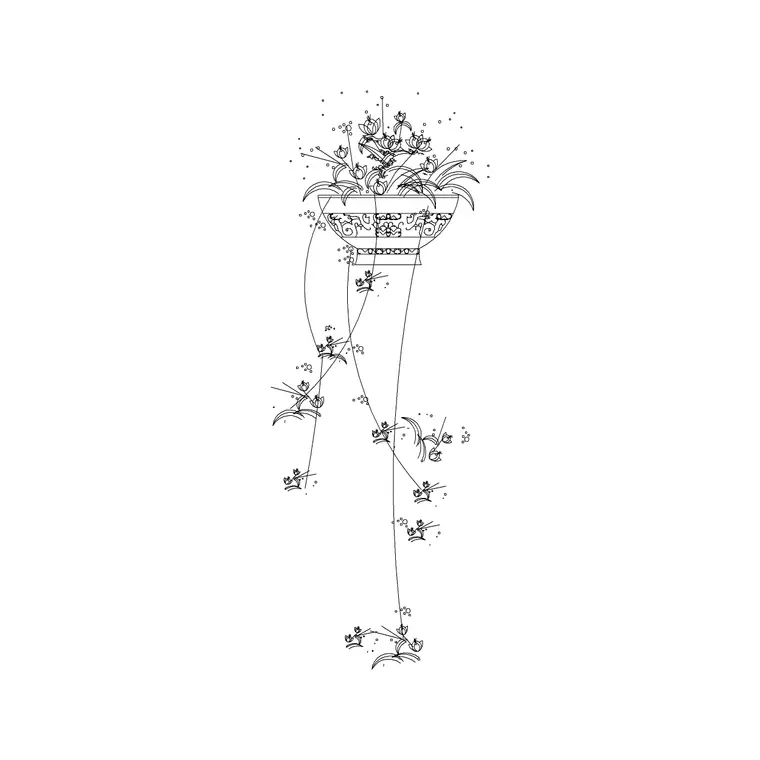
A hanging planter adds greenery without using floor space, which is exactly why it appears so often in cafés, balconies, atriums and compact interiors — and a ready-made hanging planter CAD block lets you place that suspended pot, its cords and the trailing foliage in one move. This page offers a free hanging planter CAD block in DWG and DXF, drawn with the bowl, the suspension lines and the drop of the plant so it reads correctly hung from a ceiling or a bracket. It is free for personal and commercial use, with no signup, watermark or attribution.
Because a hanging planter lives in the vertical plane, it is mainly an elevation and section element, used to show how greenery occupies the space between a ceiling and head height. Drawn to scale, the block lets you check it hangs clear of circulation and at a height that reads as decoration rather than an obstacle.
What a hanging planter block includes
A complete hanging planter block has three parts: the pot or bowl, the suspension — cords, chains or a macramé hanger reaching up to a fixing point — and the trailing plant that spills over the rim. The elevation is where all three read, with the drop of the cords and the cascade of foliage giving the block its character. A plan view shows only the circular footprint of the bowl seen from above, which marks where it hangs on a ceiling plan.
The block is layered so the suspension, the pot and the foliage can be controlled separately — useful when you want to show the empty hanger in a setting-out drawing or adjust the hanging height for a specific ceiling.
Views and where each is used
Elevation and section are the natural home of a hanging planter, because the whole point is the vertical drop from the ceiling. Use the elevation on interior elevations, café and atrium presentation drawings, and sections that show planting in the vertical zone. The plan footprint is what you place on a reflected ceiling plan or a furniture layout to mark the hanging position over a counter, a stair void or a seating cluster.
Knowing the hang height is the practical detail: the block carries the suspension so you can set the bowl at a height that clears heads while keeping the foliage in view. Many downloads ship both the elevation and the plan footprint in one DWG.
Typical hanging planter dimensions
Use these as guide ranges. The bowl of a hanging planter commonly has a diameter in the 200–400 mm band, smaller than a floor pot because it must stay light. The suspension drop varies widely with the ceiling, but the bowl is usually hung so its base sits above head height — well over 2 m off the floor in a circulation zone — with the trailing foliage allowed to fall below that.
The figures that matter are the bowl diameter for the plan footprint and the clear height beneath the lowest leaf, because a hanging planter over a walkway must not catch a passer-by. Confirm the fixing can carry the wet weight of the planted bowl, which a drawing should flag even if it does not size it.
How to insert and scale the planter
The block is drawn full size in millimetres. In a millimetre drawing, INSERT at scale 1 for real size; in a metre template insert at 0.001; in an imperial drawing set INSUNITS to millimetres so AutoCAD rescales it on insertion. That keeps the hang height honest and avoids a miniature or oversized result.
For an elevation, pick the fixing point at the top of the suspension as the insertion point so the planter hangs from the correct ceiling line, then stretch or trim the cords to suit the actual ceiling height. Because the planter is a single block reference, a row of three over a counter is a quick array, and editing the block definition adjusts the whole row's foliage at once.
Where hanging planter blocks are used
Hanging planters feature in café and restaurant interiors, atrium and lobby voids, balconies and verandas, retail and showroom displays, and compact residential rooms where floor space is precious. They are often hung in clusters at staggered heights over a counter or a stairwell. Pair the hanging planter with the cement, carved and cone-shape pot blocks in the accessories category so the planting scheme works at floor and ceiling level together.
Because the file is free and licence-clear, it suits interior and landscape student projects, mood boards and concept sections. The same block carries from an early section sketch to a finished interior elevation without the foliage being redrawn.
Hanging height and layer control
The key judgement with a hanging planter is height: set the bowl so the lowest leaf clears heads in any circulation zone, and lower over a counter or a niche where nobody walks. Because the block carries the suspension as a separate layer, you can lengthen or shorten the cords to suit each ceiling without redrawing the pot.
Keep the planter on a dedicated planting or dressing layer so you can freeze it for a clean ceiling plan and thaw it for a styled section. For a cluster, vary the drop heights and bowl sizes between copies so the group reads as designed rather than stamped. If the same cluster repeats, group it as one block and array it, then edit the master definition to tune every instance together.
Free download
Browse the full library — DWG & DXF, no signup.
Questions
Frequently asked
Is the hanging planter CAD block free for commercial use?+
Yes. It downloads free in DWG and, where available, DXF, with no signup, watermark or attribution, and is cleared for paid client work.
What height should a hanging planter be drawn at?+
Set the bowl so the lowest leaf clears head height in any walkway — typically the base sits well above 2 m in circulation — and lower it over counters or niches where nobody passes beneath.
Which view shows the hanging planter best?+
Elevation and section, because the suspended drop from the ceiling is the whole idea. Use the plan footprint on reflected ceiling plans and layouts to mark the hanging position.
Will the block open in older AutoCAD?+
Yes. The DWG targets AutoCAD 2004 and later, so it opens in AutoCAD, AutoCAD LT, BricsCAD, DraftSight and free DWG viewers.
Related downloads
Blocks for this guide

Related categories
Related guides
Block landing
Wine Rack CAD Block DWG — Free Download
Download a free wine rack CAD block in DWG and DXF — bottle storage drawn in plan and elevation for kitchens, bars and cellars. AutoCAD 2004+, no signup.
Block landing
Wine Glass CAD Block DWG — Free Download
Download a free wine glass CAD block in DWG and DXF — red and burgundy stemware in elevation and plan for bar and table settings. AutoCAD 2004+, no signup.
Block landing
Cement Planter Pot CAD Block DWG — Free
Download a free cement planter pot CAD block in DWG and DXF — concrete-finish planter drawn in plan and elevation for interiors and terraces. AutoCAD 2004+.