Curated pack · wheelchair accessible cad blocks
Free wheelchair-accessible CAD block pack for AutoCAD
By Saumyajit Maity · Published 9 Dec 2024 · Updated 6 May 2026
Accessible design lives or dies on clearances, and the fastest way to keep them honest is to drop scaled wheelchair, turning-circle and accessible-fixture blocks straight onto the plan. This free wheelchair-accessible CAD block pack gathers the pieces you need to check and demonstrate accessibility — wheelchair figures in plan, turning-circle and turning-space templates, accessible WCs and grab-rail layouts, lowered worktops and roll-under desks, and ramp and door-swing clearance symbols — in DWG and DXF at true millimetre dimensions, ready for AutoCAD 2004 or later. All free for personal and commercial work, no signup, no watermark, no attribution.
Use the pack on any project where step-free, inclusive access is part of the brief: housing, offices, schools, healthcare, retail, hospitality and public buildings. Because the blocks are drawn to scale, dropping a turning circle into a bathroom or a wheelchair figure at a desk turns an accessibility check into a glance rather than a calculation.
A clear caution: these blocks are planning aids drawn to commonly-used dimension ranges, not a substitute for the accessibility code that applies to your project. Always confirm the exact clearances against the governing standard for your jurisdiction and building type — the figures below are typical, not legal minimums.
What's in the accessibility pack
The set covers the core accessibility checks. People: a seated wheelchair user in plan and a standing assistant figure for transfer space. Clearance templates: a turning-circle template, a T-shaped turning-space template and a clear-floor rectangle for a forward or side approach. Sanitary: accessible WC layouts with grab rails, an accessible basin with knee clearance, and a level-access shower zone. Furniture and access: roll-under desks and lowered worktop sections, plus ramp-run and door-swing clearance symbols.
These are diagrammatic by design — the turning circle and clear-floor rectangle are meant to be laid over your layout to test it, then frozen or removed before the final plot. Keeping them as their own blocks means you can toggle the whole accessibility overlay on and off.
Typical accessibility dimensions to design around
Reach for these commonly-cited ranges as a starting point, and always verify against your project's code. A wheelchair turning circle is frequently drawn around 1500 mm diameter, with some standards calling for more. A clear floor space for a single wheelchair is commonly about 750–900 mm wide by 1200–1350 mm deep for a forward approach. Accessible WC compartments are often planned around a 1500 mm × 2200 mm zone to fit the transfer space and grab rails. Roll-under desks and worktops typically need around 700–740 mm clear knee height.
These figures vary by jurisdiction and building type, so treat them as typical planning values rather than fixed requirements. The point of the scaled blocks is to let you test whichever specific clearance your code mandates by overlaying it directly on the drawing.
How to use the set to check a layout
Work clearance-first. Drop the turning-circle template into each space a wheelchair user must turn in — the lobby of an accessible WC, the foot of a bed, a kitchen work zone — and confirm nothing intrudes on it. Where a turn isn't needed, use the clear-floor rectangle at each fixture, appliance or desk to confirm the approach space. Place the wheelchair figure at desks and counters with a roll-under block to verify knee clearance.
For the WC, insert the accessible compartment block, align the grab rails to the WC and basin, and check the transfer space stays clear of the door swing. Add the door-swing and ramp clearance symbols where access routes pass through. Keep all these templates on a dedicated accessibility layer so you can overlay them to test, demonstrate them to a reviewer, then freeze them for a clean construction plot.
Plan-view focus and why
Accessibility checking is almost entirely a plan-view exercise — clearances, turning spaces and approach zones are all measured on the floor plane — so this pack is plan-led. The wheelchair figure, turning circles and clear-floor rectangles are all plan blocks meant to be arrayed and overlaid on your floor plan.
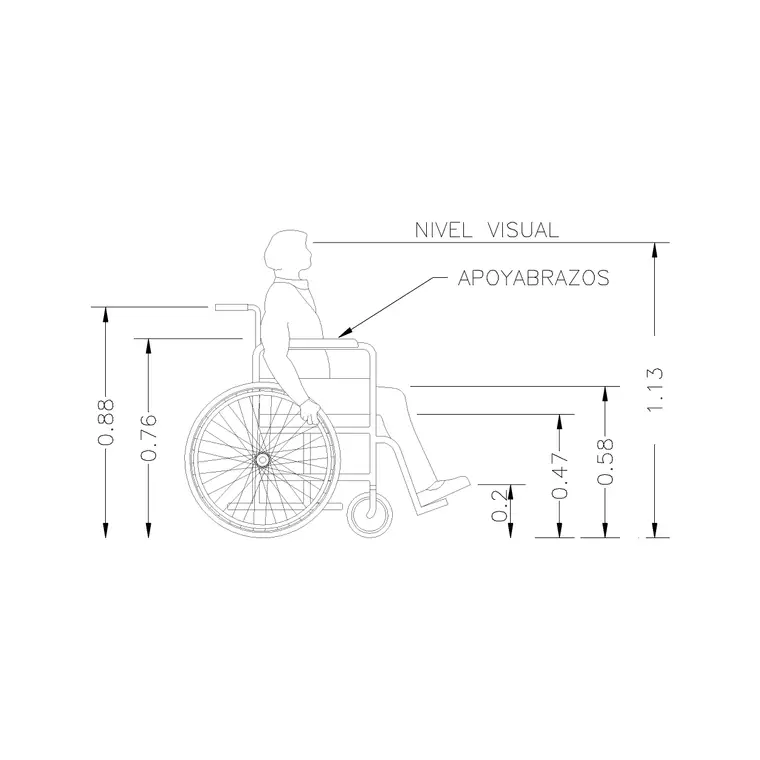
Where the pack includes fixtures like the accessible WC and basin, those carry the rail heights and knee clearances you need for an elevation, so you can produce the accessible-bathroom elevation that reviewers often ask for. But the primary work — and the primary value of the pack — is on the plan, testing that a wheelchair user can actually reach and use every space.
Per-item notes
- Wheelchair figure: place it at the point of use (desk, basin, counter) to test the real reach, not just in open floor. - Turning circle: overlay it wherever a 360° turn is needed; if furniture or fixtures clip it, the space fails. - Clear-floor rectangle: use it for forward or side approaches where a full turn isn't required. - Accessible WC layout: keep the transfer space clear of the inward door swing — swap to an outward-opening door if it clips. - Roll-under desk: pair it with the wheelchair figure to confirm knee clearance, not just width. - Ramp clearance symbol: a planning aid for the run and landings — confirm the gradient against your code separately.
Where the accessibility pack is used
Accessibility blocks belong in almost every building type: accessible and adaptable housing, offices and workplaces, schools and universities, clinics and hospitals, shops, restaurants, hotels and all public and civic buildings. Combine them with the people, furniture and kitchen categories so the accessible figures and clearances sit alongside the rest of your layout.
Because they are free and licence-clear, they suit access statements, design-review submissions, student briefs and concept plans where you need to show inclusive design without licensing fuss. Used early, the overlay catches access problems while they are cheap to fix on the drawing rather than expensive to fix on site.
Free download
Browse the full library — DWG & DXF, no signup.
Questions
Frequently asked
Do these blocks meet ADA or building-regulation accessibility standards?+
They are drawn to commonly-cited dimension ranges as planning aids, not as a guarantee of compliance. Accessibility requirements vary by country, jurisdiction and building type, so always confirm the exact clearances against the standard that governs your project — use these blocks to test against it, not to replace it.
What turning circle do these blocks use?+
The turning-circle template is commonly drawn around a 1500 mm diameter, which is a frequently-cited value, but some standards require more. Because it is a scaled block you can overlay it directly and check it against whatever figure your code mandates.
Are the accessibility blocks free for commercial use?+
Yes. Every block is free in DWG and, where available, DXF, with no signup, watermark or attribution, and is cleared for commercial use on real housing, workplace, healthcare and public-building projects.
Will these open in older AutoCAD and free viewers?+
Yes. The DWG files target AutoCAD 2004 and later and open in current AutoCAD, AutoCAD LT, BricsCAD, DraftSight and free DWG viewers like Autodesk's online viewer.
Related downloads
Blocks for this guide

Popular blocks to download
Related categories
Related guides
Curated pack
Free Child-Safe Furniture CAD Block Pack — DWG
Free child-safe furniture CAD block pack in DWG and DXF — low tables, child chairs, cots, play furniture and kid figures in plan and elevation for AutoCAD.
Curated pack
Free Elderly-Care Furniture CAD Block Pack — DWG
Free elderly-care furniture CAD block pack in DWG and DXF — high-seat chairs, care beds, grab rails, walking-aid clearances and accessible WCs for AutoCAD.
Curated pack
Free CAD Blocks for Rendering Pack — DWG & DXF
Free CAD blocks for rendering — scale people, trees, furniture and paving in DWG/DXF to populate plans before you take them into a render engine. No signup.