Block landing · vestibule door cad block
Free vestibule door CAD blocks for AutoCAD
By Saumyajit Maity · Published 14 Jun 2022 · Updated 16 Jan 2026
A vestibule door is the inner door of an entrance lobby — the pair of doors, often double-swing, that you pass through after the outer entrance to reach the building proper. The vestibule itself is a small lobby that buffers the inside from the weather, controls draughts and forms an airlock between two sets of doors. The doors are usually double-action (they swing both ways) so people can push through in either direction. This page collects free vestibule door CAD blocks in DWG and DXF, drawn full size in plan and elevation for AutoCAD 2004 or later, free for personal and commercial use.
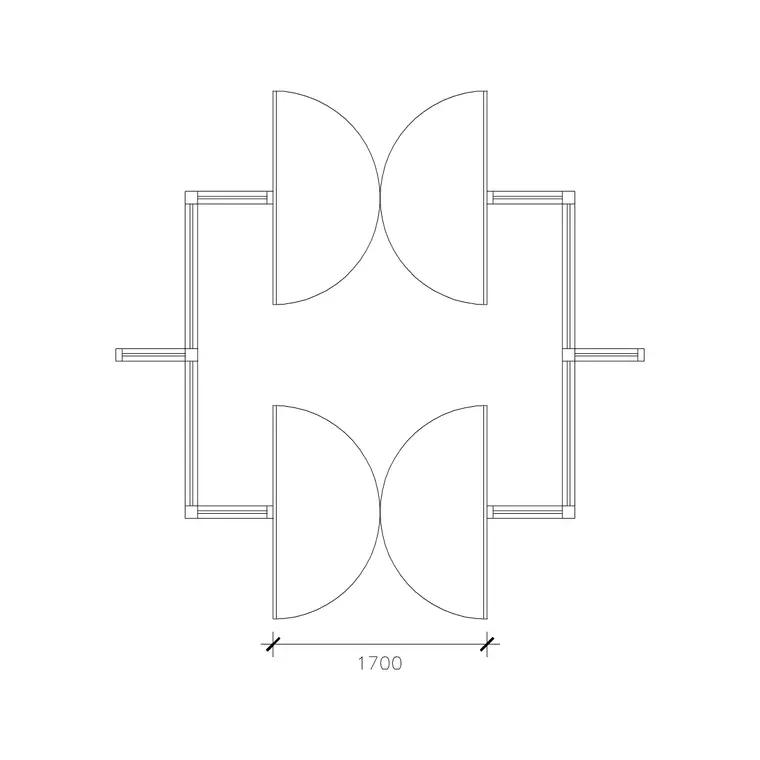
What makes a vestibule door block distinctive is the double-swing geometry: a double-action door swings both inward and outward, so the plan shows two swing arcs per leaf — one each side of the opening — and the block has to draw that double sweep. Combined with the outer entrance doors, the vestibule door defines the airlock that the lobby is designed around.
What a vestibule door block shows
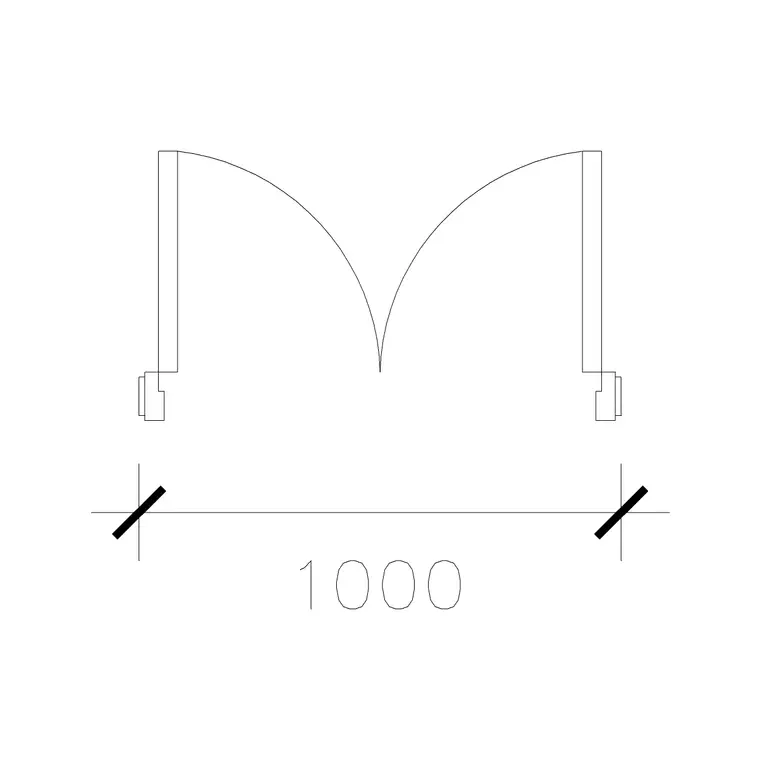
A vestibule door is typically a double leaf, double-action (double-swing) door, and that drives the plan symbol. Because each leaf can swing both ways on double-action hinges or a floor spring, the block shows a swing arc on both sides of the opening — so a pair of double-swing leaves draws four arcs in all, two each side. That double sweep is the signature of a vestibule door and the thing that distinguishes it from a normal one-way double door.
The block also shows the relationship to the vestibule: the inner vestibule doors sit a short distance back from the outer entrance doors, with the lobby between, and the two sets of swings must not collide within that small space. In elevation, vestibule doors are often part-glazed or fully glazed so the lobby stays light and people can see through, sometimes with side screens. The blocks here keep the leaves, the double swings and the screen on separate layers so both the airlock geometry and the elevation read clearly.
The vestibule as an airlock
The reason vestibule doors exist is the airlock: an entrance lobby with an outer door and an inner door, so that one is normally shut while the other is used, stopping wind, rain and heat loss from blowing straight into the building. The depth of the vestibule has to be enough that a person can clear the outer doors before reaching the inner ones, and on accessible entrances enough for a wheelchair user to pass through with both door sets manageable.
Drawing the vestibule doors as scaled blocks within the lobby is what lets you check that depth and the two sets of swings against each other. The classic clash is a vestibule drawn too shallow, where the inner and outer door swings overlap and a person is caught between them — a problem the scaled blocks expose immediately. The vestibule also commonly houses an entrance mat well, and the doors and mat have to be coordinated, which the plan layout makes visible.
Typical vestibule door dimensions
Vestibule doors are entrance doors, so they tend to the generous: a double pair often uses leaves of around 800–1000 mm each for an opening of roughly 1600–2000 mm, sized to move crowds and to meet accessible clear-width requirements. Leaf height matches entrance doors at around 2100 mm and up. The vestibule lobby depth between the two door sets is commonly around 1500–2400 mm, deep enough to clear one door set before the next and, on accessible entrances, to suit a wheelchair turning and approach.
Because the doors are double-action and often glazed, the leaves carry vision panels or are fully glazed, and the elevation shows that glazing. As with all blocks here, the vestibule door is drawn full size in millimetres, so you place the inner and outer door sets, set the lobby depth between them, and read whether the airlock works and the swings clear — the core check a vestibule design lives on.
Inserting vestibule doors and laying out the airlock
Insert these blocks at scale 1 in a millimetre drawing, or set INSUNITS to Millimeters so AutoCAD rescales automatically. Place the outer entrance doors first, then set the vestibule depth and place the inner vestibule doors that distance back, and check that the two sets of swings do not overlap within the lobby. Because the doors are double-action, draw the swing both ways on each leaf so the full sweep is shown.
Use ROTATE and MIRROR to align the inner and outer doors — they are often directly aligned for a straight-through route, but can be offset to improve the airlock or suit the entrance. Keep each door set as a single block reference so they schedule cleanly, and where a building has several identical entrances, WBLOCK the whole vestibule assembly — outer doors, lobby and inner doors — as one unit so every entrance is laid out identically.
Where vestibule doors are used
Vestibule doors belong at the main entrances of public and commercial buildings: offices, hotels, shops and shopping centres, schools, hospitals, civic and transport buildings — anywhere with heavy footfall that needs to keep the weather and draughts out while letting people flow in and out freely. The double-action swing suits exactly that busy two-way traffic, and the airlock keeps the heating and air-conditioning working efficiently.
Architects use these blocks to design entrance sequences where the airlock depth and the two door sets must coordinate; accessibility consultants check the clear widths and the lobby depth against wheelchair requirements; and services engineers value the airlock for keeping conditioned air in. Pair the vestibule door blocks with the double door, single swing door and glass door blocks in the doors category to draw a complete, scaled entrance from the street to the foyer.
Coordinating the two door sets
The whole design of a vestibule is the relationship between two sets of doors, and the scaled blocks are what let you get that relationship right. The lobby has to be deep enough that the inner and outer swings never overlap — so a person is never trapped between two moving doors — and on an accessible entrance deep enough for a wheelchair user to operate both sets in turn. Drawing both door sets as double-swing blocks within the lobby is the only reliable way to test that depth, because the double-action arcs reach both ways and the clash, if there is one, is geometric.
The layout also decides the route through: aligned inner and outer doors give a straight walk-through, while offset doors lengthen the airlock and improve the draught control but bend the route. Reading these trade-offs from the scaled plan, with both door sets and their swings drawn, is exactly what a vestibule design needs. Keep the doors on their own layer, tag the sets for scheduling, and WBLOCK a recurring vestibule so every entrance across a large building is coordinated identically.
Free download
Browse the full library — DWG & DXF, no signup.
Questions
Frequently asked
What is a vestibule door?+
A vestibule door is the inner door of an entrance lobby — usually a double, double-action (double-swing) door — that, with the outer entrance doors, forms an airlock buffering the building from the weather. The block shows the double-swing arcs and the lobby between the two door sets.
Why do vestibule doors show swing arcs both ways?+
Because they are double-action doors that swing both inward and outward, so people can push through in either direction. The block draws a swing arc on each side of the opening, which is the signature geometry of a vestibule door.
How deep should a vestibule be?+
Deep enough that the inner and outer door swings never overlap and a person can clear one set before reaching the next — commonly around 1500–2400 mm, with accessible entrances sized for a wheelchair user. The scaled blocks let you test this directly.
Are the vestibule door blocks free for commercial use?+
Yes. Every vestibule door block downloads free in DWG and DXF with no signup, no watermark and no attribution requirement, and they are cleared for commercial project use.
Related downloads
Blocks for this guide
Related categories
Related guides
Block landing
Free Wooden Door CAD Blocks — DWG Download
Download free wooden door CAD blocks in DWG and DXF — solid timber doors drawn in plan, elevation and section for AutoCAD 2004+. No signup, commercial use OK.
Block landing
Free Laminated Flush Door CAD Blocks — DWG
Download free laminated flush door CAD blocks in DWG and DXF — flat-faced flush doors with frame in plan and elevation for AutoCAD. No signup, commercial OK.
Block landing
Free Panel Door CAD Blocks — DWG Download
Download free panel door CAD blocks in DWG and DXF — two, four and six panel doors drawn in elevation and plan for AutoCAD. No signup, commercial use OK.