Block landing · panel door cad block
Free panel door CAD blocks in DWG and DXF
By Sumana Kumar · Published 28 Dec 2023 · Updated 1 May 2026
A panel door is a door whose leaf is built from a frame of stiles and rails infilled with raised or recessed panels — the classic four-panel and six-panel doors that read as traditional and substantial on an elevation. Where a flush door is a plain rectangle, a panel door carries detail, so its CAD block earns its keep most on internal elevations, door schedules and presentation drawings where that detail has to show. This page collects free panel door CAD blocks in DWG and DXF, drawn full size in elevation and plan for AutoCAD 2004 or later, free for personal and commercial use.
The value of a good panel door block is that the panel layout is already drawn correctly to scale — the stile and rail widths, the panel proportions, the moulding line — so you do not have to reconstruct that geometry every time a period or traditional door appears in your scheme.
What a panel door block shows
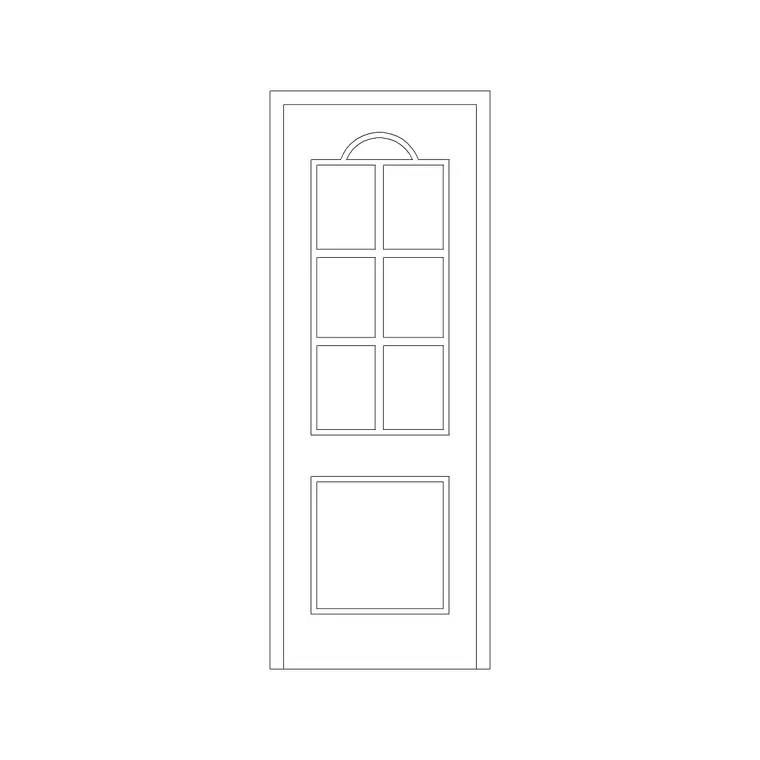
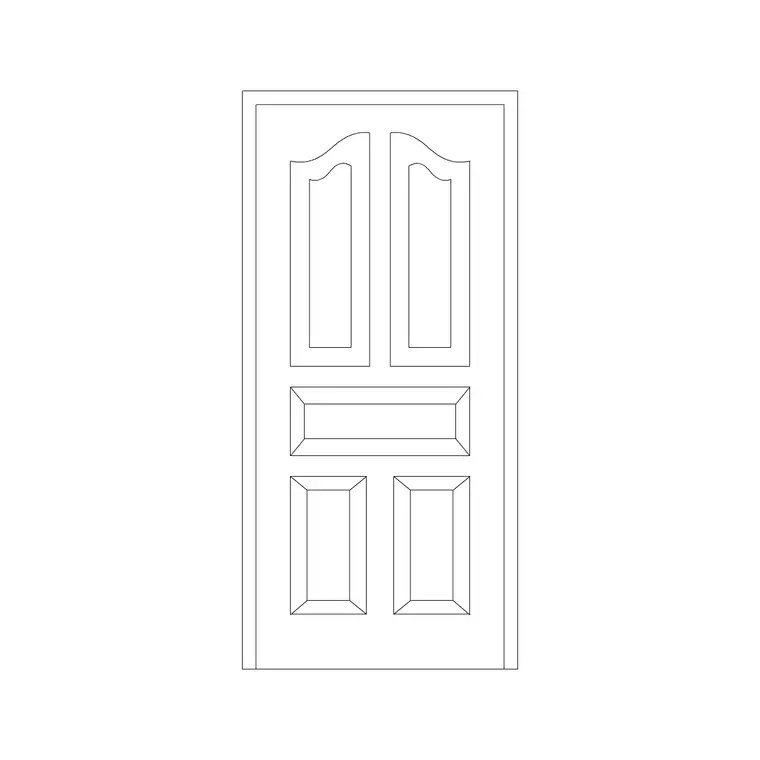
The defining drawing of a panel door is the elevation. It shows the outer frame of vertical stiles and horizontal rails, and the field of panels set within — two tall panels, four panels, or the familiar six-panel arrangement of two narrow panels over two over two. Each panel carries a moulding or bevel line, and the whole leaf sits inside its frame and architrave. That panel geometry is what makes the door read as a panel door rather than a flush slab, and it is the part the block saves you drawing.
In plan, a panel door behaves like any hinged door — a leaf, a swing arc and a frame in the opening — so on a floor plan you cannot tell a panel door from a flush one. The distinction lives in the elevation and the schedule, which is why these blocks pair a detailed elevation with a standard plan symbol, on separate layers, so one DWG serves both the layout and the elevation set.
Panel arrangements and what they suit
The panel count and arrangement carry a strong period and stylistic signal, which is worth matching to the building. A two-panel door (one tall panel over one, or a single long panel) reads as cleaner and more contemporary-traditional. A four-panel door is the classic Victorian arrangement. A six-panel door — two-over-two-over-two — is the most traditional and is the default colonial and Georgian-revival door. Glazed-top variants replace the upper panels with glass for borrowed light.
Because the blocks here are drawn at true proportions, you can place the arrangement that suits the architecture and trust that the stile, rail and panel sizes are right. Mixing arrangements deliberately — a six-panel front door with simpler internal doors — is a common and authentic detail, and having several panel blocks on the same scale makes that easy to coordinate across a scheme.
Typical panel door dimensions
Panel doors share the standard door module, so the leaf sizes match other internal doors: widths of 600 to 900 mm, with 760–810 mm common for main doors, and a leaf height around 1981–2040 mm. What varies is the internal subdivision — the stiles are typically 100–125 mm wide, the top and lock rails 100–150 mm, and the bottom rail wider at 200–250 mm to give the door a visually solid base. Leaf thickness runs 35–45 mm internally.
These proportions are drawn into the block, so when you scale the door to a non-standard height the panels and rails scale with it and stay correctly proportioned. As with any door, allow for the frame when you size the structural opening — roughly an extra 100–150 mm across the width for frame and tolerance.
Inserting panel doors and placing the elevation
Insert these blocks at scale 1 in a millimetre drawing, or set INSUNITS to Millimeters so AutoCAD rescales automatically. For the plan symbol, pick the hinge side as the insertion point and set the hand with MIRROR and ROTATE, exactly as for any hinged door.
For the elevation, panel doors are most often placed on an internal elevation sheet or a door schedule. Insert the elevation block aligned to the finished floor line, with the door head at its real height above floor, so it reads correctly against the surrounding wall and skirting. Because the panel detail is already drawn, you avoid the tedious job of reconstructing six panels by hand — and a single BEDIT change to the panel block updates the door type everywhere it appears in the set.
Where panel doors are specified
Panel doors suit traditional, period and premium residential schemes, heritage refurbishments, and any project where the door is meant to read as a designed element rather than a plain opening. They are the standard front door and main internal door of period houses, and a common upgrade in contemporary homes that want a more substantial look than a flush door gives.
Architects and interior designers use these blocks to populate internal elevations and door schedules with correctly-proportioned traditional doors; conservation and heritage work relies on them to draw replacement doors that match the original joinery. Pair the panel door blocks with the wooden door, French door and door-with-vision-panel blocks in the doors category to cover the full range of leaf types on one consistent, scaled block library.
Layers, schedules and reuse
Keep panel doors on the dedicated door layer like every other door, and split the plan symbol from the detailed elevation so you can freeze whichever you do not need on a given sheet. Because panel doors are often a specific type repeated through a house — the same six-panel door on every bedroom — tagging each with a reference attribute lets you schedule them and count the joinery accurately.
When a panel arrangement recurs, WBLOCK the elevation as a named block so every instance is identical and a later change to the moulding profile or panel proportion propagates across the whole set. That discipline is exactly how a coordinated door schedule and internal-elevation package stays consistent on a project with mixed door types.
Free download
Browse the full library — DWG & DXF, no signup.
Questions
Frequently asked
What is a panel door in a CAD block?+
A panel door has a leaf built from stiles and rails infilled with raised or recessed panels — typically two, four or six panels. The block draws that panel geometry to scale in elevation, while the plan symbol is a standard hinged-door leaf and swing.
Do the panel door blocks come in different panel counts?+
Yes. The set covers common arrangements — two-panel, four-panel and the traditional six-panel door — drawn at true proportions so you can match the door to the period and style of the building.
Are the panel door blocks free for commercial projects?+
Yes. Every block downloads free in DWG and DXF with no signup, no watermark and no attribution requirement, and they are cleared for commercial use.
Why does a panel door look the same as a flush door in plan?+
In plan every hinged door is just a leaf and a swing arc, so the panel detail does not show — it lives in the elevation and the door schedule. That is why these blocks pair a detailed elevation with a standard plan symbol.
Related downloads
Blocks for this guide
Related categories
Related guides
Block landing
Free Wooden Door CAD Blocks — DWG Download
Download free wooden door CAD blocks in DWG and DXF — solid timber doors drawn in plan, elevation and section for AutoCAD 2004+. No signup, commercial use OK.
Block landing
Free Laminated Flush Door CAD Blocks — DWG
Download free laminated flush door CAD blocks in DWG and DXF — flat-faced flush doors with frame in plan and elevation for AutoCAD. No signup, commercial OK.
Block landing
Free Double Door CAD Blocks — DWG Download
Download free double door CAD blocks in DWG and DXF — twin-leaf doors with both swing arcs drawn in plan and elevation for AutoCAD. No signup, commercial OK.