Block landing · sliding window cad block
Free sliding window CAD blocks for AutoCAD
By Sumana Kumar · Published 9 Mar 2023 · Updated 5 Jan 2026
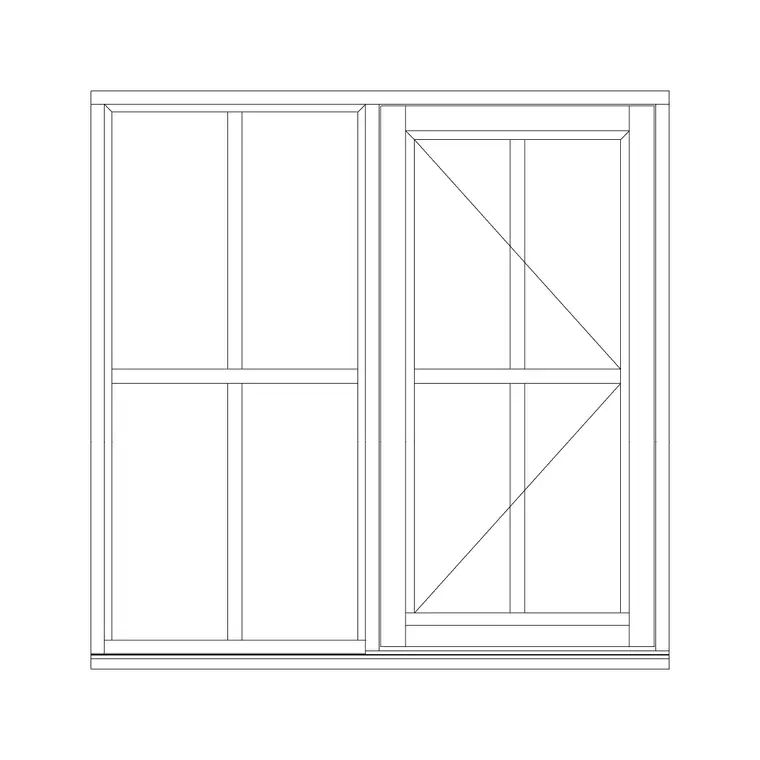
A sliding window opens by sliding one sash horizontally past another in a track, rather than swinging out on hinges. That single difference changes how you draw it and where you use it: there is no swing arc to clear, so a sliding window is the natural choice wherever an outward-opening sash would foul a walkway, a balcony rail or a neighbouring building. This page gathers free sliding window CAD blocks in DWG — single-shutter and multi-track sliders — drawn full size in millimetres for AutoCAD 2004 or later, free for personal and commercial use with no signup or watermark.
Use the blocks for apartment windows onto balconies and corridors, façades close to a boundary, and any opening where clear circulation past the window matters. Because the sash overlap and the track are drawn to scale, the plan view tells you exactly how much glass actually opens — usually half the width for a two-track slider, since one sash sits behind the other.
The sliding window is also the type where the plan view earns its keep. On the elevation a slider looks much like any other framed window, but the plan reveals the tracks, the sash overlap and the direction of slide — the information a fabricator and an installer actually need.
What makes a sliding window block different
A sliding window has no hinge and no swing, so the block drops the dashed swing triangle entirely. Instead, the key information lives in the plan: the frame with its track(s), the sashes shown overlapping where one slides behind the other, and often a small arrow indicating the direction of slide. On the elevation, a sliding window reads as a framed opening divided into two (or more) panes by the meeting stile where the sashes overlap.
Because one sash parks behind the other, only part of the window opens — typically half on a two-pane slider. The block makes that obvious, which matters for ventilation calculations and for understanding how much clear opening you actually get. A single-shutter sliding window slides one moving sash past one fixed pane.
Plan, elevation and section views
Plan view is the most informative for a sliding window, because it shows the tracks, the sash overlap and the slide direction — none of which read on the elevation. It is the view that distinguishes a slider from an outward-opening casement at a glance.
Elevation shows the frame, the meeting stile and the glazing face-on, keyed into the window schedule. Section through head and sill shows the track profile and how the frame sets into the opening, which is the detail an aluminium or uPVC slider lives by. Where a block ships multiple views in one DWG, insert the one you need and freeze the rest; for a slider, keeping the plan is usually worthwhile because it carries the unique track information.
Typical sliding window dimensions
Sliders can cover wide openings because the sashes share the load across the head and sill rather than hanging off hinges. As planning figures, a two-pane sliding window might span 1200–1800 mm overall, each sash taking roughly half; larger three- and four-track sliders run wider still for balcony and patio openings. Heights commonly sit around 1200–1500 mm for a habitable room, taller where the slider doubles as a glazed wall.
Remember the opening rule: a two-track slider opens only about half its width, so if a room needs a specific clear ventilation area, size the window accordingly. Track and frame depths depend on the system — aluminium sliders are slim, uPVC a little chunkier — so confirm the section against the product before you finalise the reveal.
Inserting the sliding window block
The blocks are full size in millimetres. Insert at scale 1 in a millimetre drawing, 0.001 in a metre drawing, or set INSUNITS to millimetres so AutoCAD rescales automatically. Run INSERT, browse to the DWG, and place at a frame corner or the centre of the opening.
Unlike a casement, you rarely need to mirror a slider for handing — instead, set which sash is the moving one and which is fixed, and which way it slides, using the plan arrow. Keep the window on a glazing layer for clean freezing, and where a façade has a run of identical sliders, COPY or ARRAY them at equal centres. If you are detailing the head and sill, insert the section view and align it under the elevation so the heights line up.
Where sliding windows are used
Sliding windows dominate apartment and high-rise design, balcony and terrace openings, and any façade close to a boundary or walkway where an outward sash would obstruct. They suit aluminium and uPVC systems particularly well, which is why they are the default in much contemporary and tropical-climate residential work. They are also common in corridors and stairwells, where a swinging sash would project into the circulation.
Architects use the block to draw and schedule these openings; services and ventilation engineers note the half-width opening when checking air change; installers read the track and slide direction from the plan. Because sliders stack neatly into repetitive façades, the block is one you will array many times across an elevation.
Sliders versus casements on the drawing
It is worth being clear about when a slider beats a casement, because the choice shows up in the block you reach for. A sliding window wins where space outside (or inside) the window is tight: it needs zero clearance for an arc, so it suits balconies, walkways, light wells and boundary façades. It loses on clear opening area — only about half the window opens — and on weatherseal in extreme exposure, where a compression-sealed casement performs better.
A casement wins where you want the whole opening clear for ventilation and a tight weatherseal, and where there is room for the sash to swing. On a coordinated drawing the difference is visible immediately: the casement carries a swing triangle, the slider carries a plan with tracks and an overlap. Choosing deliberately — and drawing the right block — means the elevation, the ventilation calc and the installer's expectations all line up, rather than discovering on site that a 'window' that was meant to open fully only opens halfway.
Free download
Browse the full library — DWG & DXF, no signup.
Questions
Frequently asked
Why does a sliding window block have no swing arc?+
A sliding window opens by sliding one sash past another in a track, not by swinging on hinges, so there is no arc to draw. The plan instead shows the tracks, the sash overlap and a slide-direction arrow, which is the information a slider actually needs.
How much of a sliding window actually opens?+
On a standard two-track slider only about half the width opens, because one sash slides behind the other. Multi-track sliders open more. Factor the half-width opening into any room ventilation calculation when you size the window.
What is a single-shutter sliding window?+
A single-shutter sliding window has one moving sash that slides past one fixed pane. The moving leaf is the 'shutter'; only that leaf opens, sliding along the track over the fixed glass beside it.
Which view best shows a sliding window?+
The plan view, because it shows the tracks, the overlapping sashes and the slide direction that distinguish a slider from a swinging window. The elevation shows the frame and glazing, and a head/sill section shows the track profile.
Related downloads
Blocks for this guide

Related categories
Related guides
Block landing
Free Casement Window CAD Blocks — DWG Download
Free casement (openable) window CAD blocks in DWG — side-hung sashes in plan, elevation and section for AutoCAD. No signup, free for commercial use.
Block landing
Free Single-Shutter Window CAD Blocks — DWG
Free single-shutter window CAD blocks in DWG — one-panel openable sashes in elevation and plan for AutoCAD. Left/right-hung, no signup, commercial OK.
Block landing
Free Double-Shutter Window CAD Blocks — DWG
Free double-shutter window CAD blocks in DWG — two-leaf openable windows with glass, in elevation and plan for AutoCAD. No signup, commercial-use OK.