Block landing · single shutter window cad block
Free single-shutter window CAD blocks for AutoCAD
By Sumana Kumar · Published 21 Mar 2026 · Updated 15 Apr 2026
A single-shutter window is the simplest openable unit on the drawing: one sash, one frame, one opening light. The term 'shutter' here means the moving sash leaf — so a single-shutter window has exactly one leaf that opens, as opposed to a double-shutter window with two leaves that meet in the middle. It is the window you specify for narrow openings, small rooms, toilets, stair landings and anywhere a single light gives enough ventilation. This page gathers free single-shutter window CAD blocks in DWG, drawn at true millimetre sizes and ready to insert into AutoCAD 2004 or later, free for personal and commercial use with no signup or watermark.
Because the single shutter is a compact, repeatable unit, it is one of the most-arrayed window blocks in a façade — think of a row of identical single-shutter windows down an apartment block or along a corridor wall. Drawing it once as a clean block and copying it keeps the elevation consistent and the file small.
The single shutter is also the natural starting point for understanding the whole openable-window family. Once you can set out and hand a single shutter correctly, the double, triple and sliding variants are just multiples and rearrangements of the same leaf.
What 'single shutter' means on the drawing
In window terminology — common in Indian, Middle Eastern and much of the international market — a 'shutter' is the opening leaf of a window, the equivalent of a casement sash. A single-shutter window therefore has one moving leaf set in a frame, hinged on one side and latching on the other. It may be the whole window, or it may be one openable leaf combined with a fixed pane beside or above it.
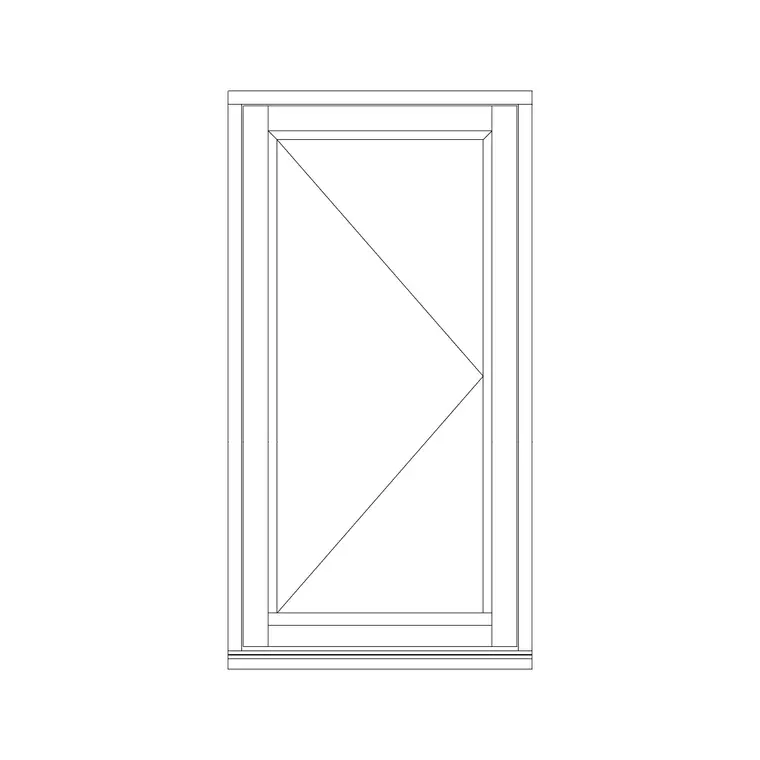
The block shows the frame, the single sash, the glazing line and the swing or sliding indicator. On a left-side openable version the hinges sit on the left jamb and the sash swings from there; on a right-side version it is mirrored. Marking the handing is the single most useful thing the block does, because a fabricator builds the window to that handing.
Views included with the block
Elevation is the primary view for a single-shutter window, showing the frame proportions, the glazing and the opening notation face-on. Some single-shutter blocks here also carry a side view, which is useful when you are drawing the window in a wall section or showing the sash projection.
Plan view cuts the window horizontally to show frame, reveal and glass, and for an inward-opening sash, the swing into the room. Where a block ships several views in one DWG, insert the one your drawing needs and freeze the rest. For a simple punched opening in a masonry wall, the elevation plus a section through the head and sill is usually all the drawing set requires.
Typical single-shutter window dimensions
A single openable leaf is kept relatively narrow so its weight stays manageable on the hinges or in the runners. As a planning range, a single shutter commonly runs about 450–700 mm wide; beyond that, designers usually split the window into two leaves. Heights vary with the room — 600–900 mm for a small toilet or kitchen window, 1200–1500 mm for a habitable room.
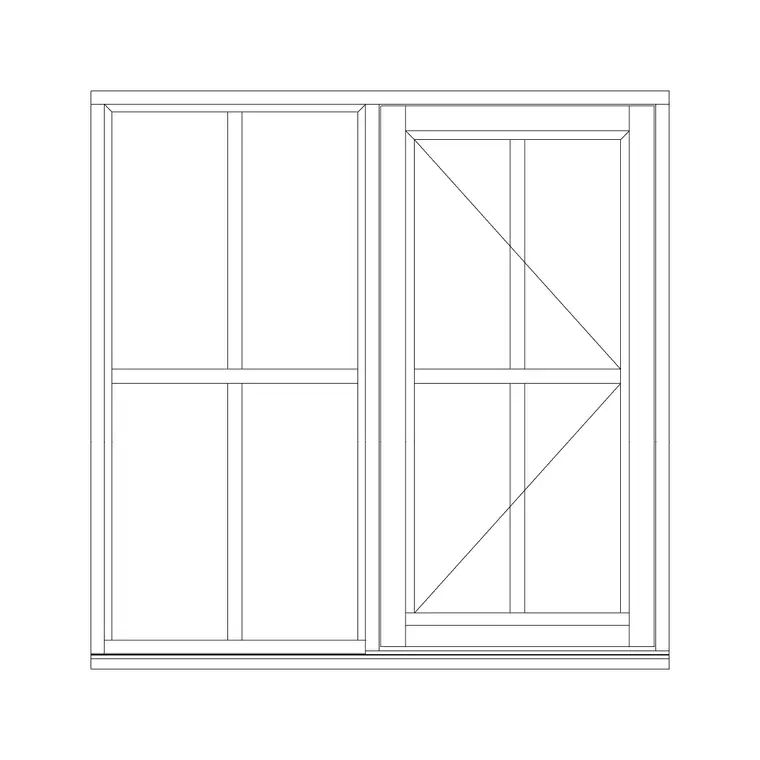
Where the single shutter is paired with a fixed pane (a common configuration), the openable leaf takes one module and the fixed glass takes the rest of the opening width. Confirm the leaf size against the frame system you are specifying, since aluminium, uPVC and timber casements each have their own practical maximum leaf width.
Inserting and handing the block
The blocks are full size in millimetres. Insert at scale 1 in a millimetre drawing, 0.001 in a metre drawing, or set INSUNITS to millimetres so AutoCAD rescales on insertion. Run INSERT, browse to the DWG, and place it at the bottom corner or centre of the structural opening.
To switch a left-side openable window to right-side, MIRROR the block about a vertical centreline rather than hunting for a separate file. Keep the windows on a dedicated glazing layer so you can toggle them off for a structural plan. When you have a run of identical single-shutter windows — a corridor, a stairwell, a repeating bay — use COPY or a rectangular ARRAY to place them at equal spacing in one operation.
Where single-shutter windows fit
Single-shutter windows suit narrow or service openings where a single light gives enough air and view: WCs, utility rooms, kitchens, stair landings, store rooms and narrow bedrooms. They also appear in repetitive façades — apartment blocks, hostels, office corridors — where the same compact window repeats across a grid.
Architects use the block to populate and schedule these openings; services engineers check that the openable area meets the ventilation requirement for the room; fabricators read the leaf size and handing. Because it is the simplest openable unit, the single-shutter block is also the cleanest one to teach with when you are showing a junior drafter how window handing and swing notation work.
Combining the single shutter with fixed glass
A very common real-world configuration is one openable single shutter set beside, above or below a fixed pane — it gives a large glazed area for light while keeping only a modest, manageable leaf that opens for ventilation. On the drawing this reads as a frame divided by a mullion or transom, with the swing notation on the openable leaf only and the fixed pane left plain.
Drawing this from blocks is straightforward: place the single-shutter block, then place a fixed-glass block alongside it sharing the mullion line, or use a combined block that already pairs the two. Keep the mullion and transom on the frame layer and the glass line on the glazing layer so the elevation reads cleanly. Tag the whole assembly with a single window-type reference for the schedule, noting the openable leaf size separately if the ventilation calculation needs it.
Free download
Browse the full library — DWG & DXF, no signup.
Questions
Frequently asked
What does 'shutter' mean in single-shutter window?+
Here 'shutter' means the opening leaf or sash of the window, not an external louvred panel. A single-shutter window has one opening leaf; a double-shutter window has two leaves that meet in the centre. The term is widely used in the international window market.
Is a single-shutter window the same as a single casement?+
Effectively yes for an openable single leaf. A single-shutter openable window with side hinges is a single casement. The 'single shutter' label simply describes that there is one moving leaf, whether it is hinged (openable) or runs in tracks (sliding).
How wide can a single shutter be?+
As a planning range, single openable leaves usually run about 450–700 mm wide so they stay light on their hinges or runners. Wider openings are normally split into two or three leaves. Always confirm the maximum against your chosen frame system.
Can I mirror the block to change the opening side?+
Yes. Use MIRROR about a vertical centreline to turn a left-side openable window into a right-side one. The frame, sash and swing notation flip together, so you do not need a separate handed file.
Related downloads
Blocks for this guide

Related categories
Related guides
Block landing
Free Casement Window CAD Blocks — DWG Download
Free casement (openable) window CAD blocks in DWG — side-hung sashes in plan, elevation and section for AutoCAD. No signup, free for commercial use.
Block landing
Free Double-Shutter Window CAD Blocks — DWG
Free double-shutter window CAD blocks in DWG — two-leaf openable windows with glass, in elevation and plan for AutoCAD. No signup, commercial-use OK.
Block landing
Free Sliding Window CAD Blocks — DWG Download
Free sliding window CAD blocks in DWG — horizontal sliding sashes drawn in plan, elevation and section for AutoCAD. No swing arc, no signup, commercial-use OK.