Block landing · double shutter window cad block
Free double-shutter window CAD blocks for AutoCAD
By Sumana Kumar · Published 8 Jan 2024 · Updated 16 Feb 2026
A double-shutter window has two opening leaves that meet at a central meeting stile, each hinged on its outer jamb and swinging open like a pair of small doors. It is the window you specify when one leaf is not wide enough — a wider opening, more ventilation, and a symmetrical look that suits both traditional and contemporary façades. This page collects free double-shutter window CAD blocks in DWG, including versions with glass divisions, drawn full size in millimetres and ready to insert into AutoCAD 2004 or later. Everything is free for personal and commercial work with no signup, watermark or attribution.
Use these blocks for living-room and bedroom windows, French-casement openings onto a balcony, and any elevation where a balanced two-leaf window reads better than a single sash. Because both leaves and their swings are drawn to scale, you can check that the open sashes clear each other and anything beyond the wall.
The double shutter is where window handing gets a little more interesting: you have two swing symbols, usually mirrored about the centre, and the order in which the leaves close (which leaf laps the other at the meeting stile) can matter for the seal. The blocks here keep that geometry clean so the elevation and the fabricator agree.
What a double-shutter window block contains
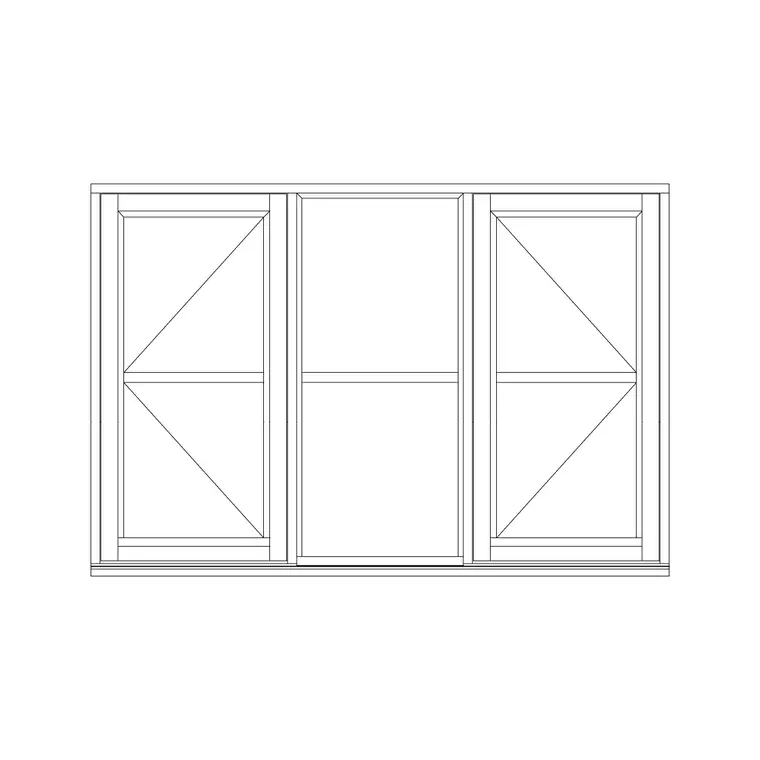
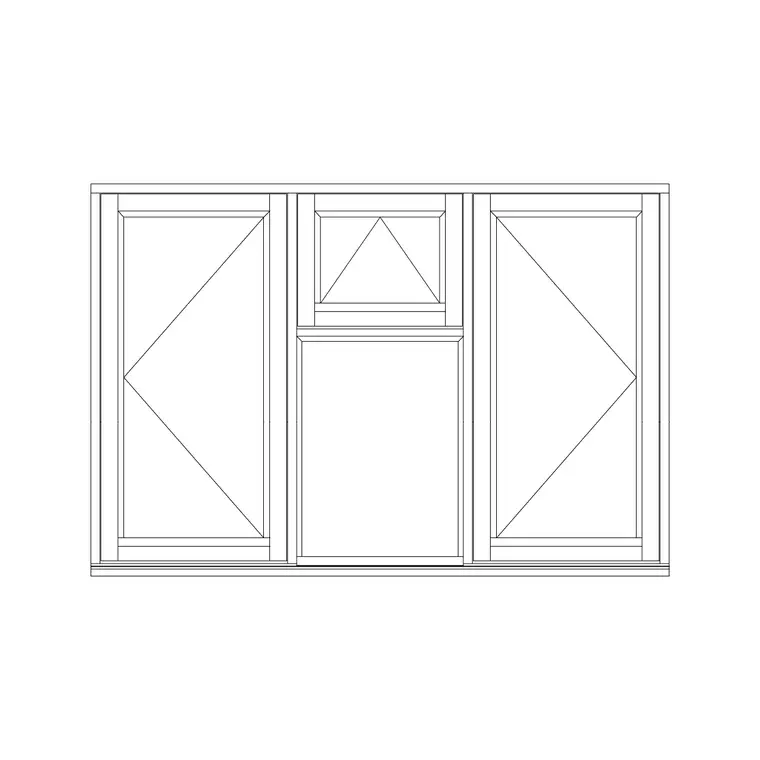
A double-shutter window block shows a frame split down the middle by a meeting stile, with two opening leaves either side. Each leaf carries its own glazing line and its own swing symbol — the two triangles usually point inward to a shared apex region or outward in mirror image, depending on whether the window opens in or out. The 'with glass' versions also draw the glazing bars or the single pane within each leaf so the elevation reads as a finished window rather than an empty frame.
In plan and section the block shows how the two leaves close against the central stile and against the frame, plus the reveal and sill. That meeting-stile detail is the part a single-shutter window never has, and it is worth keeping crisp because it governs the weatherseal.
Views the block ships in
Elevation is the main view, showing both leaves, the central meeting stile, the glazing and the mirrored swing notation face-on. It is the view you place on a house elevation and key into the window schedule.
Plan view cuts horizontally through the window to show the frame, the two leaves, the meeting stile and — for inward-opening leaves — their swing into the room. A section through head and sill completes the detail set. Where a block carries several views in one DWG, insert what you need and freeze the rest. For a French-casement door-window onto a balcony, the plan swing is especially worth drawing, because two inward-opening leaves can sweep a surprising amount of floor.
Typical double-shutter window sizes
Splitting the opening into two leaves lets a double-shutter window cover a wider span while keeping each leaf manageable. As planning figures, each leaf often runs about 400–600 mm wide, giving overall openable widths around 800–1200 mm for a pair; French-casement versions onto a balcony can be taller, with leaf heights of 1800–2100 mm where they read almost as doors.
For a standard habitable-room window, an opening of roughly 1200 mm wide by 1200–1500 mm high split into two leaves is typical. As always, confirm the leaf width against your frame system — two narrow leaves are lighter and seal more reliably than two leaves pushed to their maximum.
Inserting and arranging the block
The blocks are drawn full size in millimetres; insert at scale 1 in a millimetre drawing, 0.001 in a metre drawing, or set INSUNITS to millimetres so AutoCAD rescales on insertion. Use INSERT, browse to the DWG, and place at a frame corner or the centre of the opening.
Because the two leaves are usually mirror images, you can edit one side and MIRROR it to keep the pair symmetrical. If your design opens both leaves the same way (a 'French casement' where one leaf carries the other on a rebate), set the swing notation accordingly. Keep windows on a glazing layer so you can freeze them for a structural plan, and tag the assembly with a single window-type reference for the schedule.
Where double-shutter windows are used
Double-shutter windows suit living rooms, master bedrooms, dining rooms and any space wanting generous ventilation and a balanced, symmetrical façade. The French-casement form — two leaves opening fully with no central mullion in the clear opening — is popular onto balconies, terraces and Juliet balconies, because it throws the whole width open.
Architects use the block to draw and schedule these wider openings; interior designers check the inward swing against furniture and curtains; fabricators read the leaf sizes and the meeting-stile arrangement. On heritage and traditional schemes the symmetrical two-leaf window is often the authentic choice, so the block does double duty on both modern and period elevations.
Meeting stile, handing and the weatherseal
The detail that distinguishes a double-shutter window from two single shutters side by side is the meeting stile — the vertical joint where the two leaves come together in the middle. On a true French casement there is no fixed central mullion; the leaves close against each other, with one leaf carrying a rebate and a 'first-closing' shutter that the second leaf laps over to make the seal. On a simpler double casement the leaves close against a fixed central mullion instead.
Which arrangement you draw affects both the look and the performance, so it is worth being deliberate. If you want the full clear opening (for moving furniture onto a balcony, say), draw the rebated meeting-stile version with no central mullion. If you want a simpler, cheaper window, draw the central-mullion version. Note the choice on the schedule alongside the handing, so the fabricator builds the meeting stile you actually detailed rather than guessing from the elevation symbol alone.
Free download
Browse the full library — DWG & DXF, no signup.
Questions
Frequently asked
What is a double-shutter window?+
A double-shutter window has two opening leaves that meet in the centre, each hinged on its outer jamb. It covers a wider opening than a single shutter while keeping each leaf light enough to swing easily, and it gives a symmetrical look on the elevation.
Is a double-shutter window the same as a French casement?+
A French casement is a type of double-shutter window where the two leaves close against each other with no fixed central mullion, giving a full clear opening. A simpler double-shutter window may instead close against a fixed central mullion.
Do the blocks include the glazing inside each leaf?+
The 'with glass' versions draw the glazing line or pane within each leaf so the elevation reads as a finished window. Plain versions show the frame and leaves, and you can add the glazing line on your own layer if needed.
How do I keep both leaves symmetrical when editing?+
Draw or edit one leaf, then MIRROR it about the vertical centreline of the window. The glazing and swing notation mirror together, keeping the pair symmetrical without redrawing the second leaf.
Related downloads
Blocks for this guide

Related categories
Related guides
Block landing
Free Casement Window CAD Blocks — DWG Download
Free casement (openable) window CAD blocks in DWG — side-hung sashes in plan, elevation and section for AutoCAD. No signup, free for commercial use.
Block landing
Free Single-Shutter Window CAD Blocks — DWG
Free single-shutter window CAD blocks in DWG — one-panel openable sashes in elevation and plan for AutoCAD. Left/right-hung, no signup, commercial OK.
Block landing
Free Sliding Window CAD Blocks — DWG Download
Free sliding window CAD blocks in DWG — horizontal sliding sashes drawn in plan, elevation and section for AutoCAD. No swing arc, no signup, commercial-use OK.