Block landing · round dining table cad block
Free round dining table CAD blocks in DWG and DXF
By Saumyajit Maity · Published 22 May 2022 · Updated 10 Feb 2026
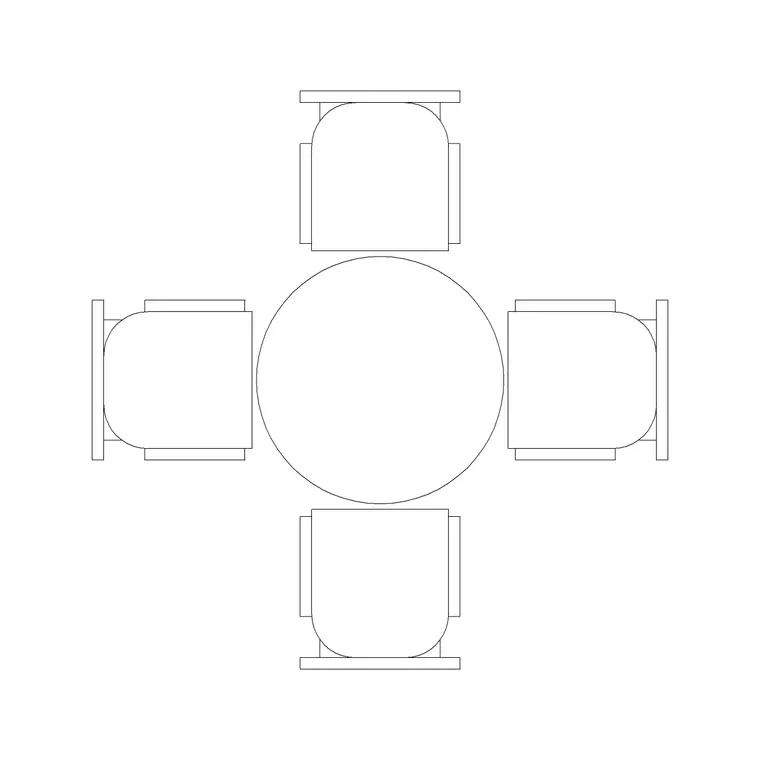
A round dining table behaves differently from a rectangular one, and that difference is exactly why a scaled block helps. With no corners and no head of the table, a circular table seats people evenly and fits into square or awkward rooms where a long rectangle would feel forced. This page collects free round dining table CAD blocks in DWG and DXF — four and six-seater circular tables drawn with their chairs arranged radially — at true millimetre dimensions, ready for AutoCAD 2004 or later. Every file is free for personal and commercial use, with no signup and no watermark.
Use these blocks where you need flexible, sociable seating: compact dining rooms, restaurant floors that mix table sizes, hotel suites and meeting-cum-dining spaces. The radial chair arrangement is the key detail — it tells you how the occupied circle grows as you add seats, which is what really decides whether a round table suits the room.
Why a round table needs its own block
A rectangle and a circle of the same nominal seat count occupy the floor very differently. A round table claims a clear circle around it rather than a clear rectangle, so it can tuck into a square room or a bay window where a long table would block circulation. The block captures that circular occupied zone, including the chairs splayed out around the rim, so you can see the real swept area at a glance.
The trade-off a round table makes is that diameter grows faster than capacity. Going from four seats to six does not just add a row — it pushes the whole diameter outward because every place setting needs its own arc of the perimeter. A scaled block makes that growth visible, which stops you specifying a six-seater that swallows a room sized for four.
Round dining table sizes to design around
Use these diameters as your reference. A two to three-seater round cafe table runs roughly 700–900 mm across. A four-seater round table is commonly 1000–1200 mm in diameter. A six-seater needs about 1300–1500 mm, and an eight-seater pushes to 1600–1800 mm or more. Standard table height sits near 750 mm, with chairs around 450 mm to the seat.
The perimeter rule of thumb is roughly 600 mm of table edge per diner, which is why the diameter climbs as seats are added. Around the table, allow a clear ring of about 900–1100 mm for pulling chairs out and passing behind them — and remember that on a circular table that ring is needed on every side, not just two. The scaled block lets you draw that swept circle and test it against the walls and doors.
Working in plan with a round set
Round dining sets are almost always placed in plan, where the circular table and its radial chairs read clearly from above. Because the set is symmetrical, you rarely need to rotate it to a room axis the way you would a rectangle — you place it centrally in the space and check the clear ring around it. Keep the dining set on its own furniture layer so you can show the bare room when a plan gets crowded.
For interior elevations a side view of a round table reads almost like any other table, so the plan block carries most of the design work. If you need to show the table against a feature wall or pendant light, insert a side-view block and align it with the elevation's setting-out.
Inserting and centring the block
These blocks are drawn full size in millimetres. Insert at scale 1 in a millimetre drawing, 0.001 in a metre template, or set INSUNITS to millimetres and let AutoCAD handle the conversion. Run INSERT or drag the DWG in, and pick the centre of the table as the insertion point — on a round table the geometric centre is the natural handle, and it makes centring the set in a room or under a pendant trivial.
Because the table is radially symmetrical, rotation barely matters for the table itself, but you may want to rotate so a particular chair faces a view or a doorway. As a single block reference, the whole set copies and updates together, so a restaurant floor of identical round tops stays consistent and edits in one move.
Where round dining tables work best
Round tables shine in specific situations, and the block helps you prove the case. In a small or square dining room, a circular table often seats the same number as a rectangle in less awkward space. In conversation-led settings — a private dining room, a meeting-and-lunch space, a hospitality lounge — the lack of a head of the table makes everyone equal, which is why boardrooms and informal restaurants reach for them.
They also mix well on a varied restaurant floor, where a few round four-tops break up rows of square two-tops and give the plan flexibility for different group sizes. Pair these blocks with the rectangular dining, chair and sofa blocks in the furniture category to lay out a complete, varied dining scheme from one consistent, scaled library.
Flexibility and group seating
One quiet advantage of a round table is that it absorbs an extra guest more gracefully than a rectangle. Squeezing a fifth chair onto a four-seater rectangle means someone sits at an awkward corner; on a round table you simply re-space the chairs around the rim, and the block makes it easy to test that by copying a chair and re-arranging the ring. That flexibility is worth showing on a layout when a client wants occasional capacity for guests.
For hospitality, round tables are the classic choice when a venue needs to switch between dining and event modes — a restaurant that hosts private functions, or a hotel that flips a room from breakfast to a meeting. Drawing the round sets as scaled blocks lets you produce both the everyday layout and the banquet layout from the same library, and to count covers honestly in each mode by reading the occupied circles rather than guessing.
Free download
Browse the full library — DWG & DXF, no signup.
Questions
Frequently asked
What diameter round table seats four people?+
A four-seater round dining table is typically 1000–1200 mm in diameter. The blocks are drawn to that range with the chairs arranged radially, so you can check the clear ring needed around the set.
Why does a round table get so much bigger when I add seats?+
Diameter grows faster than seat count because each diner needs roughly 600 mm of table edge. Going from four to six seats pushes the whole perimeter — and therefore the diameter — outward, which the scaled block makes visible.
Are the round dining table blocks free for commercial projects?+
Yes. Every block downloads free in DWG (and DXF where available) with no signup, no watermark and no attribution requirement, cleared for commercial use.
Do I need to rotate a round table block to a room axis?+
Rarely. Because the table is circular and symmetrical, you usually place it centrally and check the clear ring around it. Rotate only if you want a specific chair to face a view or doorway.
Related downloads
Blocks for this guide
Related categories
Related guides
Block landing
Free Office Chair CAD Blocks — DWG Download
Download free office chair CAD blocks in DWG and DXF — task chairs, swivel chairs and executive seats drawn in plan and elevation, AutoCAD 2004+, no signup.
Block landing
Free Bar Table CAD Blocks — DWG Download
Download free bar table CAD blocks in DWG and DXF — round, square and rectangular high bar tables in plan and elevation for AutoCAD. No signup, commercial-use OK.
Block landing
Free Restaurant Table CAD Blocks — DWG Download
Download free restaurant table CAD blocks in DWG and DXF — 2, 4 and 6 cover tables with chairs drawn in plan and elevation for AutoCAD. No signup, commercial-use OK.