Block landing · medical pendant cad block
Free medical pendant and OT light CAD blocks in DWG
By Saumyajit Maity · Published 30 Jan 2024 · Updated 4 Feb 2026
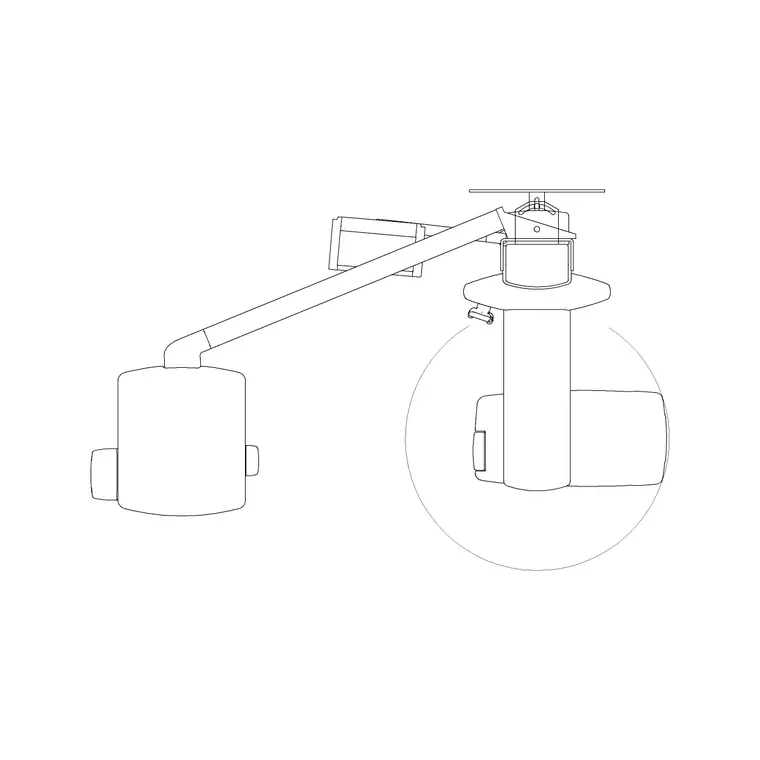
Medical pendants and operating-theatre (OT) lights are ceiling-mounted equipment, which makes them unusual among medical blocks: they live on the reflected ceiling plan as much as on the floor plan, and they sweep through space on articulated arms rather than sitting still. A scaled pendant and OT light CAD block lets you set their ceiling positions and check the arcs their arms cover. This page offers free medical pendant and OT light blocks in DWG and DXF, drawn to true millimetre dimensions in plan and elevation, ready for AutoCAD 2004 or later — free for personal and commercial work, no signup, no watermark.
A theatre is planned around the operating table, and the ceiling-mounted lights and service pendants have to reach that table from every angle the surgical team needs. Because the arms swing through a wide arc, the block has to convey not just where the pendant is fixed but the space its arms sweep, so the ceiling coordination — with ductwork, lights and structure — actually works.
Pendants and OT lights: what each is
Two related pieces of ceiling equipment share this page. A medical service pendant is a ceiling-mounted arm (or pair of arms) carrying medical gas outlets, power, data and shelves or a monitor, positioned so the team has services to hand around the table or bed — common in theatres, ICU and critical care. An operating-theatre light is a ceiling-mounted surgical luminaire on articulated arms, often in twin or triple configurations, that the team positions over the surgical field from different angles.
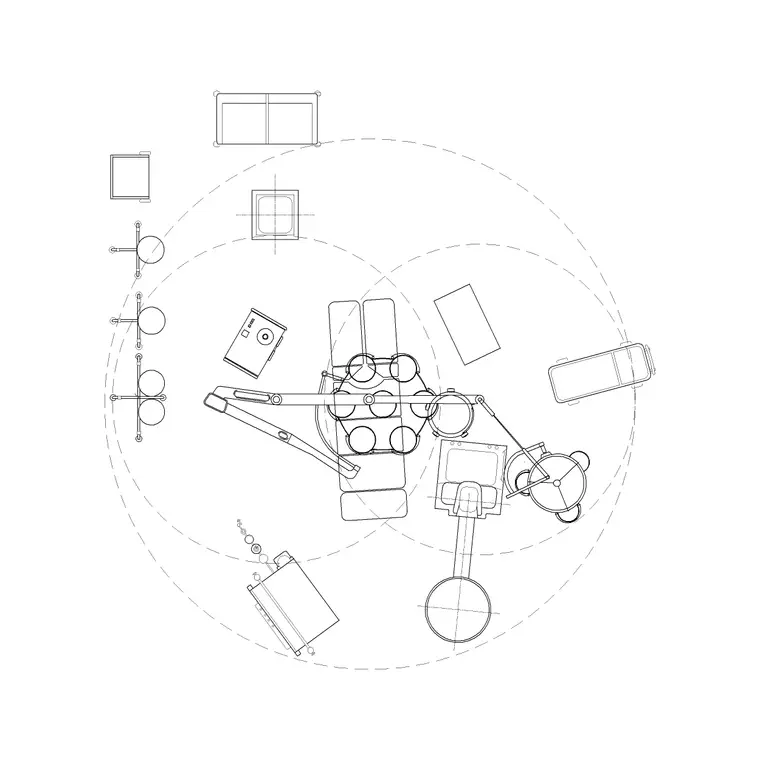
Both are defined by their reach. The block shows the ceiling fixing point and the swept arc the arms cover, because that arc — not the fixing point — is what has to be coordinated with everything else on and below the ceiling.
Sizing the swept arc and clearances
Pendants and OT lights vary by manufacturer and configuration, so design to the chosen product's planning data for the exact arm lengths and arcs. As a guide, the arms reach far enough to bring services or light to any side of an operating table, so the swept arc is a substantial circle centred on the ceiling fixing — often several metres across once both arms are considered.
What you are reserving is the clear ceiling space and the clear height for the equipment to move. The block lets you draw that swept arc at concept stage so the theatre's ceiling-mounted services, the laminar-flow canopy, the structure and the lights all coordinate, then refine to the real product's reach later.
Reflected ceiling plan and elevation
Unlike floor-standing equipment, pendants and OT lights are set out on the reflected ceiling plan: the fixing point located over the table, and the swept arc drawn to check the arms clear the laminar-flow canopy, the ductwork, the lighting and the structural grid. The plan block, with its swept arc, is the key tool for that ceiling coordination.
The elevation and section are essential because these are height-critical: the pendant and light have to hang low enough to be useful but high enough to clear the team and any tall equipment, and the structure above has to carry them. Drawing them in section against the operating table and the ceiling void proves the heights and the fixing into the structure work.
How to insert and coordinate the blocks
These blocks are drawn full size in millimetres. Insert at scale 1 in a millimetre drawing, 0.001 in a metre drawing, or set INSUNITS to millimetres so AutoCAD converts on insertion. Run INSERT, snap the fixing point over the operating-table position, and orient the arms to the surgical approach.
Because these are ceiling items, place them on the reflected ceiling plan layer and draw the swept arc on its own layer so you can overlay it against the ductwork, the canopy and the structure to find clashes. Keep the fixing point, the arms and the swept arc on separate layers, and tag the block so the theatre's ceiling equipment schedules straight from the drawing.
Where pendant and OT light blocks are used
Medical pendant and OT light blocks belong in operating-theatre layouts, intensive-care and critical-care units, recovery and procedure rooms, and any clinical space with ceiling-mounted services. Healthcare and theatre planners use them to set the equipment over the table and coordinate the ceiling; architects use them to reserve ceiling space; M&E and structural engineers use them to confirm the gases, power and data reach the pendant and that the structure carries the load.
Because theatre ceilings are among the most congested zones in any building — lights, pendants, laminar flow, ductwork, sprinklers and structure all competing — the swept-arc block is a vital coordination tool. Pair it with the wider medical category, including the operating-table and theatre equipment blocks, to plan a complete theatre.
Free download
Browse the full library — DWG & DXF, no signup.
Questions
Frequently asked
What's the difference between a medical pendant and an OT light?+
A pendant is a ceiling arm carrying medical gases, power and data (and sometimes a monitor) to the bedside or table. An OT light is a ceiling-mounted surgical luminaire on articulated arms. Both are on this page because both are ceiling-mounted and defined by their swept reach.
Why does the block show a swept arc?+
The arms move through a wide arc to bring services or light to any side of the table, and that arc — not the fixing point — is what must clear the laminar-flow canopy, ductwork, lighting and structure. Drawing the arc lets you coordinate the congested theatre ceiling.
Are these set out on the floor plan or the ceiling plan?+
On the reflected ceiling plan, because they are ceiling-mounted. The fixing point is located over the table and the swept arc is checked against the other ceiling services, with the elevation or section proving the hanging heights and structural fixing.
Are the pendant and OT light blocks free for commercial use?+
Yes. They download free in DWG and DXF with no signup, no watermark and no attribution, and they are cleared for commercial healthcare project use.
Related downloads
Blocks for this guide
Related categories
Related guides
Block landing
Free Hospital Bed CAD Block — DWG & DXF Download
Download a free hospital bed CAD block in DWG and DXF — electric patient bed in plan and elevation with bedside clearances for ward layouts. No signup.
Block landing
Free Patient Stretcher CAD Block — DWG Download
Download a free patient stretcher CAD block in DWG and DXF — wheeled trolley/gurney in plan and elevation for A&E and recovery layouts. No signup.
Block landing
Free Medical Trolley CAD Block — DWG Download
Download a free medical trolley CAD block in DWG and DXF — dressing, treatment and crash carts in plan and elevation for clinical layouts. No signup.