Block landing · garage door cad block
Free garage door CAD blocks for AutoCAD
By Saumyajit Maity · Published 12 Jun 2025 · Updated 17 Jun 2026
A garage door is the big door — a wide, tall opening that closes a vehicle space — and it works on a completely different principle to an internal door, lifting, rolling or folding rather than swinging on a side hinge. That makes the elevation the key drawing, because a garage door is mostly seen and designed face-on as a feature of the building's front. This page collects free garage door CAD blocks in DWG and DXF, drawn full size in elevation and plan for AutoCAD 2004 or later, free for personal and commercial use.
The garage door block earns its keep on the elevation, where the panel pattern, the proportions and the opening width define a large part of a house frontage or a commercial unit's face. Whether it is a panelled sectional door, an up-and-over slab or a roller shutter, the block gives you the correct width-to-height proportion and panel layout so the front elevation reads right.
Garage door types and how they draw
Garage doors come in a handful of mechanisms and each draws differently. A sectional door is made of horizontal panels hinged together that rise and curve back along ceiling tracks — in elevation it shows the panel lines, often with a square or ribbed pattern, and in section it shows the door turning from vertical to horizontal under the ceiling. An up-and-over (canopy) door is a single rigid slab that tilts out and up — its elevation is a single panel and its swing-out arc matters at the kerb. A roller shutter coils into a drum above the opening — its elevation shows fine horizontal slats and a headbox.
The blocks here focus on the elevation because that is the view a garage door is designed in, showing the panel pattern that gives the door its character. Where the mechanism affects the plan or section — the up-and-over's outward arc, the sectional's ceiling track — that is included so you can check the door against the driveway and the garage ceiling.
The panelled sectional door
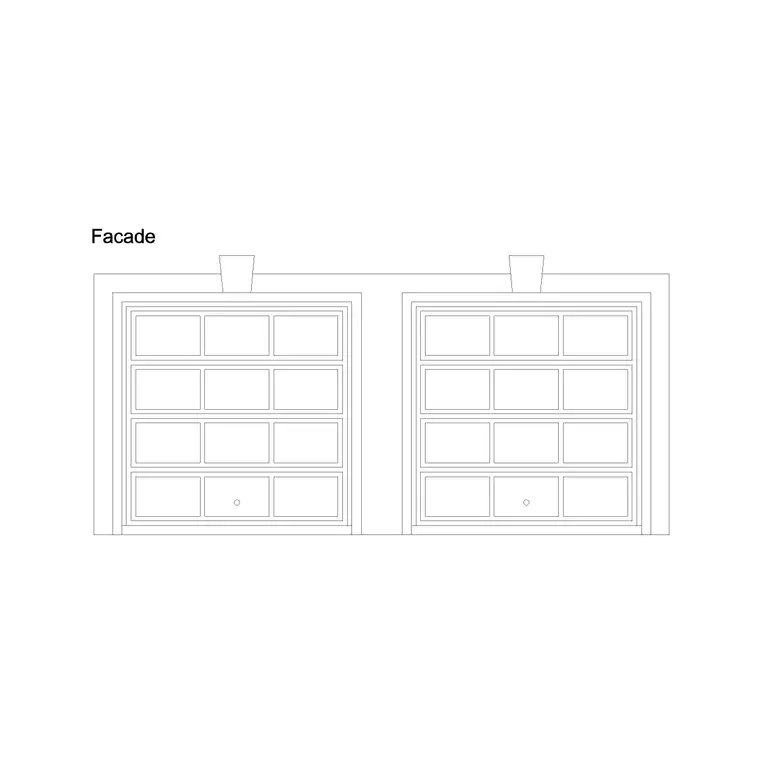
The sectional door is the most common modern garage door, and its elevation is defined by its panels — typically four or five horizontal sections, each often subdivided into square or rectangular panels that give the familiar grid pattern. That panel layout is what makes the door read as a sectional door rather than a plain slab, and it is the part the block draws for you at the right proportions.
The square-panel pattern is a deliberate design choice: it breaks up a large flat door, scales it to look right against the house, and can be matched to the front door or window proportions. Because the block draws the panels to scale, you can place a sectional door of the right width and see immediately how the panel grid sits against the building's frontage. Where the door rises on ceiling tracks, the section view shows the headroom the mechanism needs above the opening.
Typical garage door sizes
Garage doors are sized to vehicles, so the widths are large. A single garage door is commonly around 2100–2600 mm wide; a door comfortable for a single car with mirrors is often about 2400 mm. A double garage door spans roughly 4200–5000 mm to take two cars or one car with generous clearance. Standard heights run about 2000–2300 mm, with taller doors of 2400 mm and up for larger vehicles, vans and 4x4s.
The mechanism adds requirements above and around the opening: a sectional door needs headroom above the lintel for the curved track, an up-and-over needs space for the slab to tilt out, and a roller needs room for the coil drum. The block shows the opening at full size and, where relevant, the space the mechanism claims, so you can confirm both the vehicle fits through and the door has room to operate. As with all blocks here, these are drawn in millimetres at true size.
Inserting a garage door on an elevation
Insert these blocks at scale 1 in a millimetre drawing, or set INSUNITS to Millimeters so AutoCAD rescales automatically. For the elevation, align the door to the finished ground line and set its head at the correct height under the lintel, so it sits properly within the opening on the building's front. Because a garage door is wide, check it against the surrounding masonry, the lintel and any adjacent windows so the frontage reads coherently.
Where the door affects the plan or section — the up-and-over's outward swing into the driveway, the sectional's track into the garage — insert that view too and confirm the clearance. Keep the door as a single block reference so it copies cleanly to a paired or repeated garage, and use BEDIT to adjust the panel pattern or proportions across every instance at once, which is handy on a terrace of identical garages.
Where garage door blocks are used
Garage door blocks appear on house elevations, garage and outbuilding drawings, and the front faces of commercial and industrial units. On a domestic elevation the garage door is often the largest single element of the frontage, so getting its proportion and panel pattern right is a real design task. On commercial and light-industrial drawings, roller shutters and large sectional doors close loading bays and workshop fronts.
Architects use these blocks to compose front elevations where the garage door is a major feature; designers of light-industrial and commercial units use them to draw loading and vehicle access; and anyone drawing a driveway checks the up-and-over's outward swing against the kerb and parked cars. Pair the garage door blocks with the vehicle, window and wooden door blocks across the catalogue to draw a complete, scaled building frontage.
Checking clearance and operation
Because a garage door is so large and its mechanism moves through real space, the block is most valuable for clearance checks. An up-and-over door swings its slab outward as it opens, so on a short driveway you must confirm the open slab does not foul a parked car or overhang the public footway — the section or plan view shows that arc. A sectional door is the kinder option here because it rises straight up and back without swinging out, which is why it suits tight driveways.
Inside, the mechanism claims ceiling and side space: the sectional's curved track needs headroom above the opening, the roller needs room for its drum, and the operator motor needs clearance at the ceiling. Drawing the door and its operating space to scale lets you confirm the garage interior can house the mechanism. Keep the door on its own layer, tag it for scheduling on a multi-unit scheme, and WBLOCK a recurring garage door so a terrace or a development of identical units stays consistent across the elevations.
Free download
Browse the full library — DWG & DXF, no signup.
Questions
Frequently asked
What garage door types do the blocks cover?+
The set covers the common mechanisms — sectional doors with panelled fronts, up-and-over (canopy) slab doors and roller shutters — drawn mainly in elevation, with plan and section where the mechanism affects clearance above or in front of the opening.
What width is a single versus a double garage door?+
A single garage door is commonly around 2100–2600 mm wide and a double around 4200–5000 mm, at heights of roughly 2000–2400 mm. The blocks are drawn full size so you can check the opening against the vehicle and the building frontage.
Why does an up-and-over door need driveway clearance?+
An up-and-over (canopy) door swings its rigid slab outward as it lifts, so it sweeps space in front of the opening. The block shows that outward arc so you can confirm it does not foul a parked car or the footway on a short driveway.
Are the garage door blocks free for commercial use?+
Yes. Every garage door block downloads free in DWG and DXF with no signup, no watermark and no attribution requirement, and they are cleared for commercial project use.
Related downloads
Blocks for this guide
Popular blocks to download
Related categories
Related guides
Block landing
Free Wooden Door CAD Blocks — DWG Download
Download free wooden door CAD blocks in DWG and DXF — solid timber doors drawn in plan, elevation and section for AutoCAD 2004+. No signup, commercial use OK.
Block landing
Free Laminated Flush Door CAD Blocks — DWG
Download free laminated flush door CAD blocks in DWG and DXF — flat-faced flush doors with frame in plan and elevation for AutoCAD. No signup, commercial OK.
Block landing
Free Panel Door CAD Blocks — DWG Download
Download free panel door CAD blocks in DWG and DXF — two, four and six panel doors drawn in elevation and plan for AutoCAD. No signup, commercial use OK.