Block landing · bifold door cad block
Free bifold door CAD blocks for AutoCAD
By Saumyajit Maity · Published 15 May 2025 · Updated 11 Jan 2026
A bifold door is made of several leaves hinged together that fold and concertina to one or both sides of the opening, stacking flat against the wall and opening up almost the entire span. It is the door of choice for connecting a living space to a garden across a wide opening, because it can open up far more of the wall than a slider or French door. On the drawing it has its own distinctive plan symbol — a zigzag of folded leaves. This page collects free bifold door CAD blocks in DWG and DXF, drawn full size in plan and elevation for AutoCAD 2004 or later, free for personal and commercial use.
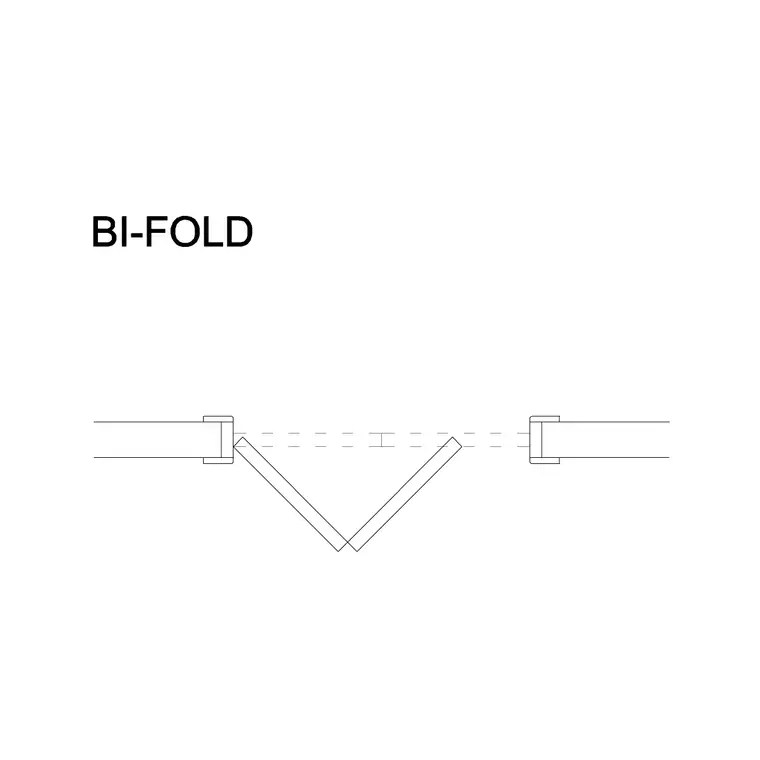
The bifold door block has to show two things the other door types do not: how the leaves fold and where the folded stack parks. When open, the leaves concertina into a stack at one end (or both), so the block draws that stack to scale — and that stacking zone is the bifold's equivalent of a swing arc, the space it claims that you have to keep clear.
How a bifold door folds in plan
A bifold door in plan shows a row of leaves hinged together, drawn closed across the opening and, in the open state, folded into a concertina stack to one side. Each pair of leaves folds against each other like a screen, so the open door reads as a zigzag of leaves bunched at the end of the run. That folded stack projects a short distance — into the room or out to the terrace, depending on which way the leaves fold — and that projection is the clearance the block makes visible.
Because the leaves are hinged in a chain and run on a top track, the block shows the track line and the hinge points so you can read how many leaves there are and which way they fold. Unlike a slider, a bifold opens almost the full width of the opening, leaving only the slim folded stack — which is its big advantage and the reason it draws so differently. The blocks here keep the leaves, the track and the folded stack on separate layers so both the closed and open states read clearly.
Leaf count, fold direction and the traffic door
Bifold configurations vary by the number of leaves and which way they fold, and the block should match the set you are specifying. A common arrangement is three, four, five or more leaves folding to one side; wider openings split into two stacks folding to both sides. The leaves can fold inward (stacking inside the room) or outward (stacking onto the terrace) — a real decision, because the stack needs clear space wherever it parks and outward folding keeps the room floor free.
Many bifold sets include a traffic door: one leaf that also works as a normal hinged door so you can pop in and out without folding back the whole run. That traffic leaf has its own small swing, which the block can show, and it matters because day to day the bifold is mostly used through that single door. Choosing the leaf count, the fold direction and the traffic-door position at block stage lets you check the stacking space and the everyday use against the room.
Typical bifold door dimensions
Bifold leaves are narrower than a normal door so they fold neatly — individual leaf widths commonly run around 500–900 mm, with each leaf kept fairly slim so the folded stack is not too deep. A typical residential bifold has leaves of roughly 600–900 mm; the overall opening is the sum of the leaves and ranges from about 1800 mm for a three-leaf set to 4000–6000 mm and beyond for large garden openings. Leaf height for an external bifold is commonly around 2100 mm.
The folded stack depth depends on the leaf width and count — more leaves mean a deeper stack — so the block lets you read how much space the parked leaves claim at the end of the run. External bifold leaves are thicker for double glazing and weather sealing, around 44–70 mm. Because the blocks are drawn full size, you place the set and read both the full clear opening when folded back and the depth of the stacked leaves against the room or terrace.
Inserting a bifold door
Insert these blocks at scale 1 in a millimetre drawing, or set INSUNITS to Millimeters so AutoCAD rescales automatically. Place the run of leaves across the opening, then set which end the leaves stack at and which way they fold — use MIRROR to flip the stack to the other end, and choose inward or outward folding to suit where there is clear space for the stack.
Show the open, folded state so the drawing communicates the stacking zone, which is the thing a bifold demands. If the set has a traffic door, place it where day-to-day access is convenient and show its small swing. Keep the bifold as a single block reference so it schedules as one door type, and where the same bifold recurs across identical units, array it and update every instance with one BEDIT change to the leaf count or proportion.
Where bifold doors are used
Bifold doors are the signature wide-opening door for connecting a living or dining space to a garden, terrace or patio — they open up almost the whole wall, far more than a slider or French door, which is why they are so popular in extensions and contemporary homes. Internally, slimmer bifolds are used to close off a room flexibly, as wardrobe fronts, and as folding partitions that divide or open a space.
Architects and interior designers use these blocks to draw garden-facing openings where maximising the clear span is the whole point, and to draw folding partitions and wardrobe fronts internally. The design coordinates with the structural opening, since a wide bifold needs adequate support over a large span. Pair the bifold door blocks with the sliding door, French door and pocket door blocks in the doors category — the family of wide and space-saving openings — to compare them on the same plan.
Stacking space and the open span
The bifold's appeal and its constraint are the same thing: it opens almost the entire width, but the folded leaves have to go somewhere, and drawing that stack to scale is what keeps the design honest. The stacking zone is the bifold's version of a swing arc — a band of space at the end of the run, into the room or onto the terrace, that must stay clear of furniture, planting and circulation. Outward folding keeps the internal floor clear but claims terrace space; inward folding does the reverse. The scaled block shows exactly how much depth the stack needs so you can decide.
The other thing the block proves is the genuine open span — bifolds open up far more of the wall than a slider, but the folded stack still occupies a slice of the opening, so the truly clear aperture is the opening minus the stack. Reading that from the full-size block, rather than assuming the whole frame opens, is what stops an over-optimistic clearance on the plan. Keep the doors on their own layer, tag them for scheduling, and WBLOCK a recurring bifold set so every garden opening across a scheme stacks and folds identically.
Free download
Browse the full library — DWG & DXF, no signup.
Questions
Frequently asked
What is a bifold door in a CAD block?+
A bifold door is a row of leaves hinged together that fold and concertina to one or both sides of the opening, stacking flat against the wall. The block shows the leaves closed across the opening and folded into a stack when open, plus the track they run on.
Which way do bifold doors fold?+
They can fold inward (stacking inside the room) or outward (stacking onto the terrace), and to one end or split to both ends. The block lets you set the fold direction and stack position so you can keep the stacking zone clear of furniture and planting.
What is a traffic door on a bifold?+
A traffic door is one leaf in a bifold set that also opens as a normal hinged door, so you can pass through without folding back the whole run. The block can show its small swing, since day to day the bifold is mostly used through that single leaf.
Are the bifold door blocks free for commercial use?+
Yes. Every bifold door block downloads free in DWG and DXF with no signup, no watermark and no attribution requirement, and they are cleared for commercial project use.
Related downloads
Blocks for this guide

Related categories
Related guides
Block landing
Free Wooden Door CAD Blocks — DWG Download
Download free wooden door CAD blocks in DWG and DXF — solid timber doors drawn in plan, elevation and section for AutoCAD 2004+. No signup, commercial use OK.
Block landing
Free Laminated Flush Door CAD Blocks — DWG
Download free laminated flush door CAD blocks in DWG and DXF — flat-faced flush doors with frame in plan and elevation for AutoCAD. No signup, commercial OK.
Block landing
Free Panel Door CAD Blocks — DWG Download
Download free panel door CAD blocks in DWG and DXF — two, four and six panel doors drawn in elevation and plan for AutoCAD. No signup, commercial use OK.