Block landing · father and daughter figure cad block
Free father and daughter figure CAD block
By Sumana Kumar · Published 30 Jan 2026 · Updated 31 May 2026
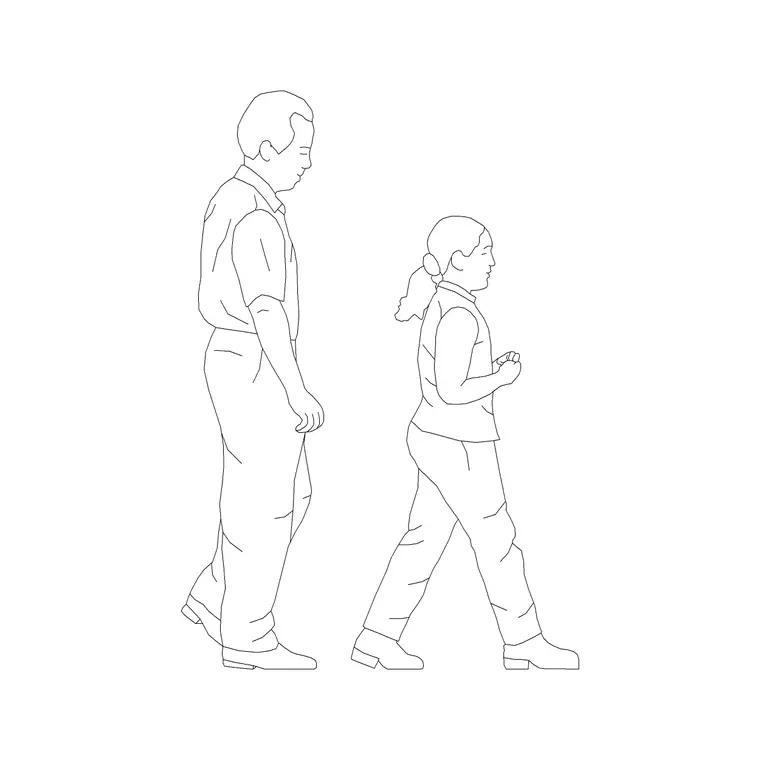
An adult-and-child pair carries a specific, useful contrast: the standard reference height standing right next to the lower child scale, in one composed block. The father and daughter figure is exactly that — a man and a child arranged together — and it does double duty as a scale device and a story about who a home or family space is for. This page provides a free father and daughter figure CAD block in DWG and DXF, drawn in elevation and ready to insert in AutoCAD 2004 or later, free for personal and commercial use with no signup or watermark.
The pairing is what makes the block valuable. Putting an adult and a child side by side in a single object means the two reference heights are locked together, so any counter, rail or window you draw them against is checked against both adult and child reach at once. For residential architects and family-space designers, that is a quietly efficient correctness check wrapped in a warm, presentable image.
What the father and daughter block shows
The block is two elevation figures composed as a pair — an adult man and a child, standing close with the natural height step between them. The composition reads as a parent and child rather than as two unrelated people, with spacing and stance that suggest they are together. It is drawn as a clean silhouette pair so it scales and animates the drawing without clutter.
As a single block reference the pair inserts and moves as one, keeping the adult-to-child relationship intact wherever you place it. That is the advantage over two separate figures: the height contrast and the spacing are built in, so the parent-and-child read survives every time you drag, mirror or copy the block, and one edit updates it across the project.
Homes, gardens and family-oriented spaces
The father and daughter pair suits domestic and family briefs. In a house elevation it tells the client the home is drawn for a family and sets the scale of doors, windows and garden features in one move. In a garden or landscape view it animates a path or lawn while checking the scale of fences, steps and play features against both adult and child. In family commercial spaces — a clinic, a family café, a leisure centre — it communicates the intended audience directly.
The built-in height contrast also makes the pair a strong scale device. Two reference points of very different height fix the scale of an elevation more firmly than a single figure, and the human warmth of a parent and child reads better in a presentation than an anonymous measuring stick. One well-placed pair can carry both scale and atmosphere.
Adult and child heights to design around
The adult is at standard adult scale — commonly around 1700 to 1800 mm at the design stage — and the child sits well below, at a height that reads as a young child rather than a small adult. Both are design-stage ranges to read the architecture against, not fixed dimensions, and any critical child reach should be confirmed against the relevant guidance for the age you are designing for.
Keep both figures uniform and full size; never stretch one to change the height step, as that breaks the believable proportion that makes the pair work. Set INSUNITS to millimetres so AutoCAD rescales on insertion if needed, and mirror the whole block, not one figure, when you want the pair to face the other way so the composition stays intact.
Placing the pair in AutoCAD
INSERT the block and snap the feet of both figures to your floor or ground line with endpoint OSNAPs so the pair stands on the surface. The spacing and height step are built in, so you place the pair as a single object — by a door, on a path, beside a counter — and the composition does the rest. Use MIRROR on the whole block to flip the pair's facing.
Keep the pair on a dedicated scale-figure layer, screened or non-plotting for presentation-only use, so it shows in client PDFs but can be removed for construction issue. Maintain one master block so a single change updates every instance, and avoid exploding it, which would let the adult and child drift out of their composed relationship.
Free download
Browse the full library — DWG & DXF, no signup.
Questions
Frequently asked
What does the father and daughter block contain?+
An adult man and a child composed as a pair in elevation, with the natural height step and spacing that read as a parent and child. The relationship is built into the block, so it stays intact wherever you place it.
Why use it instead of a separate adult and child?+
The pair locks the adult-to-child height contrast and spacing into one object, so the parent-and-child read survives every move and one edit updates it everywhere. It is also a quick dual-scale check against counters and rails.
How are the two heights set?+
The adult is at standard scale, commonly around 1700 to 1800 mm at the design stage, and the child sits well below at a young-child height. Treat both as ranges and don't stretch either figure to change the step.
Is it free to use in client drawings?+
Yes. The DWG and DXF download is free for personal and commercial use with no signup, watermark or attribution, so it can go directly into residential and family-space presentations.
Can it check child reach as well as scale?+
Yes — stand the pair beside a worktop, rail or window and read both adult and child reach off the elevation at once. Confirm any critical child reach against the appropriate guidance for the age group.
Related downloads
Blocks for this guide
Popular blocks to download
Related categories
Related guides
Block landing
Human Figure Plan CAD Blocks — Free DWG
Download free human figure plan-view CAD blocks in DWG — people seen from above, drawn to scale for floor plans and circulation. AutoCAD 2004+, no signup.
Block landing
Human Figure Elevation CAD Blocks — Free DWG
Free human figure elevation CAD blocks in DWG — people drawn front-on and in profile to scale your sections and streetscapes. AutoCAD 2004+, no signup.
Block landing
Standing Person Scale Figure CAD Blocks (Free)
Free standing person scale figure CAD blocks in DWG — clean, true-height figures to set the scale of plans, sections and elevations. AutoCAD 2004+, no signup.