Block landing · family group figure cad block
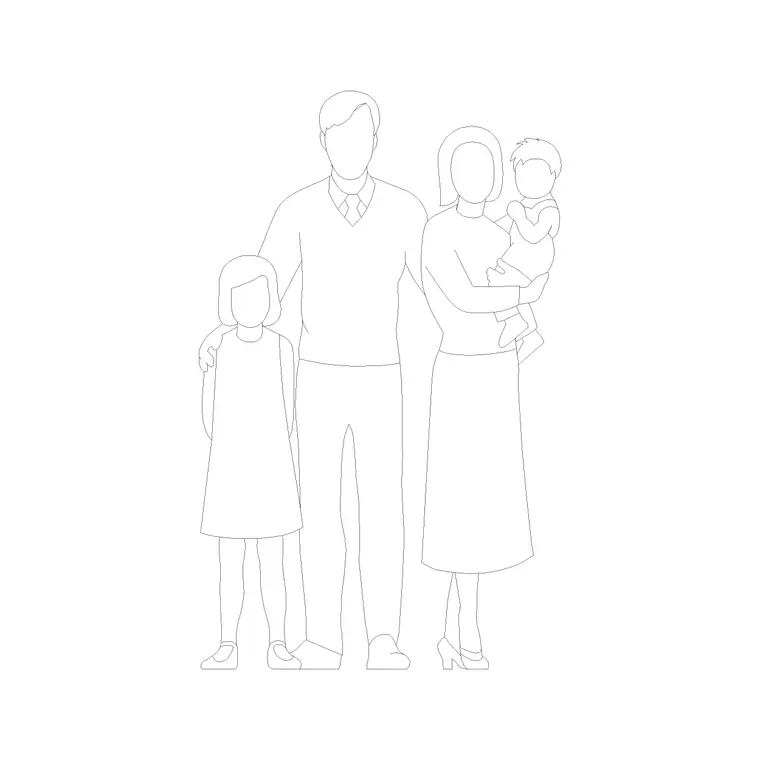
Free family group figure CAD block for scene drawings
By Saumyajit Maity · Published 13 Mar 2022 · Updated 26 Apr 2026
Some drawings need to say who a building is for, and nothing says family like a family. The family group figure is a pre-composed cluster of adults and a child you drop into a residential elevation, a park view or a family-oriented commercial space to show, at a glance, the people the design is meant to serve. This page provides a free family group figure CAD block in DWG and DXF, drawn in elevation as a believable family group and ready to insert in AutoCAD 2004 or later, free for personal and commercial use with no signup or watermark.
A family group works because it carries scale and meaning at once. The adults give you the standard reference height, the child gives you the lower scale, and the grouping itself reads as a household rather than as a row of measuring sticks. For residential architects, landscape designers and anyone presenting a home or a family venue, that single block does the work of several individual figures while looking composed instead of assembled.
What the family group block includes
The block is a small cluster of figures in elevation — commonly two adults with a child between or beside them — arranged with natural spacing and a clear height progression from adult to child. The composition is the point: the figures are placed to read as a family unit, with the kind of slight overlap and varied stance that real groups have. It is drawn as clean silhouettes so the group scales the architecture without distracting from it.
As a single block reference, the whole family moves and inserts together, keeping its internal arrangement intact. That is the advantage over assembling individuals: you get a finished, believable group in one action, and a single edit to the master updates the family wherever it appears in the project.
Homes, parks and family venues
The family group belongs in any brief about households and family life. In a residential elevation it tells the client the home is drawn for the people who will live there, and it sets the scale of doors, windows and garden walls in one move. In landscape and park design a family group animates a lawn, a path or a play area and shows the space being used as intended. In family-focused commercial spaces — a family restaurant, a leisure centre, a clinic waiting room — the group communicates the audience instantly.
The mixed heights also make the group a strong scale device. With adults and a child in one cluster you get several reference points, so the height of a counter, a fence or a piece of play equipment reads confidently. One well-placed family can carry both the scale and the story of a presentation drawing.
Group composition and figure heights
Each figure is drawn at its own true scale, so the adults read at roughly 1700 to 1800 mm and the child sits well below that, with the exact heights treated as design-stage ranges to check the architecture against rather than fixed values. The spacing within the group is composed for a natural, slightly informal arrangement — close enough to read as together, varied enough to avoid looking like a parade.
Keep the group uniform and full size; never stretch individual figures to change the height relationships, as that destroys the believable proportion that makes a family read as a family. Set INSUNITS to millimetres so AutoCAD rescales on insertion if needed, and if you want the group to face the other way, mirror the whole block so the composition flips together.
Placing the family group in AutoCAD
INSERT the block and snap the feet of the group to your floor or ground line using endpoint OSNAPs so the whole family stands on the surface. Because the arrangement is built in, you position the cluster as a single object — on a path, in a garden, beside an entrance — and let the composition do the work. Use MIRROR on the whole block to flip the group's facing.
Place the family on a dedicated scale-figure layer, screened or non-plotting for presentation-only use, so it appears in client PDFs but can be turned off for construction. Keep one master block to maintain consistency across the sheet, and avoid exploding it, which would let the figures drift out of their composed spacing and lose the family read.
Building larger populated scenes
A family group is an excellent anchor for a busier scene. Add a couple, a pair of friends or a few single figures around it to populate a park or a plaza, or place several family groups at varied distances for a leisure or retail setting. For a top-down site or floor plan you want plan-view people instead, kept on their own block so the elevation and plan never mix.
The full people category brings together families, couples, groups, children and single figures so you can assemble a complete, consistent cast. Keep the family group in the same drawing as your other figures so they all share insertion scale and layer conventions, and the populated scene reads as one coherent crowd rather than a patchwork.
Free download
Browse the full library — DWG & DXF, no signup.
Questions
Frequently asked
Who is in the family group figure?+
Typically two adults and a child, composed as a believable family cluster with natural spacing and a clear adult-to-child height progression. The arrangement is built into the block so the group reads as a household, not a row of figures.
Can I add or remove a person from the group?+
Keep the block intact for the composed look. If you need a different make-up, place additional single, child or couple figures alongside it rather than exploding the family block, which would scatter its spacing.
How are the heights set?+
Each figure is at its own true scale — adults around 1700 to 1800 mm and the child well below — with those treated as design-stage ranges. Don't stretch figures to change heights; uniformly scale or swap blocks if you need different statures.
Is the family group free for commercial use?+
Yes. The DWG and DXF download is free for personal and commercial use with no signup, watermark or attribution, so it can go directly into residential, landscape and family-venue drawings.
Does it work for park and landscape drawings?+
Very well — a family group animates lawns, paths and play areas and sets the scale of fences and equipment. Place several groups at varied distances to populate a larger landscape scene believably.
Related downloads
Blocks for this guide
Popular blocks to download
Related categories
Related guides
Block landing
Human Figure Plan CAD Blocks — Free DWG
Download free human figure plan-view CAD blocks in DWG — people seen from above, drawn to scale for floor plans and circulation. AutoCAD 2004+, no signup.
Block landing
Human Figure Elevation CAD Blocks — Free DWG
Free human figure elevation CAD blocks in DWG — people drawn front-on and in profile to scale your sections and streetscapes. AutoCAD 2004+, no signup.
Block landing
Standing Person Scale Figure CAD Blocks (Free)
Free standing person scale figure CAD blocks in DWG — clean, true-height figures to set the scale of plans, sections and elevations. AutoCAD 2004+, no signup.