Block landing · disabled person figure cad block
Free disabled person figure CAD block for access checks
By Sumana Kumar · Published 18 Jun 2026 · Updated 28 Jun 2026
Accessibility is the one area of a drawing where a figure stops being decoration and becomes a compliance tool. The disabled person figure — typically a wheelchair user shown in elevation — lets you test reach, clearance and sightlines against a real seated-mobility envelope rather than assuming an able-bodied standing adult. This page offers a free disabled person figure CAD block in DWG and DXF for AutoCAD 2004 or later, free for personal and commercial use with no signup or watermark.
The block matters because so much of what goes wrong with access is invisible to an able-bodied check. A counter that an adult reaches comfortably can be unusable from a seated position; a switch at standing height is out of reach from a wheelchair. Placing a wheelchair-user figure against a counter, a switch, a basin or a doorway shows the seated reach and the wheelchair footprint directly, which is why architects and access consultants keep one in their figure set for inclusive design.
What the disabled person figure shows
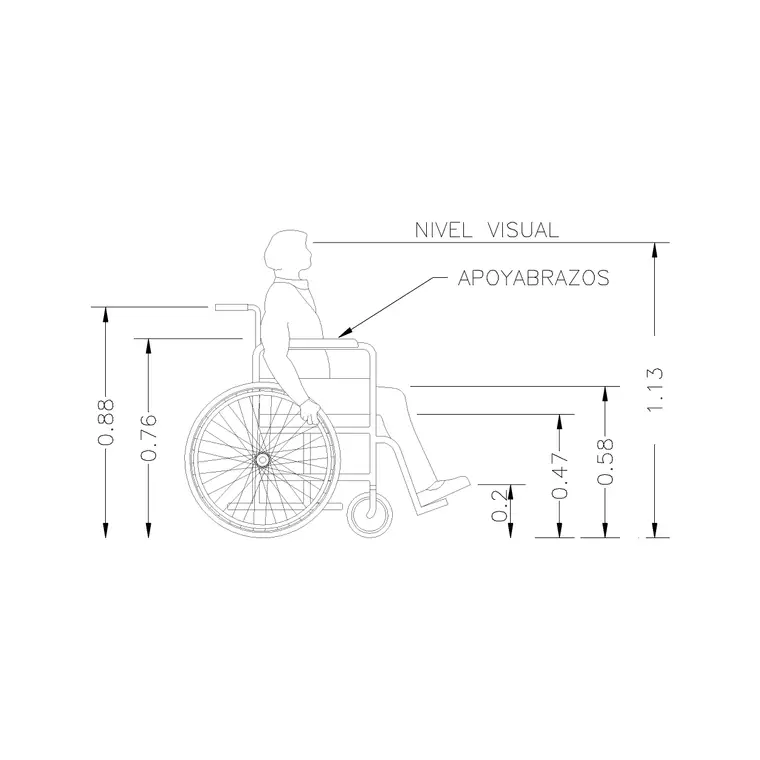
The block is an elevation of a wheelchair user — a seated person in a wheelchair, drawn as a recognisable side or front profile that captures the seated eye line, the forward reach and the chair's footprint. It is drawn as a clean silhouette so it can be placed against fittings and openings to read seated reach and clearance directly. The figure represents the seated-mobility envelope that able-bodied figures simply do not.
Because it is a single block reference, you insert one instance against each fitting or opening you need to test. As a block it never needs redrawing, so a single wheelchair user checks a whole run of counters, switches and doors, and editing the master updates every instance, keeping an access review consistent across the sheet.
Reach, clearance and access checks
The figure is a working tool for inclusive design. Against a reception or kitchen counter it shows whether the worktop and any knee recess suit a seated user. Against a wall it reads the seated forward and side reach to switches, sockets, controls and grab rails. In a doorway or corridor it shows the wheelchair footprint so you can check effective clear width and turning space, and in a WC or bathroom it tests transfer space and fitting positions.
Used this way, the figure surfaces problems before site does. A switch drawn at standing height, a counter with no knee clearance, a door too narrow for the chair — each shows up plainly with the figure in place. It is the difference between assuming a space is accessible and demonstrating it on the drawing.
Seated reach and wheelchair dimensions
The figure represents a seated wheelchair user, so the useful dimensions are the seated eye line, the reach envelope and the chair footprint. As a design-stage guide, a seated user's eye line commonly falls somewhere around 1100 to 1300 mm, comfortable forward reach often lands in the region of a low-to-mid wall height, and a self-propelled wheelchair footprint is commonly taken as roughly 700 to 1200 mm in plan; treat all of these as ranges and, crucially, confirm every access dimension against the accessibility standard or building regulation that applies to your project.
This is the one figure where you should not rely on the block alone for compliance. Use it to visualise and sanity-check seated reach and clearance, then verify the actual figures against the relevant accessibility code. Keep the block full size, set INSUNITS to millimetres, and never stretch it, as distorting an access figure defeats its purpose.
Placing the figure for an access review
INSERT the block and snap the wheel contact to your floor line with an endpoint OSNAP so the chair sits on the surface. Place it against each fitting in turn — counter, switch, basin, grab rail — and read the seated reach off the elevation. In plan, place the wheelchair footprint at door openings and in turning areas to check clear width and manoeuvring space. Mirror the block with MIRROR for an approach from the other side.
Keep the access figure on a clearly named layer so a reviewer can find every check at a glance, and consider leaving it visible on access-statement drawings rather than treating it as presentation-only. Maintain one master block for consistency, and pair the elevation reach checks with plan footprint checks so both reach and clearance are demonstrated.
Using it alongside other figures
A wheelchair user reads most clearly alongside a standing figure, because the contrast between standing and seated reach is the heart of an inclusive design check. Place the two against the same counter or wall to show the range of users a fitting must serve. Add ambulant figures with the wheelchair user to represent a realistic mix of mobility in a public space.
The full people category collects standing, seated, walking and accessibility figures so you can build an inclusive, consistent cast. Keep the disabled person figure in the same drawing as your other people so they share insertion scale and layer conventions, and your access checks sit naturally within the wider populated scene.
Free download
Browse the full library — DWG & DXF, no signup.
Questions
Frequently asked
Does the figure prove a space is compliant?+
It helps you visualise and sanity-check seated reach and clearance, but it does not replace the standards. Always confirm every access dimension against the accessibility code or building regulation that applies to your project.
What does the block represent?+
A wheelchair user shown in elevation — a seated person in a wheelchair capturing the seated eye line, reach envelope and chair footprint. It represents the seated-mobility user that able-bodied figures don't.
Can I use it for door and corridor widths?+
Yes — place the wheelchair footprint in plan at openings and turning areas to check effective clear width and manoeuvring space. Verify the resulting dimensions against the relevant accessibility standard.
Is the figure free to use in access drawings?+
Yes. The DWG and DXF download is free for personal and commercial use with no signup, watermark or attribution, so it can go directly into access statements and inclusive-design drawings.
Should I stretch it to match my chair model?+
No — distorting an access figure defeats its purpose. Keep it full size and uniform, and if you need a specific wheelchair envelope, model that separately and confirm it against the applicable standard.
Related downloads
Blocks for this guide
Popular blocks to download
Related categories
Related guides
Block landing
Human Figure Plan CAD Blocks — Free DWG
Download free human figure plan-view CAD blocks in DWG — people seen from above, drawn to scale for floor plans and circulation. AutoCAD 2004+, no signup.
Block landing
Human Figure Elevation CAD Blocks — Free DWG
Free human figure elevation CAD blocks in DWG — people drawn front-on and in profile to scale your sections and streetscapes. AutoCAD 2004+, no signup.
Block landing
Standing Person Scale Figure CAD Blocks (Free)
Free standing person scale figure CAD blocks in DWG — clean, true-height figures to set the scale of plans, sections and elevations. AutoCAD 2004+, no signup.