Block landing · decorative plate cad block dwg
Free decorative plate CAD block in DWG
By Sumana Kumar · Published 9 Oct 2023 · Updated 21 Mar 2026
A decorative plate CAD block is a small tableware prop that works two ways: laid flat as part of a place setting in a plan, or shown face-on as a decorative wall plate in an elevation. Either way it adds the styling detail that turns a bare dining layout into a drawing that reads as a set table or a dressed display. This page offers it as a free DWG, ready for AutoCAD and any compatible viewer.
The block is free for personal and commercial drawings — no signup, no watermark, no attribution. It belongs to the styling layer of a drawing, the props you add once the furniture and joinery are placed, and it pairs naturally with the cutlery, fruit and glassware blocks in the same library to build a believable table or counter scene.
Two ways the plate block is used
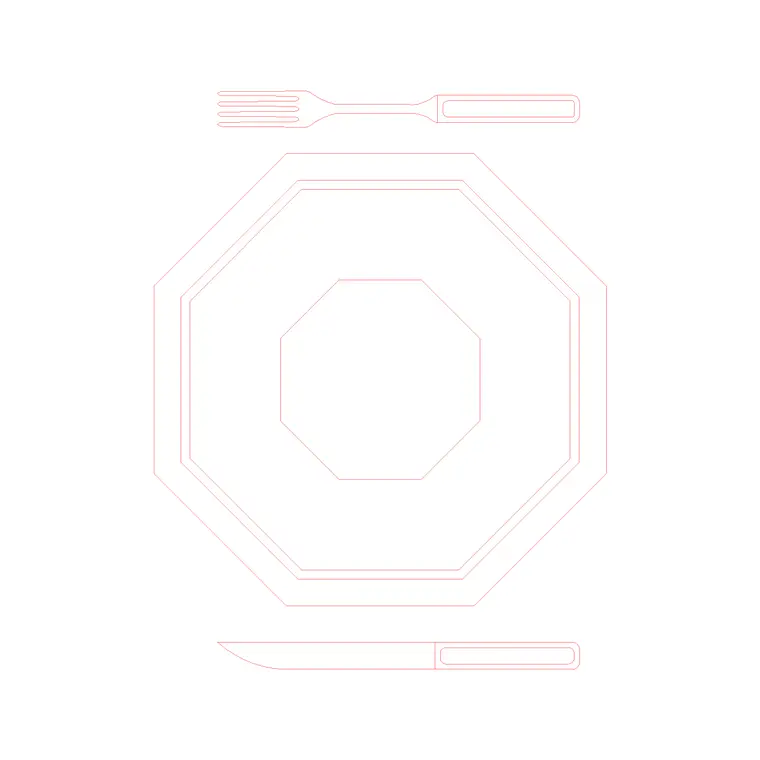
As a plan symbol, the plate is a circle (sometimes a concentric pair of circles showing the rim) laid flat to mark a cover at a dining table — one plate per seat in a banquet or restaurant layout. As an elevation or face-on prop, the same circular form becomes a decorative wall plate or a plate on a stand in a dresser or display.
Knowing which role you need decides how you place it. In plan, the plate sits on the table outline at each seat; in elevation, it sits on a shelf line or hangs on a wall face. The block is simple enough to serve both roles cleanly.
Typical sizing to design around
A dinner plate is commonly somewhere around 250–290 mm in diameter, a side or starter plate nearer 180–220 mm, and a charger or display plate larger still. Treat those as ranges and scale the block to the cover or display you are drawing.
For a place setting, draw the plate centred on each seat with enough table edge in front to read as a cover. For a wall display, scale the plate to the wall it dresses and arrange several at varied sizes for a gallery effect. SCALE from the centre so the plate grows evenly.
Where a decorative plate block is used
Use it in restaurant and banquet table layouts, hotel dining and buffet plans, cafe and bistro drawings, residential dining-room and kitchen elevations, and decorative wall-display and dresser elevations. In a place-setting detail it pairs with cutlery and a glass; on a wall it becomes a feature plate arrangement.
A single plate per cover, repeated around a table, is a clean way to show a set dining layout. For a dresser or display wall, a cluster of plates at different sizes reads as a styled collection rather than a uniform grid.
How to insert and place the block
The DWG is drawn full size in millimetres. Insert at scale 1 in a millimetre drawing, 0.001 in a metre template, or set INSUNITS to millimetres so AutoCAD rescales on insertion. Run INSERT, browse to the file and pick the centre of the plate as the insertion point.
For a plan place setting, snap the centre to each cover position on the table. For a wall display, place the plate on the wall face or a shelf line and SCALE from the centre to vary sizes. Because it inserts as a single block reference, repeating covers around a table is a few quick copies or an array.
Building a place setting or display
A plate rarely sits alone. For a place setting, combine it with the plate-with-cutlery and fruit-plate blocks plus a glass to build a full cover, then array that cover around the table. For a wall or dresser display, cluster plates of different sizes and mix in fruit and jar props for variety.
Keep all of these on a styling layer so you can freeze the tableware for a clean furniture plan and thaw it for the dressed presentation. When a place setting works, WBLOCK the whole cover as one reusable unit and array it around any dining layout in seconds.
Layering and reuse
Put tableware and decorative plates on a dedicated styling layer, separate from the table and joinery geometry. That separation lets you issue both a technical furniture plan and a dressed presentation from the same drawing without duplicating anything.
Giving the props their own colour and lineweight also keeps them from competing with table dimensions and circulation notes. On the final sheet, the plates then read as the styling they were meant to be rather than clutter over the technical information.
File format, compatibility and licensing
The plate is a native DWG, so whether you use it as a place-setting symbol or a wall display it inserts without any conversion. It opens in current AutoCAD and AutoCAD LT, in BricsCAD and DraftSight, and in free online DWG viewers for a quick look. A DXF version, where available, covers the occasional package that prefers that interchange format.
The licence asks nothing of you: free for personal and commercial use, no signup, no watermark and no attribution. A restaurant banquet plan, a hotel dining layout or a residential dresser elevation can all use it without tracking credits. You can edit the rim detail, recolour the plate or scale it for chargers and side plates, and the result carries freely into any project drawing.
Free download
Browse the full library — DWG & DXF, no signup.
Questions
Frequently asked
Is the decorative plate CAD block free for commercial use?+
Yes. It is a free DWG download with no signup, no watermark and no attribution, cleared for commercial project drawings.
Can I use the plate both in plan and as a wall display?+
Yes. As a plan symbol it marks a cover at a dining table; face-on it serves as a decorative wall plate or a plate on a stand in an elevation.
What diameter should I scale it to?+
A dinner plate is commonly around 250–290 mm and a side plate smaller; scale the block from the centre to suit the cover or display. Treat dimensions as adjustable ranges.
Will it open in AutoCAD LT and free viewers?+
Yes. The DWG targets AutoCAD 2004 and later, opening in AutoCAD, AutoCAD LT, BricsCAD, DraftSight and free online DWG viewers.
Related downloads
Blocks for this guide

Related categories
Related guides
Block landing
Free Classical Column CAD Blocks — DWG Download
Download free classical column CAD blocks in DWG — shaft, capital and base drawn in elevation and plan for AutoCAD. No signup, free for commercial use.
Block landing
Free Greek & Ionic Column CAD Blocks — DWG
Free Greek and Ionic column CAD blocks in DWG — fluted shafts and volute capitals drawn in elevation for AutoCAD. No signup, free for commercial use.
Block landing
Free Decorative Arch CAD Blocks — DWG Download
Download free decorative arch CAD blocks in DWG — round, segmental and classical archways drawn in elevation for AutoCAD. No signup, free for commercial use.