Block landing · corner kitchen sink cad block
Corner kitchen sink CAD block in DWG and DXF
By Sumana Kumar · Published 16 Jul 2022 · Updated 2 Feb 2026
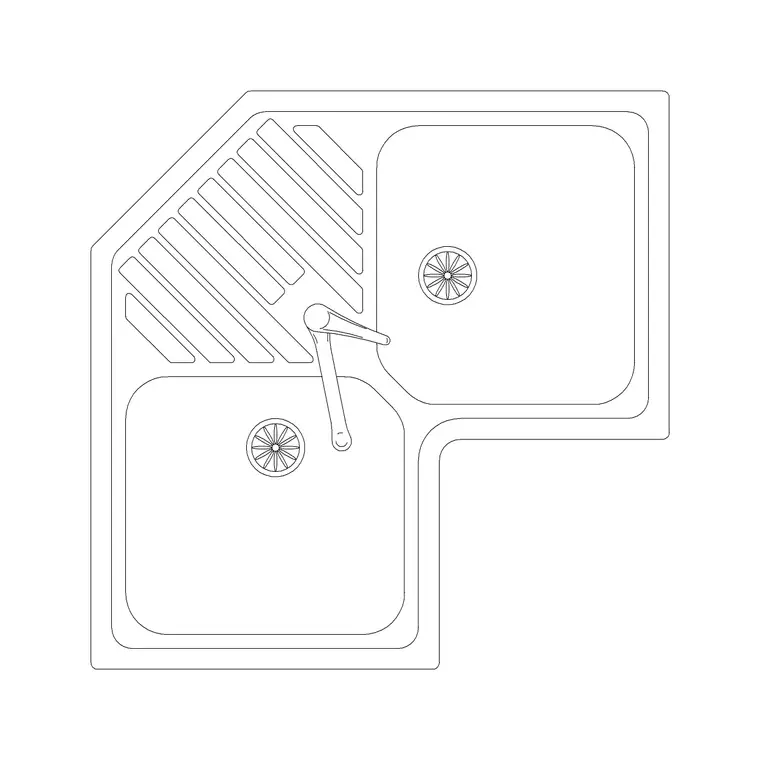
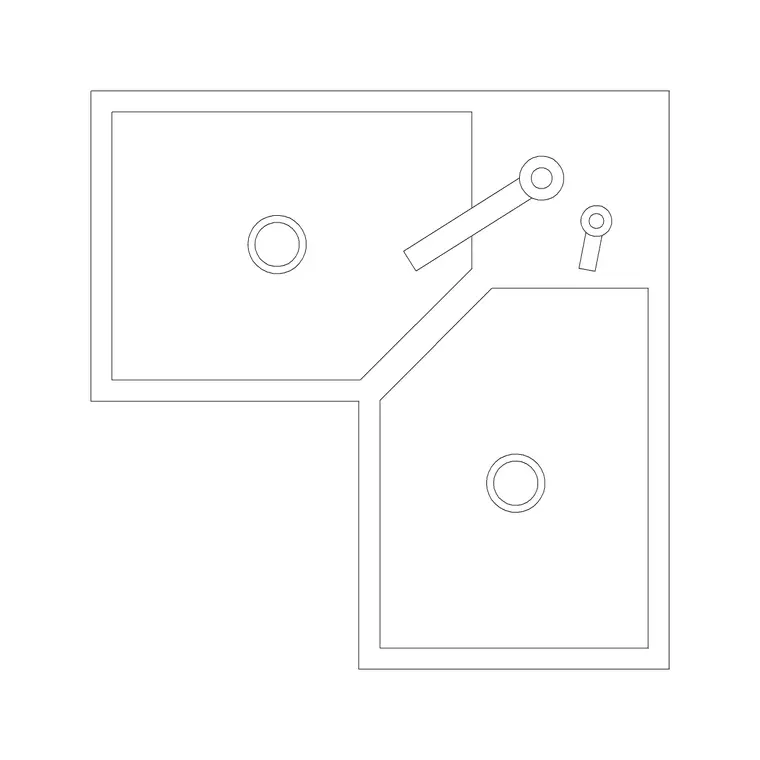
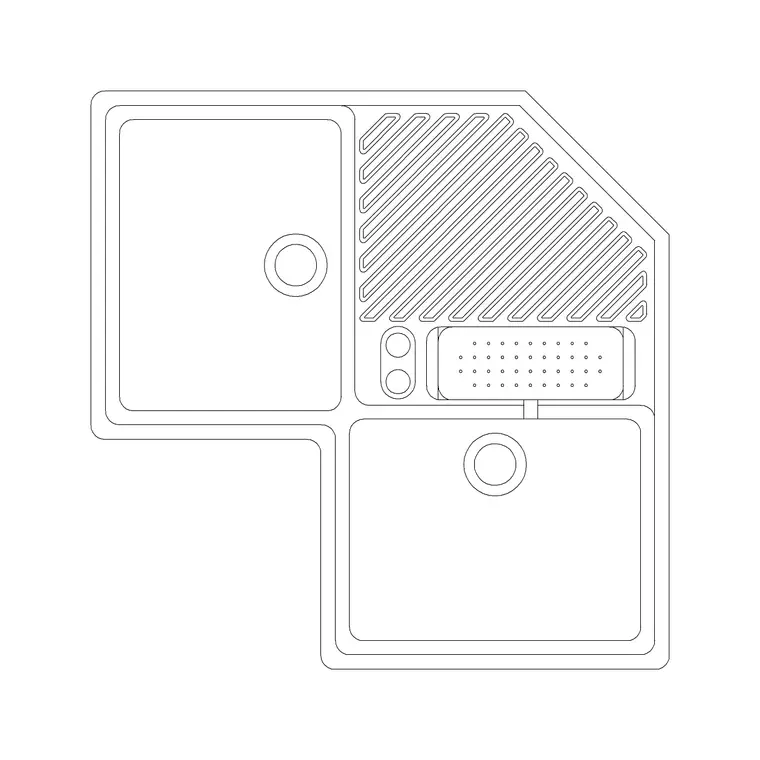
A corner kitchen sink tucks the wet zone into the 90-degree junction where two worktop runs meet, freeing up the straight runs for prep and appliances and making good use of an otherwise awkward corner cabinet. The bowls — often two, set at an angle to each other or sharing an L-shaped basin — follow the diagonal of the corner. Getting this block to scale is what tells you whether the sink clears both worktop returns and whether the tap, set in the corner, has room to swing. This page gives you a free corner kitchen sink CAD block in DWG and DXF, drawn at true millimetre dimensions for AutoCAD 2004 or later, free for personal and commercial work with no signup or watermark.
Because a corner sink straddles two runs, its footprint is more complex than a straight unit, and a scaled block saves real time. Drop it into the corner of a plan and you can read at once how it sits against both walls, how the corner base cabinet has to be configured, and where the door and access into that cabinet fall.
What a corner sink block shows
A corner sink block represents an L-shaped or angled twin-bowl basin set across the corner where two worktops meet. In plan you see the two bowls following the corner diagonal, the shared or central tap deck, and the rim line where the sink meets each worktop run. The L-shape or angled arrangement is the defining feature and is what makes the block different from a straight double sink.
It is built as a single block reference so the whole corner assembly moves and rotates together. Because the geometry is handed to the corner, you choose the orientation on insertion and rotate to match which way the L opens. The bowls, divider and tap are drawn as sensible sub-elements so you can recolour the cut-out for a joinery drawing or freeze detail for a general arrangement plan.
Views and orientation
The plan view is the working view, since the whole point of a corner sink is how it occupies the corner in a layout. Where an elevation is supplied it shows the bowl depths and the tap, but the geometry that matters — the L across the corner — is read in plan.
Orientation is everything with a corner unit. The block is drawn for one corner hand; for the opposite corner, MIRROR it rather than re-inserting, and rotate as needed so the bowls open into the room and the tap sits in the angle. Keep the tap separate so you can choose a tall mixer that clears the corner backsplash from the faucet category.
Typical corner sink sizes to design around
Use these as ranges to plan with. A corner sink spans both worktop returns, so each leg of the L commonly reaches into the region of 800–1000 mm along its run, with the bowls sized to sit within the depth of a 600 mm worktop on each side. Bowl depth is similar to a standard sink, often about 150–220 mm.
The corner base cabinet beneath is the constraint to watch: corner units are wide and their access is restricted, so confirm the sink footprint matches a real corner carcass and that the cabinet door or the diagonal access into it is workable. Leave standing room at the angle, and remember the tap in the corner needs clearance from any return wall or window reveal.
How to insert, scale and place the block
The block is drawn full size in millimetres. Insert at scale 1 in a millimetre drawing, 0.001 in a metre drawing, or set INSUNITS to millimetres to let AutoCAD rescale an imperial template on insertion. Use INSERT or drag the DWG from a tool palette.
Snap the insertion to the inside corner where the two worktops meet so the sink registers against both runs cleanly, then rotate to seat the L correctly. If the corner is the other hand, MIRROR the block. Put it on a sanitary-ware layer so you can freeze it for a shell plan and thaw it for a fitted plan, and use BEDIT once if you need to adjust the bowl split or tap and have all instances follow.
Where corner sinks are used
Corner sinks suit L-shaped and U-shaped kitchens where the corner would otherwise be dead storage, compact apartment kitchens that need every run for appliances, and utility rooms with a tight footprint. By moving the wet zone into the angle, they keep the straight runs clear for the hob, prep space and undercounter appliances.
Plan the corner sink with the worktop returns and the corner cabinet first, then arrange the cooking and storage along the straight runs. Pair the block with the hob, oven, dishwasher and cabinet blocks in the kitchen set, and keep the sanitary-ware and joinery on layered drawings so the corner detail reads clearly without cluttering the general plan.
Free download
Browse the full library — DWG & DXF, no signup.
Questions
Frequently asked
What is a corner kitchen sink?+
It is an L-shaped or angled twin-bowl sink set across the 90-degree corner where two worktop runs meet, using the corner cabinet so the straight runs stay free for prep and appliances.
Will the corner sink block fit either corner hand?+
The block is drawn for one corner hand. For the opposite corner, MIRROR it after inserting and rotate so the bowls open into the room and the tap sits in the angle.
What cabinet does a corner sink need?+
A corner base cabinet, which is wide with restricted diagonal access. The block is true-scale, so check the sink footprint against a real corner carcass and confirm the cabinet access is workable.
Is the corner sink CAD block free for commercial use?+
Yes. It downloads free in DWG and, where available, DXF, with no signup, watermark or attribution, and it is cleared for commercial project drawings.
Related downloads
Blocks for this guide

Related categories
Related guides
Block landing
Free Sanitary Fixtures CAD Blocks — DWG Download
Download free sanitary fixtures CAD blocks in DWG and DXF — WCs, wash basins, urinals and sinks in plan and section for AutoCAD sanitary plans.
Block landing
Free Kitchen Faucet / Mixer Tap CAD Block — DWG
Download free kitchen faucet and mixer tap CAD blocks in DWG and DXF — monobloc and pull-out mixers in plan and elevation. No signup, commercial OK.
Block landing
Free Kitchen Sink Unit CAD Block — DWG Download
Download free kitchen sink unit CAD blocks in DWG and DXF — single, double and 1.5-bowl sinks with drainers in plan and section. AutoCAD 2004+, no signup.