Block landing · corinthian column cad block dwg
Corinthian column CAD block for AutoCAD
By Saumyajit Maity · Published 27 Sep 2023 · Updated 1 Jan 2026
The Corinthian column is the most ornate of the classical orders, and its acanthus-leaf capital is fiddly to draw from scratch, so a ready-made Corinthian column CAD block earns its place in any classical library. This free DWG gives you the slender fluted shaft and the bell-shaped, foliage-carved capital drawn to scale, ready to insert into AutoCAD 2004 or later. It is free for personal and commercial use, with no signup, watermark or attribution required.
Reach for it whenever a facade calls for richness rather than restraint: grand civic buildings, theatres, churches, hotel lobbies and the show fronts of period houses. Because the block is correctly proportioned, you can set a colonnade rhythm and align capitals to an entablature without fighting the geometry — the hard part, the acanthus capital, is already done.
What makes the Corinthian block different
The Corinthian order is recognised by its capital: two staggered rows of acanthus leaves rising into small volutes (helices) at the corners, crowned by a concave-sided abacus. That detail is what people most want from this block, because it is slow to draw cleanly and easy to get wrong. The shaft below is tall and slender — Corinthian is the most attenuated of the orders — and is usually fluted, with the flutes sometimes filled (cabled) in the lower third on richer examples.
The block is supplied as 2D elevation linework, so the leaves, volutes and flutes are editable curves rather than a flattened image. You can hatch the shaft, simplify the capital for a small-scale plan, or enrich it for a 1:10 detail.
Views and what you get
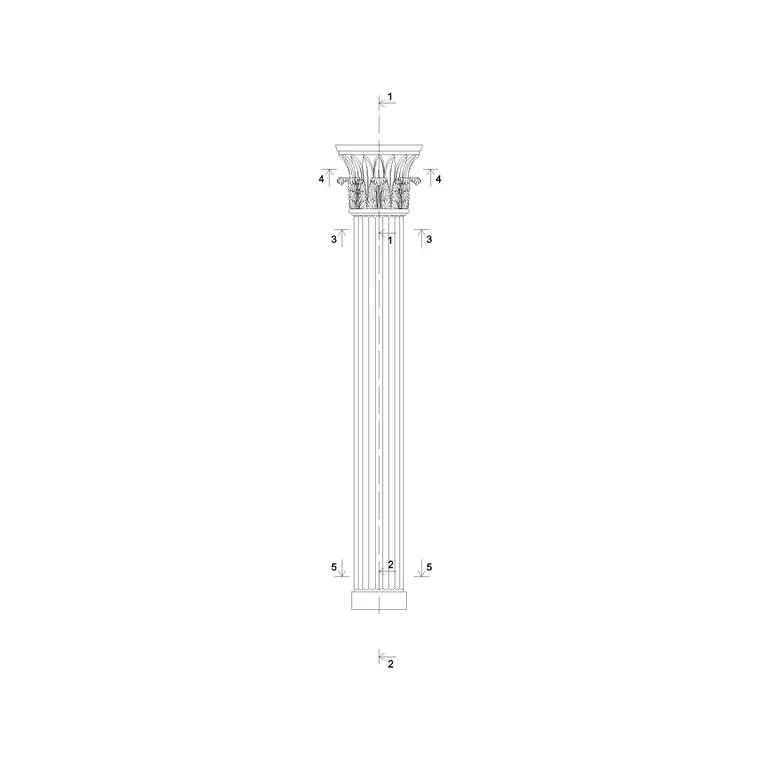
This download is the front elevation — the full column from base to abacus, the view that shows the Corinthian proportion and the leafy capital head-on. It is the right view for facades, porticos and colonnades drawn in elevation.
If you also need the footprint to array a colonnade, combine it with a round column plan block; for a section through the shaft, use a column cross section. Building those three views on one centreline gives you a coordinated set. The capital is the part most worth keeping as a reusable component, so many people WBLOCK just the capital out of this drawing to reuse on pilasters and engaged columns elsewhere in the same scheme.
Proportions and sizing to work to
Corinthian columns are tall for their width: the shaft commonly runs around 9–10 lower diameters in height, and the capital itself is roughly a full lower diameter tall, taller than the Doric or Ionic cap. So a column with a 500 mm lower diameter might stand near 5 m to the top of the shaft, with the capital adding around another 500 mm.
Decide the lower shaft diameter first, scale the whole block to it, and the capital, base and flute spacing follow because they were drawn in proportion. Internal Corinthian columns and pilasters in lobbies often sit in the 250–450 mm diameter range; external portico columns can be much larger. Use these as design ranges and confirm the final size against your own setting-out and any structural core.
Inserting and scaling in AutoCAD
The block is full-size in millimetres. Insert at scale 1 in a millimetre drawing; use 0.001 for a metre template, or set INSUNITS to millimetres in an imperial drawing so AutoCAD converts on insertion. Run INSERT, browse to the DWG, snap the insertion point to the base centre at floor level, and place it on the column line.
Keep the column on a dedicated layer so you can isolate the order from the wall behind. For a colonnade, ARRAY at the exact bay centres rather than copying by hand. The acanthus capital carries a lot of vertices, so if a long colonnade feels heavy, keep the rich capital on the presentation sheet and substitute a simplified capital block on working drawings, then swap back for the final issue.
Where the Corinthian order belongs
Use it where the brief wants grandeur: state buildings, courthouses, banks, opera houses, cathedral fronts and the most formal house facades. Interior designers apply it to double-height lobbies, ballrooms and feature fireplaces; engaged Corinthian columns and pilasters frame doorways and panelled walls. Set and exhibition designers reach for it because the silhouette instantly signals classical wealth.
It also belongs in restoration and survey drawings of period buildings, where you need an accurate, proportioned Corinthian column to record against. Because it is licence-clear, it goes onto student boards and competition panels with no sourcing worry. Combine it with entablature, cornice and arch blocks from the same family to build a fully enriched classical facade.
Tips for editing the capital
The acanthus capital is the part you will most often adapt. For a smaller drawing scale, thin or merge the inner leaf detail so it does not turn into a black blob when plotted. For a richer detail, you can fill the lower flutes (cabling) and add the small rosette that traditionally sits on the abacus face. Keep the leaves, volutes and abacus on their own sub-layers within the block so you can control lineweight per element.
If you build a refined version, save it back into the block with BEDIT so every instance updates, or WBLOCK the capital alone for reuse on pilasters. Mirroring the capital for the opposite face of a corner pilaster is a quick way to wrap the order around a return without redrawing the leaves.
Free download
Browse the full library — DWG & DXF, no signup.
Questions
Frequently asked
Does this block include the acanthus-leaf Corinthian capital?+
Yes. The defining feature of the order — the two rows of acanthus leaves and corner volutes under a concave abacus — is drawn as editable elevation linework so you can simplify or enrich it for your drawing scale.
Is the Corinthian column block free to use commercially?+
It is. The DWG downloads free with no signup, no watermark and no attribution requirement, and it is cleared for commercial as well as personal and student projects.
How tall should I make the column relative to its width?+
Corinthian is the slenderest order — the shaft runs roughly 9 to 10 lower diameters tall, with a capital about a diameter high. Set your lower shaft diameter and scale the block to it, and the height follows in proportion.
Can I reuse just the capital on a pilaster?+
Yes. WBLOCK the capital out of the drawing and place it on a flat pilaster shaft. Mirroring it lets you wrap the same capital around a corner pilaster without redrawing the leaves.
Related downloads
Blocks for this guide
Related categories
Related guides
Block landing
Free Classical Column CAD Blocks — DWG Download
Download free classical column CAD blocks in DWG — shaft, capital and base drawn in elevation and plan for AutoCAD. No signup, free for commercial use.
Block landing
Free Greek & Ionic Column CAD Blocks — DWG
Free Greek and Ionic column CAD blocks in DWG — fluted shafts and volute capitals drawn in elevation for AutoCAD. No signup, free for commercial use.
Block landing
Free Decorative Arch CAD Blocks — DWG Download
Download free decorative arch CAD blocks in DWG — round, segmental and classical archways drawn in elevation for AutoCAD. No signup, free for commercial use.