Block landing · awning window elevation cad block
Free awning window elevation CAD block in DWG
By Saumyajit Maity · Published 6 Sep 2025 · Updated 20 Jun 2026
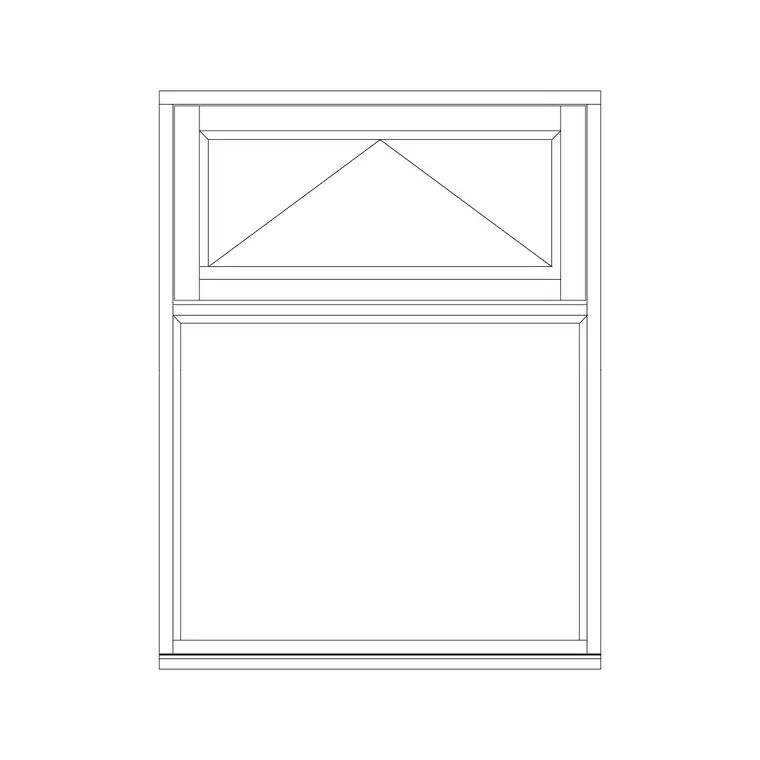
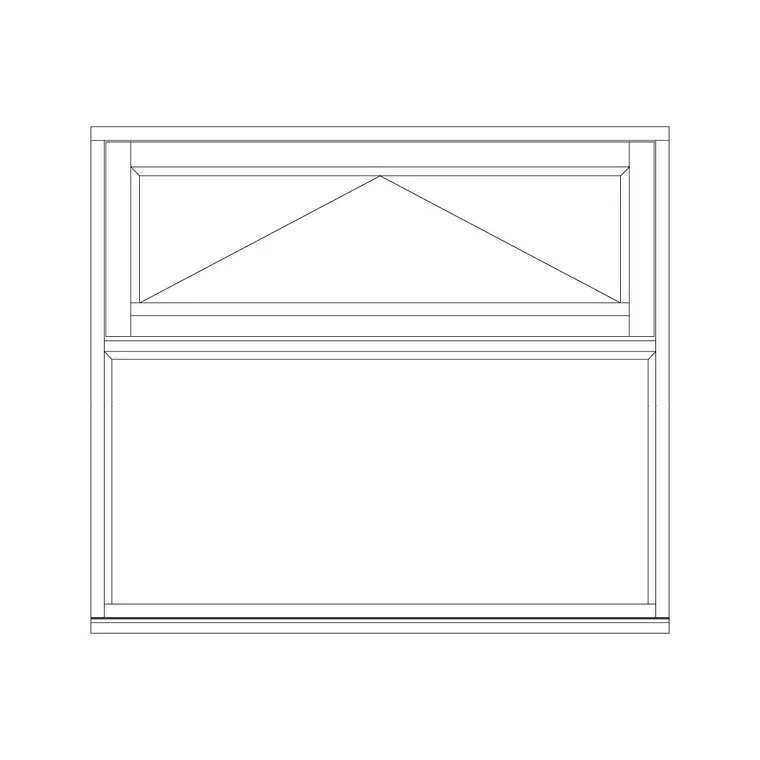
An awning window is hinged at the top and pushes open from the bottom, so the leaf swings outward like a small awning and sheds rain away from the opening. That makes it the window you specify where you want ventilation that can stay open in light rain — bathrooms, kitchens, high-level openings and above fixed glazing. A clean awning window elevation CAD block captures the top-hung opening indication that distinguishes it from a side-hung casement, and this page offers one free in DWG.
The block is drawn to a believable module in elevation, with the frame, the glazing and the top-hung opening symbol, so it reads correctly when scaled into a real elevation. Use it on house and apartment elevations, bathroom and kitchen windows, and window schedules, and crosslink to the windows category for awning-with-fixed-glass, openable and sliding variants. It is free for personal and commercial use, with no signup or watermark.
What an awning window elevation block shows
An awning window is top-hung: the hinge runs along the head and the bottom of the leaf swings outward. In elevation the block draws the frame, the glazing and the standard opening indication for a top-hung leaf — a triangle or chevron whose apex points to the hinged top edge — which is the convention that tells a reader the window is an awning rather than a side-hung casement or a fixed light.
The download keeps the frame, glazing and opening symbol on sensible layers so you can control the line work and screen the glass back for a presentation elevation. The opening indication is the load-bearing detail here: getting that symbol right is what makes the elevation read correctly to anyone scheduling or building the window.
Awning, hopper and fixed-glass combinations
The awning is part of a family of projecting windows. A hopper window is its mirror image — hinged at the bottom and opening inward at the top — and is common in basements and bathrooms. An awning is frequently combined with a fixed light: a large pane of fixed glass for the view with a slim awning above or below it for ventilation, which gives the daylight of a picture window with the airflow of an opening leaf.
This block represents the awning leaf with its top-hung indication; the windows category holds the awning-with-fixed-glass combination for exactly that view-plus-ventilation arrangement. Showing the right combination on the elevation matters because it tells the reader which part of the window opens and which is sealed.
Typical sizes and where the window sits
Awning windows are often wider than they are tall, because a shallow top-hung leaf projects less and sheds rain well, and they are frequently placed high in a wall for privacy and security while still ventilating the room. The width and height come from the elevation, and the sill height is usually higher than a standard window where the awning sits above a worktop, a bath or a fixed light.
Treat these as design-around ranges and confirm the real size, sill height and projection against your project and the chosen product. The block is drawn to a believable module so the proportions read correctly when scaled into an elevation, but the final dimensions and the projection of the open leaf belong to the project and the product.
How to insert and place the window
The block is in millimetres. Insert at scale 1 in a millimetre drawing, 0.001 in metres, or set INSUNITS so AutoCAD rescales automatically. On an elevation, snap the window into the opening in the wall and align the sill to the right height above the finished floor — often higher than a normal window for a bathroom or above-worktop awning.
If your opening differs, scale the block to fit, then check the proportions and the position of the opening symbol still read correctly. Keep the top-hung indication with its apex at the hinged top edge so the elevation is unambiguous, and record the window in your schedule with its reference, size and opening type so the drawing and the schedule agree.
Where awning windows are used
Awning windows suit bathrooms, kitchens, utility rooms and any space where rain-resistant ventilation is wanted, high-level clerestory openings that ventilate without being reachable, and the ventilation strip above or below a large fixed light. Their top-hung action lets them stay open in light rain, which is why they recur in wet and humid climates and in service rooms.
Pair the block with wall, sill and lintel details and with the awning-with-fixed-glass and openable windows in the windows category to compose a complete elevation. On an elevation, a correctly-drawn awning window with its top-hung symbol tells the reader immediately how the opening ventilates and how it differs from the casements around it.
Layering, schedules and reuse
Put the window on a dedicated windows or openings layer, keeping frame, glazing and the opening symbol separable so you can produce a clean elevation, a glazing plan and a schedule from the same geometry. An annotation layer for the reference and dimensions keeps labels under control.
Awning windows often repeat across a building — the same bathroom or clerestory unit at every floor — so a tuned awning block is worth saving to your library once its size and opening type match your specification. WBLOCK it so every instance is identical and the schedule count is reliable, and tag each with a type reference so a window schedule can be pulled straight from the drawing rather than counted by hand.
Free download
Browse the full library — DWG & DXF, no signup.
Questions
Frequently asked
Is the awning window elevation block free for commercial use?+
Yes. It downloads free in DWG with no signup, no watermark and no attribution requirement, and it is cleared for commercial project work.
How is an awning window different from a casement?+
An awning window is hinged at the top and pushes open from the bottom, swinging outward like an awning, so it sheds rain and can stay open in light showers. A casement is hinged at the side. The elevation shows this with a top-hung opening symbol.
What does the opening symbol on the elevation mean?+
The triangle or chevron on the leaf points its apex to the hinged edge. For an awning that apex sits at the top, marking it as top-hung — which is how a reader distinguishes it from a side-hung casement or a fixed light.
Can I combine it with fixed glazing?+
Yes. Awning leaves are often paired with a fixed light to give the daylight of a picture window plus the ventilation of an opening leaf. The windows category includes an awning-with-fixed-glass block for that arrangement.
Related downloads
Blocks for this guide

Related categories
Related guides
Block landing
Free Casement Window CAD Blocks — DWG Download
Free casement (openable) window CAD blocks in DWG — side-hung sashes in plan, elevation and section for AutoCAD. No signup, free for commercial use.
Block landing
Free Single-Shutter Window CAD Blocks — DWG
Free single-shutter window CAD blocks in DWG — one-panel openable sashes in elevation and plan for AutoCAD. Left/right-hung, no signup, commercial OK.
Block landing
Free Double-Shutter Window CAD Blocks — DWG
Free double-shutter window CAD blocks in DWG — two-leaf openable windows with glass, in elevation and plan for AutoCAD. No signup, commercial-use OK.