Block landing · 4 person workstation cad block dwg
4 person workstation CAD block in DWG and DXF in 2026
By Saumyajit Maity · Published 7 Mar 2025 · Updated 11 Feb 2026
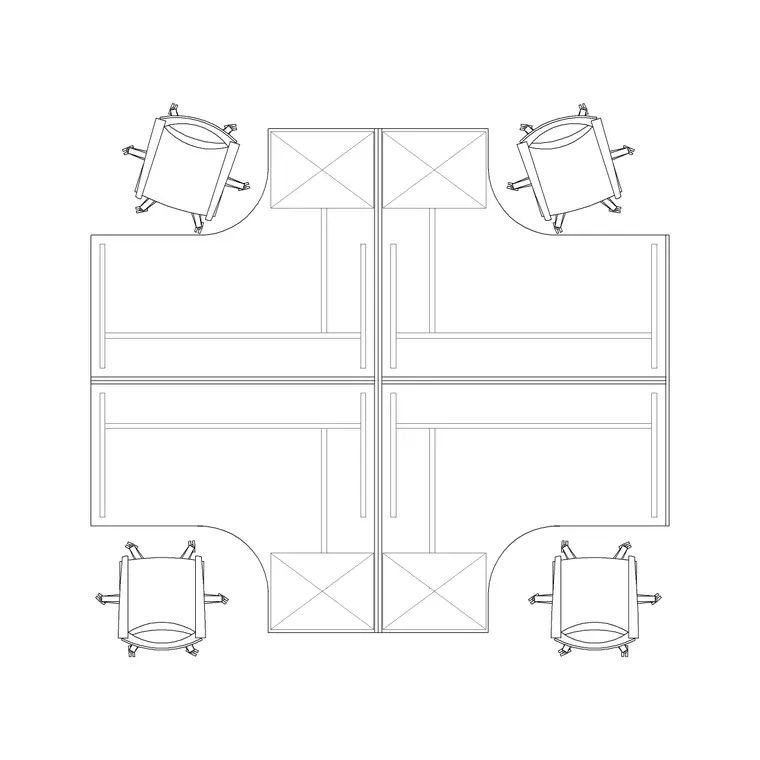
A four-person workstation is the pod that defines the rhythm of most open-plan offices. Drawn as a single cluster of four desks sharing a central spine, it lets a space planner fill a floor plate with whole pods rather than placing desks one at a time. This 4 person workstation CAD block is drawn at true millimetre dimensions in plan view, ready to insert into AutoCAD 2004 or later, and it is free for personal and commercial work with no signup and no watermark.
The quad unit is where furniture density really starts to matter. Get the pod footprint right and the gaps between pods almost draw themselves; get it wrong and the whole floor either feels cramped or wastes lettable area. Because this block already carries four work positions, the shared cable spine and the seat clearances, you can array it across a bay and immediately judge how many people the floor holds and whether the aisles between clusters work.
What the four-person pod contains
The plan view shows four desk surfaces arranged around a common centre — usually two facing two across a low screen, with a shared spine running down the middle that carries power and data. The block includes the desk outlines, the central screen or spine, and the seat positions, all on layers you can freeze or recolour independently.
A well-drawn quad pod also reflects where the cable management and any shared pedestal storage sit, because those determine how tightly two pods can sit back-to-back. When you insert this block you are placing a complete working cluster, not four loose rectangles, so the spacing between desks already reflects the room a person needs to roll a chair back and stand.
Typical sizing to design around
Use these ranges as a starting point. With single desk positions commonly drawn 1200 to 1600 mm wide and 700 to 800 mm deep, a four-person pod of two-facing-two typically spans around 2400 to 3200 mm in the desk-width direction and roughly 1400 to 1650 mm in the facing direction, before you add chair pull-out space. Add the seat clearance and the working envelope of a pod often sits in the region of 3200 to 4000 mm by 2800 to 3400 mm.
For circulation, plan around 900 to 1000 mm of clear floor behind each seated user, and keep aisles between pods generous enough to serve as walkways, often 1000 to 1200 mm or more depending on traffic. Treat all of these as typical planning ranges, not fixed specifications; the exact pod size depends on the desking system you specify, so check the manufacturer dimensions before you commit a layout.
How to insert and array the pod
The block is drawn full size in millimetres. Insert at scale 1 in a millimetre drawing, 0.001 in a metre drawing, or set INSUNITS to millimetres on an imperial template so AutoCAD rescales automatically and you avoid a units mismatch. Run INSERT or drag the DWG from a tool palette, pick an insertion point at the pod centre, and rotate to suit the bay.
Because the pod is a single block reference, populating a floor is a matter of arraying it. Use a rectangular ARRAY to repeat pods across a bay on a regular grid, adjusting the row and column spacing until the aisles read correctly. A later edit to the block definition with BEDIT — say, swapping the desk depth — updates every pod on the floor at once, which is far faster than editing dozens of individual desks.
Where four-person pods are used
The quad pod is the default unit of the modern open-plan office: corporate floors, agencies, software teams, finance back-offices, co-working spaces and call centres all lay out on clusters of four. It also suits team rooms and project spaces where a small group needs to sit together, and it scales naturally into larger six- and eight-person benches when you remove the dividing screens.
Because the block is free and licence-clear it works from concept to construction. Use it in a test-fit to prove how many seats a floor plate yields for a leasing pitch, then keep the same geometry as you coordinate power, data and the furniture schedule. The pod that proved the headcount is the pod that gets built.
Layers, attributes and schedules
Keep the pod on a dedicated furniture layer, with chairs on their own layer again, so you can produce a clean structural plan by freezing furniture and a furnished plan by thawing it from one drawing. Giving desks, screens and seating distinct colours and lineweights keeps a busy open-plan drawing readable.
Tag each pod as a block with a simple attribute — a seat count or a team name — and you can extract a furniture and headcount schedule straight from the model. For facilities and space planning that turns the drawing into a live record of capacity per zone. When a bay layout is signed off, WBLOCK the furnished pod, complete with chairs and storage, as one reusable assembly so the next floor is laid out in a fraction of the time.
Free download
Browse the full library — DWG & DXF, no signup.
Questions
Frequently asked
Is the 4 person workstation CAD block free for commercial use?+
Yes. It downloads free in DWG, with DXF where available, and is cleared for commercial projects. There is no signup, no watermark and no attribution requirement.
How big is a four-person workstation pod?+
It varies with the desking system, but a two-facing-two pod commonly occupies roughly 3200 to 4000 mm by 2800 to 3400 mm once chair pull-out space is included. Treat that as a planning range and confirm against your chosen furniture.
Can I turn the pod into a longer bench?+
Yes. Explode or copy the desk positions and remove the dividing screens to make a six- or eight-person bench, or simply array two pods side by side. Keeping desks on their own layer makes this rearrangement straightforward.
What AutoCAD versions open the file?+
The DWG targets AutoCAD 2004 and later, so it opens in current AutoCAD, AutoCAD LT, BricsCAD, DraftSight and free DWG viewers. DXF is provided where available for other CAD tools.
Related downloads
Blocks for this guide
Related categories
Related guides
Block landing
Free Office Chair CAD Blocks — DWG Download
Download free office chair CAD blocks in DWG and DXF — task chairs, swivel chairs and executive seats drawn in plan and elevation, AutoCAD 2004+, no signup.
Block landing
Free Lighting Fixtures CAD Blocks — DWG Download
Download free lighting fixtures CAD blocks in DWG and DXF — chandeliers, wall lights, downlights and pendants in plan and elevation for AutoCAD.
Block landing
Free Office Desk CAD Blocks — DWG Download
Free office desk CAD blocks in DWG and DXF — straight desks and desk-with-chair units in plan and elevation for AutoCAD. No signup, commercial OK.