Block landing · 20 seater conference table cad block dwg
20 seater conference table CAD block in DWG and DXF in 2026
By Sumana Kumar · Published 21 Mar 2026 · Updated 15 Apr 2026
A twenty-seater conference table commands a large boardroom, and at this scale room planning is unforgiving: a table this long needs serious circulation around it, careful AV sightlines and often a modular construction to get it into the room at all. This 20 seater conference table CAD block is drawn at true millimetre dimensions in plan view, ready for AutoCAD 2004 or later, and free for personal and commercial work with no signup and no watermark.
A scaled twenty-seat table is what turns a big empty room into a workable boardroom on the page. Drop the table and its twenty chairs in, and you can read at once whether the room is long enough, whether people can pass behind seated guests on both sides, and whether everyone can see the screen at the far end. The block carries the table outline and the seat positions so you are sizing a genuine large boardroom rather than guessing at a vast rectangle.
What the twenty-seater block contains
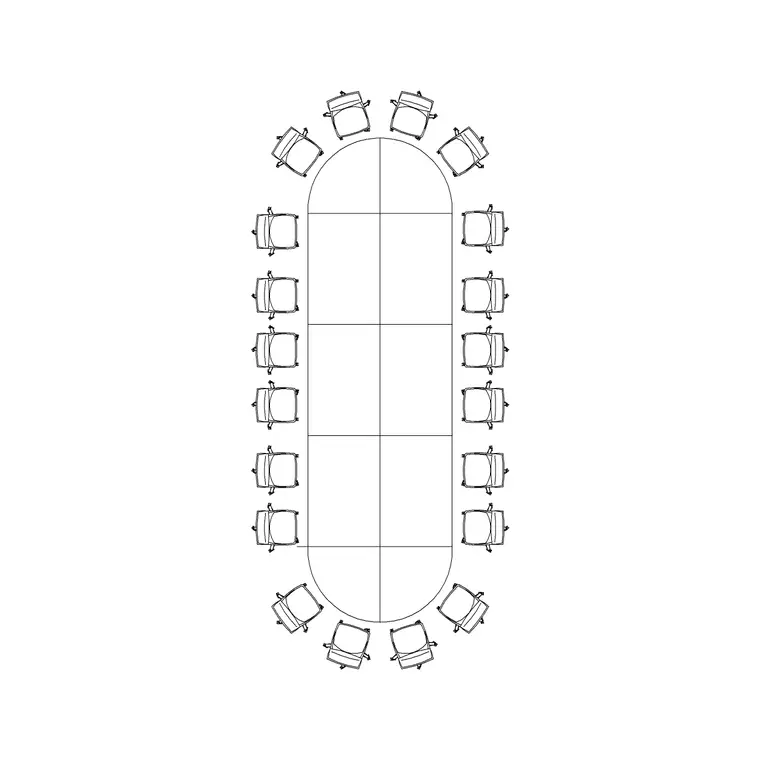
The plan view shows the table top with twenty seat positions — commonly nine along each long side and one at each end, or eight a side with two at each end on a wider table. The block keeps the table outline and the chair positions on separate layers so the seating can be frozen or recoloured independently.
A table this large is frequently boat-shaped or built from joined segments, both to improve sightlines and to allow it to be carried into the room in pieces, so the block is drawn to the true outline rather than one plain rectangle. Inserting it places the table with a believable twenty-seat arrangement, so you can judge the room proportions and the seating capacity together rather than discovering at chair-placement stage that the table is the wrong size.
Typical sizing to design around
Use these ranges to plan a large boardroom. A twenty-seater table is commonly drawn somewhere around 6000 to 8000 mm long and roughly 1400 to 1800 mm wide, depending on the seat spacing and whether the ends carry one or two chairs. Plan for roughly 600 to 750 mm of table edge per person, which is what drives the considerable length at twenty seats.
For the room, allow generous circulation: around 1000 to 1400 mm of clear floor between the table edge and the walls or any perimeter furniture, with more on the primary routes since a long table forces people to walk its full length. These are typical planning ranges rather than fixed specifications; a twenty-seat table is usually a bespoke or modular item, so confirm the exact dimensions and the segment joints against the manufacturer data before sizing the room and its doors.
How to insert and place the table
The block is full size in millimetres. Insert at scale 1 in a millimetre drawing, 0.001 in a metre drawing, or set INSUNITS to millimetres on an imperial template so AutoCAD rescales on insertion. Run INSERT or drag the DWG from a tool palette, pick an insertion point at the table centre, and rotate to align with the room and the AV wall.
With a table this long, check the access route as well as the room: confirm the segments or the assembled table can reach the room through the doors and corridors, and that the AV screen is large enough to read from the far seats. As a single block reference the table and chairs copy and rotate together, and you can edit the block definition with BEDIT to add or remove seats or adjust the segment layout, updating every instance at once.
Where the twenty-seater is used
A twenty-seat table suits executive and council boardrooms, large committee rooms, parliamentary and chamber settings, and headquarters meeting suites where a big leadership group or full board convenes. It defines a flagship room, so it is coordinated tightly with AV, acoustics, lighting and often a dedicated power and data infrastructure.
Because the block is free and licence-clear it carries from the test-fit to the construction set. Use it to prove a large room can genuinely seat twenty with proper circulation, then keep the same geometry as you coordinate the AV, the under-table power and data and the furniture schedule. The table that validated the room is the one that gets specified, manufactured and installed.
Power, AV and access coordination
At twenty seats, power, data and AV become a real infrastructure exercise. Place floor-box and socket blocks at intervals beneath the table to show where under-table power and connectivity reach each cluster of seats, and align the table so the screen and any video-conference cameras serve the full length of the room.
Keep table, chairs and services on separate layers so a furniture plan, a small-power plan and an AV plan all come from one drawing. Because the table is often modular, note the segment joints and any in-table cable routes in the drawing or in block attributes, and record the seat count and AV provision so the schedules carry everything the fit-out contractor, the AV integrator and the furniture manufacturer need.
Free download
Browse the full library — DWG & DXF, no signup.
Questions
Frequently asked
How long is a twenty-seater conference table?+
Commonly around 6000 to 8000 mm long and 1400 to 1800 mm wide, depending on seat spacing and end seating. Plan roughly 600 to 750 mm of edge per person and confirm exact dimensions against the often-bespoke model you specify.
Is the 20 seater conference table block free for commercial use?+
Yes. It downloads free in DWG, with DXF where available, and is cleared for commercial projects with no signup, no watermark and no attribution requirement.
Is a twenty-seat table built in segments?+
Often yes. Tables this large are commonly modular so they can be carried in and assembled. The block is drawn to the true outline, and you can note the segment joints in the drawing or a block attribute for the manufacturer.
How much circulation should I leave around it?+
Allow around 1000 to 1400 mm of clear floor between the table edge and the walls, more on main routes, since a long table forces people to walk its full length. Treat these as planning ranges to confirm on the job.
Related downloads
Blocks for this guide
Related categories
Related guides
Block landing
Free Office Chair CAD Blocks — DWG Download
Download free office chair CAD blocks in DWG and DXF — task chairs, swivel chairs and executive seats drawn in plan and elevation, AutoCAD 2004+, no signup.
Block landing
Free Lighting Fixtures CAD Blocks — DWG Download
Download free lighting fixtures CAD blocks in DWG and DXF — chandeliers, wall lights, downlights and pendants in plan and elevation for AutoCAD.
Block landing
Free Office Desk CAD Blocks — DWG Download
Free office desk CAD blocks in DWG and DXF — straight desks and desk-with-chair units in plan and elevation for AutoCAD. No signup, commercial OK.