Curated pack · 20 free workstation cad blocks dwg
Twenty free workstation CAD blocks for AutoCAD in 2026
By Saumyajit Maity · Published 25 Apr 2026 · Updated 13 Jun 2026
Workstations are the building block of every office plan, and getting them drawn to scale is what lets a layout pass the only test that matters: does everyone have enough desk, screen space and room to push their chair back. This pack collects 20 free workstation CAD blocks in DWG — single desks, two- and four-person clusters, long bench-desk runs and partitioned cubicles — each drawn to scale and ready to insert into AutoCAD 2004 or later. Every file is free for personal and commercial use, with no signup and no watermark.
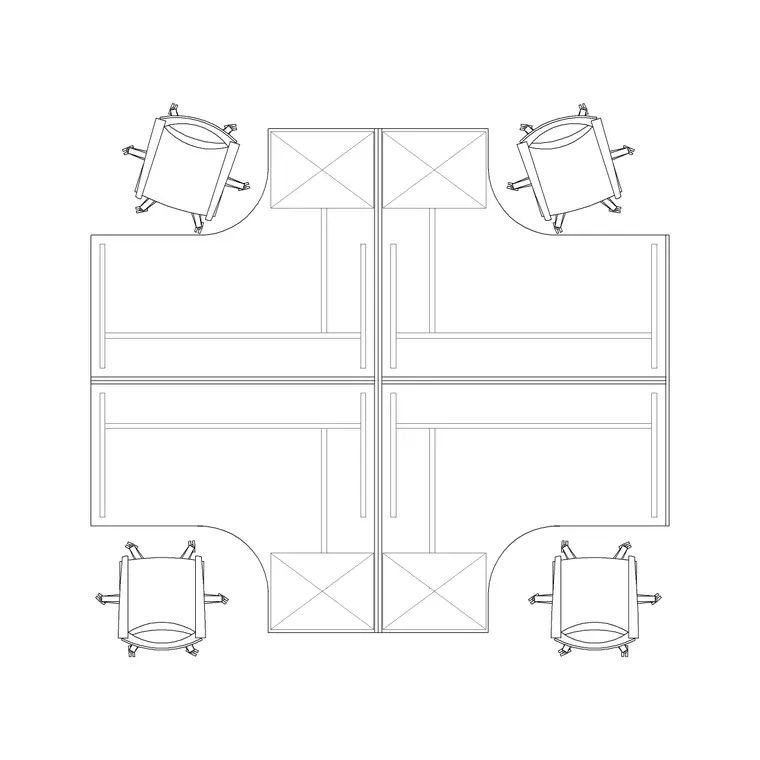
Twenty configurations cover the office layouts you actually build: the private single desk, the back-to-back pair, the four-person pod that tiles across an open floor, the continuous bench desk for dense teams, and the screened cubicle. Most blocks come with the task chair, screens and a basic pedestal already in place, so a pod lands as a complete unit rather than a bare desktop.
Because a workstation is really a kit of desk plus chair plus circulation, the numbers that matter are the desk footprint and the clear space behind the chair. Drawing the whole unit to scale lets you tile pods across a floor, check the gangways between rows and confirm the density before a single partition is ordered.
The 20 workstation configurations in the pack
The set covers the main desking layouts. Single workstations for private offices and spaced-out floors. Back-to-back pairs that share a spine. Four- and six-person clusters that tile efficiently across an open plan. Continuous bench-desk runs for dense, agile teams. And screened cubicles where privacy matters. Each comes with a chair and, on most, a screen and pedestal so the unit reads as a real desk position.
Keeping the range in one pack lets you test densities side by side — a generous single-desk layout against a tight bench run — and pick the configuration that suits the team and the floor. Each block sits on sensible layers so the desk, chair, screens and storage can be coloured or frozen independently.
Workstation sizes to design around
Use these as planning ranges and confirm against the furniture and the brief. A single desktop commonly runs around 1400-1800 mm wide and 700-800 mm deep; a bench-desk position per person is often a little narrower, around 1200-1400 mm. A four-person cluster footprint depends on the desk size plus the shared spine, and a screened cubicle adds the partition thickness around the desk.
The figure that governs the floor is the gangway behind the chairs. Allow enough clear space for a person to push back and stand, and more where the gap is also a circulation route between rows. Drawing the workstation with its chair to scale makes the gangway a visual check: you can see at a glance whether two rows of pods leave a usable aisle between them.
Why these are plan blocks
Workstations are space-planning tools, so the pack is built around the plan view — the desk, chair, screens and storage seen from above and tiled across the floor. This is the view you array into rows, reflect into back-to-back pairs and repeat across a floor plate to read the total headcount. Keep the workstations on a furniture layer so you can freeze them to show the bare floor plate and thaw them for the furnished plan.
For presentation or a furniture elevation you would pair these with desk and chair elevation blocks from the office and furniture categories, but the layout work itself happens in plan. Because each pod is a single block reference, a four-person cluster copies as one object, and a later change to the cluster updates every instance across the floor at once.
Tiling workstations across a floor
Start by setting the structural grid and the primary circulation, then drop one workstation pod and array it to fill a zone. A rectangular array tiles a four-person cluster across an open plan in seconds; mirroring a pair gives a back-to-back spine. Keep the gangways between rows consistent so the floor reads as an ordered layout rather than a scatter of desks.
Check the edges and the routes. Desks against a glazed facade need room for blinds and a person to pass; rows need a clear aisle that connects to the core and the fire routes. Because the pods are block references, you can swap a four-person cluster for a bench run across a zone, re-array, and instantly compare how many people each density fits while keeping the circulation legible.
Layers, schedules and reuse
Put workstations on a furniture layer, with desks, chairs, screens and storage on their own sub-layers or lineweights, so you can produce a clean floor-plate drawing, a furniture plan and a power-and-data coordination plan from the same model. Freezing the furniture layer gives the bare shell; thawing it gives the fitted floor.
Tag each workstation with a type or seat code and a data extraction gives you a headcount and a furniture schedule straight from the plan — exactly the count a space-planning or FF&E spreadsheet wants. When a pod and its power-and-data are finalised, WBLOCK the unit so the next floor or project starts with the desking already solved. Because the pods are references, a desk-size change ripples through every instance at once.
Where workstation blocks are used
Workstation blocks are the core of any office drawing: open-plan floors, private and shared offices, co-working spaces, call centres, design studios and back-office areas. They pair with the conference-table, reception and storage blocks in the office category and with the chair and human-figure blocks to build a complete, believable floor plan.
Because the set is free and licence-clear, it suits student office schemes, fit-out concepts, test-fit plans and presentation drawings where headcount and density have to be shown credibly. Twenty configurations give enough range to plan a whole floor plate — or compare several densities for the same space — without the same desk pod repeating in a way that flattens the layout.
Free download
Browse the full library — DWG & DXF, no signup.
Questions
Frequently asked
Are these 20 workstation CAD blocks free for commercial projects?+
Yes. All twenty download free in DWG with no signup, no watermark and no attribution requirement, and they are cleared for commercial use.
Do the workstation blocks include the chair?+
Most do. Each pod typically arrives with a task chair and, on many, a screen and pedestal, so a workstation lands as a complete unit rather than a bare desktop. The included elements are listed on each block's page.
What desk size should I design around?+
A single desktop commonly runs around 1400-1800 mm wide and 700-800 mm deep, with bench-desk positions often a little narrower. Confirm against the furniture you specify, and check the gangway behind the chairs for circulation.
Can I extract a headcount from the workstation blocks?+
Yes. Tag each workstation with a type or seat code and AutoCAD's data extraction counts them into a schedule, giving you a headcount and furniture list straight from the floor plan.
Related downloads
Blocks for this guide
Popular blocks to download
Related categories
Related guides
Curated pack
Free Office CAD Block Pack — DWG & DXF
Free office CAD block pack in DWG and DXF — desks, workstations, conference tables and reception furniture in plan view. No signup, commercial-use OK.
Curated pack
Free Reception Area CAD Block Pack — DWG
Free reception area CAD block pack in DWG and DXF — reception desks, waiting seating and scale figures for lobby layouts. No signup, commercial-use OK.
Curated pack
Free Restaurant CAD Block Pack — DWG & DXF
Free restaurant CAD block pack in DWG and DXF — dining tables, chairs, bar stools and high chairs for cafe and restaurant layouts. No signup, commercial OK.