Block landing · 2 door wardrobe cad block
Free 2 door wardrobe CAD block in DWG in 2026
By Saumyajit Maity · Published 26 Jan 2025 · Updated 5 Jan 2026
A two-door wardrobe is the workhorse of small-bedroom planning, and a clean 2 door wardrobe CAD block lets you drop a believable storage unit into a layout in seconds. This page offers a free two-door wardrobe block in DWG, drawn in plan view at true millimetre dimensions so it reads correctly the moment it lands on the page. The file is free for personal and commercial work, with no signup, no watermark and no attribution required.
Reach for this block when you are laying out a guest room, a children's bedroom, a studio flat or a tight master where a narrow run of storage has to fit between a wall and a door swing. Because it is drawn to scale, you can immediately test whether the cupboard clears the bed, the window reveal and the room door, rather than eyeballing it.
What a 2 door wardrobe block represents
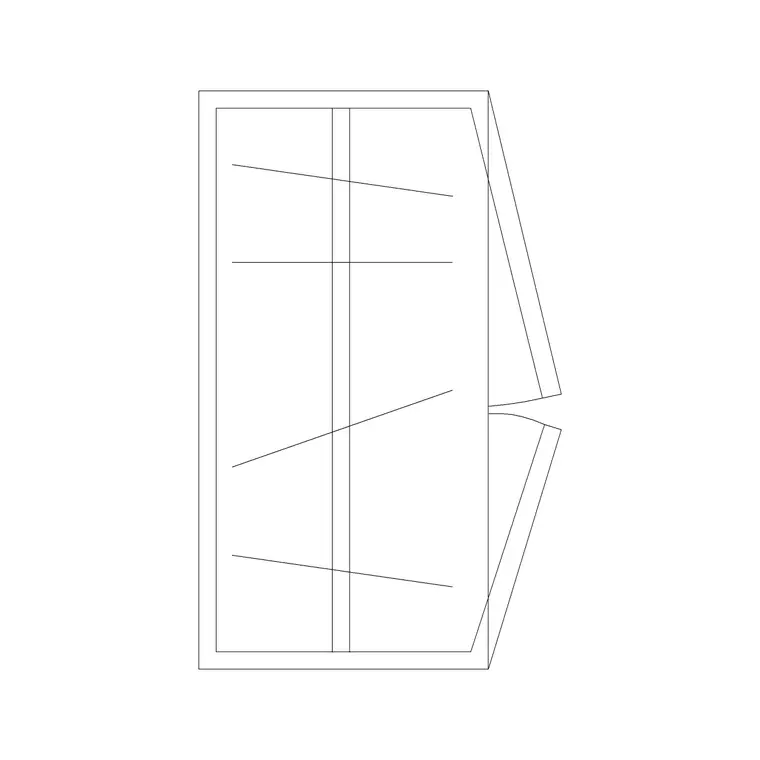
The block models a two-door cupboard seen from above: the carcass rectangle, the two leaf doors and, usually, a swing arc or a line indicating which way the doors open. In a plan-only file the swing arcs are the most useful part of the drawing, because the open-door footprint is what really governs how close you can place a bed or a desk.
A two-door unit is a single storage module rather than a run — one bay of hanging space behind a pair of hinged leaves. That makes it ideal for rooms where you only have a metre or so of free wall and a full four- or six-door run would never fit. Treat it as the smallest sensible scaled wardrobe in your furniture library.
Views and what's included
This download ships in plan view, which is the view you work in for bedroom layouts and furniture plans. The plan shows the cupboard outline and the door leaves so you can array, copy and rotate the unit around a room and check clearances against the bed and circulation.
Because the block is a plan, it is built to sit on a furniture layer alongside the bed, side table and window blocks. If you need an interior elevation of the same cupboard for a joinery drawing, draw the face-on view separately and keep it on its own elevation layer — the plan here is for setting out, not for the cabinet-maker's elevation.
Typical 2 door wardrobe sizing
Use these ranges as a sanity check rather than fixed specs, since every project differs. A two-door hinged wardrobe is commonly around 900–1100 mm wide, because two comfortable hinged leaves of roughly 450–550 mm each add up to that span. Depth is usually 550–650 mm to clear a clothes hanger on a front-to-back rail. Height varies with the ceiling — often 2000–2400 mm — but height does not show in plan.
Allow clear floor in front of the unit for the doors to open. With hinged leaves you typically need 450–600 mm of swing clearance, so keep that strip free of the bed or any other furniture. Dropping the scaled block in turns that clearance check into a glance at the swing arcs.
How to insert and place the block
The block is drawn full size in millimetres. In a millimetre drawing insert at scale 1 and it lands at real size; in a metre template insert at 0.001; or set INSUNITS to millimetres so AutoCAD rescales automatically on insertion. Use INSERT (or drag the DWG from a tool palette), pick the insertion point at a back corner of the carcass so the cupboard snaps tight against the wall, and rotate to face into the room.
Once placed, move the block onto a dedicated furniture layer so you can freeze it for a clean structural plan. If the door swings point the wrong way for the room, mirror the block about its vertical centreline rather than redrawing it.
Where two-door wardrobes are used
Two-door units turn up wherever space is tight: secondary bedrooms, children's rooms, studio and one-bed apartments, hotel rooms, hostel and student-accommodation units, and box rooms repurposed as offices. They also work as a supplementary cupboard beside a larger run when one bay of extra hanging space is needed.
Pair this block with the bed, bedside-table and dressing-table blocks in the furniture category to fit out a complete bedroom quickly. For larger rooms, step up to a three-, four- or six-door run from the same family so the storage grows with the floor area while the drawing style stays consistent.
Keeping the wardrobe on the right layer
Put the wardrobe on a furniture layer rather than layer 0 from the start. Giving storage its own colour and lineweight lets you produce a clean shell plan by freezing furniture and a fully furnished plan by thawing it, both from the same drawing. The door-swing arcs can sit on the same layer or a lighter sub-layer if you want to dim them on a presentation plan.
If you tag the cupboard as a block with a simple type attribute, you can extract a furniture schedule straight from the drawing — useful when a fit-out spreadsheet needs a count of storage units per room. When a layout is finalised, WBLOCK the bed-plus-wardrobe arrangement as one reusable unit so you can repeat a standard room across a scheme.
Free download
Browse the full library — DWG & DXF, no signup.
Questions
Frequently asked
Is the 2 door wardrobe CAD block really free?+
Yes. It downloads free in DWG with no signup, no watermark and no attribution requirement, and it is cleared for both personal and commercial project use.
What view does the file include?+
Plan view — the cupboard seen from above with the door leaves shown. That is the view you use for bedroom layouts and furniture plans. If you need a face-on cabinet elevation, draw it separately on an elevation layer.
How wide is a typical two-door wardrobe?+
Often around 900–1100 mm, since two comfortable hinged leaves add up to roughly that span. Treat the figure as a planning range and scale or stretch the block to match your actual unit before finalising.
How do I get the door swings facing the other way?+
Mirror the block about its vertical centreline with the MIRROR command. That flips the swing direction without distorting the carcass, which is faster and cleaner than redrawing the arcs.
Related downloads
Blocks for this guide
Related categories
Related guides
Block landing
Free Office Chair CAD Blocks — DWG Download
Download free office chair CAD blocks in DWG and DXF — task chairs, swivel chairs and executive seats drawn in plan and elevation, AutoCAD 2004+, no signup.
Block landing
Free Bar Table CAD Blocks — DWG Download
Download free bar table CAD blocks in DWG and DXF — round, square and rectangular high bar tables in plan and elevation for AutoCAD. No signup, commercial-use OK.
Block landing
Free Restaurant Table CAD Blocks — DWG Download
Download free restaurant table CAD blocks in DWG and DXF — 2, 4 and 6 cover tables with chairs drawn in plan and elevation for AutoCAD. No signup, commercial-use OK.