Block landing · wall mounted light fixture cad block
Free wall mounted light fixture CAD block in DWG
By Sumana Kumar · Published 29 May 2024 · Updated 19 Jun 2026
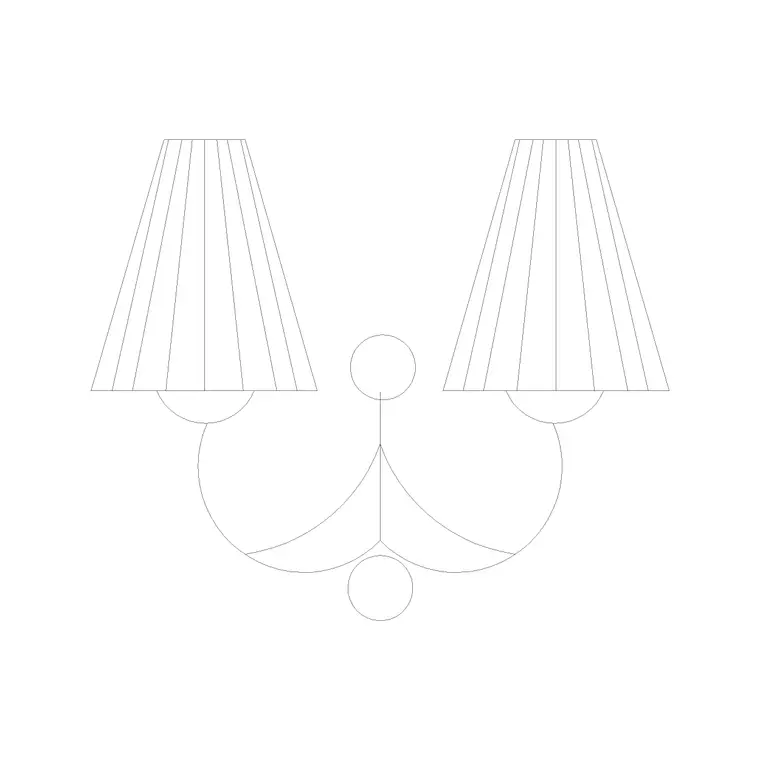
A wall mounted light fixture is any luminaire that fastens to the wall surface rather than recessing into it — surface sconces, up/down lights, bulkhead fittings and amenity lights all fall under the term. This page offers a free wall mounted light fixture CAD block in DWG and DXF that you can drop into both interior and exterior elevations, drawn at true millimetre size and free for commercial work with no signup or watermark.
Unlike a recessed downlight, a surface fixture stands proud of the wall, so its projection and its position relative to doors, windows and finished floor all need to be visible on the drawing. The block here is built to make those checks easy: it shows the fitting in elevation with a sensible footprint so you can verify spacing, mounting height and clearance in one move.
Surface, recessed and the difference in the block
Drawing a wall mounted fixture is not the same as drawing a recessed one. A recessed light reads mostly as a clean outline on the wall face; a surface or wall mounted fitting has depth, so the block carries the body of the luminaire standing off the wall, the mounting plate and the light-emitting face. That projection — commonly in the 80–200 mm range for a compact fitting — is the dimension that decides whether the light clears a corridor, a stair handrail or an opening door.
The block is drawn as plain geometry on tidy layers, so it prints sharply at 1:50, 1:20 and 1:10 detail scales. You can freeze the body and keep just the face outline for a simplified elevation, or keep the full detail for a coordination drawing.
Interior versus exterior uses
Indoors, wall mounted fixtures handle corridor lighting, stair lighting, mirror and vanity lights, and feature lighting on accent walls. Outdoors, the same family covers entrance lights beside a door, bulkheads along an external walkway, up/down wall washers on a façade and amenity lighting in car parks and service yards. The block suits both because it is a neutral elevation symbol you can label to suit the specification.
For exterior elevations, the mounting height usually keys off the door head or a string course rather than a round number, so insert the block and snap it to that datum line. For façade washers, an even horizontal spacing across the elevation reads best, and arraying the block keeps those centres exact.
Mounting heights and spacing to design around
Treat these as starting ranges and confirm against the brief and the manufacturer's data. An entrance or amenity wall light commonly mounts in the 1800–2200 mm above-floor band so the body sits above head height. A corridor bulkhead might run lower or higher depending on the ceiling, and a façade wall washer is set by the architectural grid more than by a fixed height.
For a run of identical fittings, spacing is usually driven by the lighting design's required levels, but the drawing's job is to show the chosen centres clearly. Because the block is full size, you can dimension the centre-to-centre spacing straight off the elevation for the electrical contractor.
Inserting and aligning the fixture
The DWG is drawn in millimetres. Insert at scale 1 in a millimetre drawing, 0.001 in a metre drawing, or set INSUNITS to millimetres for automatic rescaling on an imperial template. Use INSERT or drag from a palette and pick the insertion point at the centre of the mounting plate so the fixture rotates and mirrors cleanly.
Snap the block to the wall face line, raise it to the mounting height, and for a repeating run use ARRAY with a fixed spacing. If the elevation shows a returning wall or a recess, MIRROR or rotate the block so the body projects the correct way. Keep every fixture as a block reference so a later change to the type updates every instance at once.
Coordinating with the electrical layer
Wall mounted fixtures sit at the join between architecture and services, so they belong on a dedicated lighting or electrical layer with their own colour and lineweight. That separation lets you issue a clean architectural elevation by freezing the lighting, and a services coordination elevation by thawing it — same drawing, no duplicate geometry.
Tag each fitting with a type code as a block attribute and you can extract a luminaire schedule directly from the sheet, which feeds the electrical take-off and the lighting specification. On a repetitive building — a hotel, a hospital wing, a block of flats — a WBLOCK of a typical wall plus its fixtures becomes a reusable unit you array down the floor.
IP rating, location and what the drawing should note
Where a wall mounted fixture goes changes what it has to be, and the drawing is where that intent is recorded. A fitting over a bathroom basin, in a wet room, on an exposed external wall or in a car park sits in a damp or wet location, so the specification calls for a higher ingress-protection rating than a dry hallway sconce — and the elevation is where you tag which fitting type belongs where.
While the block itself is a neutral symbol, labelling each instance with its type reference ties it to the fitting schedule that carries the IP rating, the mounting method and the lamp. That link is what stops a dry-rated fitting being installed in a wet zone by mistake. For external fixtures, the elevation should also make the mounting height clear relative to the door head or finished ground level, since an exposed fitting that is too low invites damage and one that is too high lights the wrong place. Showing the fixture full size, tagged and at the right height, makes those decisions legible on a single sheet.
Free download
Browse the full library — DWG & DXF, no signup.
Questions
Frequently asked
What counts as a wall mounted light fixture here?+
Any surface-fixed luminaire: sconces, up/down lights, bulkheads, entrance lights and amenity lights. The block is a neutral elevation symbol you label to match your chosen fitting.
Can I use this block on exterior elevations?+
Yes. It suits entrance lights, façade washers, walkway bulkheads and car-park amenity lights as well as interior corridor and vanity fittings. Snap it to the door head, string course or grid datum that drives the exterior layout.
How is a surface fixture different from a recessed one in the drawing?+
A surface or wall mounted fixture stands proud of the wall, so the block carries its projection — often 80–200 mm — which is what governs clearance to doors, handrails and circulation. A recessed light reads mostly as a flat outline.
Will the file open in free DWG software?+
Yes. It targets AutoCAD 2004 and later and opens in AutoCAD, AutoCAD LT, BricsCAD, DraftSight and free viewers such as Autodesk's online DWG viewer.
Related downloads
Blocks for this guide

Popular blocks to download
Related categories
Related guides
Block landing
Free Lighting Fixtures CAD Blocks — DWG Download
Download free lighting fixtures CAD blocks in DWG and DXF — chandeliers, wall lights, downlights and pendants in plan and elevation for AutoCAD.
Block landing
Free Table Lamp CAD Blocks — DWG Download
Download free table lamp CAD blocks in DWG and DXF — classical and decorative table lamps in plan and elevation for AutoCAD 2004+. No signup, commercial-use OK.
Block landing
Free Floor Lamp CAD Blocks — DWG Download
Download free floor lamp CAD blocks in DWG and DXF — straight and arc floor lamps in plan and elevation for AutoCAD 2004+. No signup, free for commercial use.