Block landing · volleyball net cad block dwg
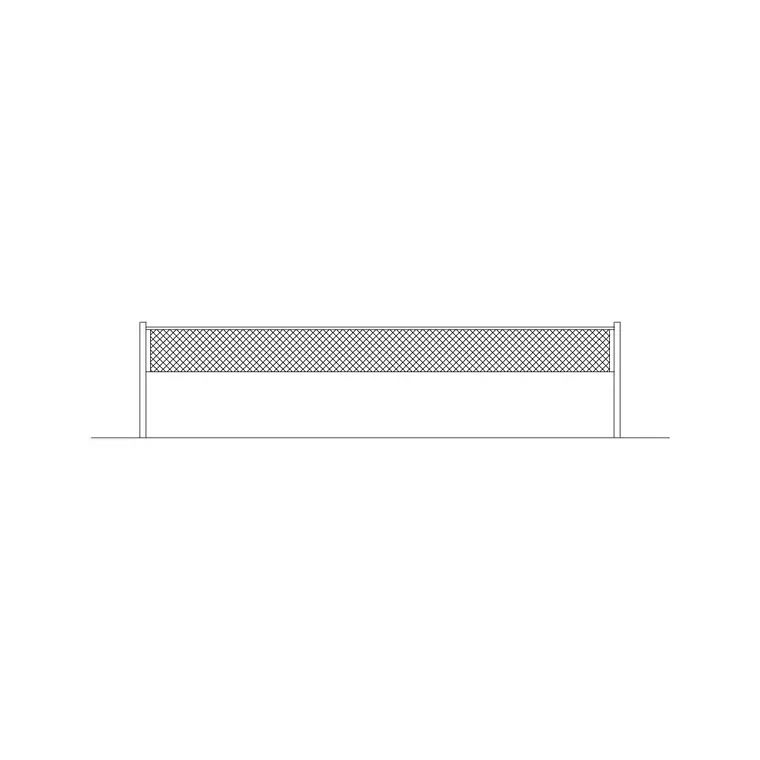
Free volleyball net CAD block in DWG
By Sumana Kumar · Published 14 Aug 2023 · Updated 27 Jun 2026
A volleyball net is a small block with a big job: it fixes the centre line of a court, locates the two posts and, in elevation, sets the net height that everything else on the court is measured against. This page offers a free volleyball net CAD block in DWG, drawn at true millimetre size so you can place it on a court layout, in a sports-hall plan or on a beach-volley scheme and read the posts, the net span and the centre line at a glance. It is free for personal and commercial work, with no signup or attribution.
Because a net straddles the exact middle of the court, dropping the block in is often the first move when you set out a volleyball court — the posts and centre line anchor the side lines, the attack lines and the run-off zones around them.
What the volleyball net block represents
The block stands in for the net assembly: two posts, the net spanning between them, and the centre line that the net sits over. In plan it shows the post positions and the net as a line across the court, which is what you snap the rest of the court geometry to. In elevation it shows the net height and the posts standing on the floor line, which is the view a presentation or section drawing needs.
A tidy block keeps the posts, the net mesh and the centre line on separate layers so you can show a simple setting-out line for a court plan or a fuller net detail for an elevation, without redrawing. As a single block reference it inserts, rotates and mirrors as one object.
Views and what is included
For a court layout you work in plan, and the plan view here gives you the posts and centre line to set out the court around. For a sports-hall section or a presentation elevation, the elevation view shows the net at height with the posts on the floor. Where both views ship in the same DWG, insert the plan to set out the floor and the elevation to draw the section, working from one consistent file.
Keep the net on its own court-equipment layer so you can freeze it to show a clean hall floor and thaw it to show the court in use.
Typical sizing to design around
Treat these as planning figures and confirm against the governing standard for the project, since indoor, beach and recreational courts differ. A full indoor court is around 18 m long and 9 m wide, with the net spanning the 9 m width. Net height is commonly set around 2.43 m for men's and 2.24 m for women's play, with recreational and junior nets lower. The posts stand a short distance outside the side lines.
The figures that drive the room, not just the court, are the run-off zones: a free clear area is usually required around the court, and generous ceiling height above the net for serves and blocks. The net block fixes the centre; the court block and the room then grow outward from it.
How to insert and set out the court
The block is full size in millimetres. Insert at scale 1 in a millimetre drawing, 0.001 in a metre drawing, or set INSUNITS to millimetres so AutoCAD rescales automatically. Run INSERT, snap the insertion point to the court centre, and the posts and centre line land in the right place. Use the centre line as the mirror axis to set out the two halves of the court symmetrically.
Move the net onto a court-equipment layer, then draw or insert the side lines, attack lines and service zones referenced off the net. For a multi-court hall, COPY or ARRAY the net at the court pitch so each court is identically set out, which keeps line-marking drawings clean and repeatable.
Where the volleyball net block is used
Volleyball net blocks belong in sports-hall and multi-use games area (MUGA) layouts, school and university gymnasiums, leisure-centre courts, beach-volley and outdoor recreation schemes, and line-marking drawings. They pair with the broader court-layout and sports-equipment blocks in the fitness and sports library to build a complete sports floor.
Because the file is free and licence-clear, it suits feasibility plans and concept boards where you need to test how many courts fit in a hall. The same net block carries from an early capacity study through to a coordinated line-marking and equipment drawing without being redrawn.
Coordinating courts and overlays
Sports halls often overlay several court types — volleyball, badminton, basketball — on the same floor, so keeping each sport on its own colour-coded layer is what makes the drawing legible. Put the volleyball net and lines on a volleyball layer; you can then freeze everything else to issue a single-sport line plan, or thaw all layers to show the full overlay.
If you attribute the net block with a court reference, an equipment schedule can list the number of nets and posts a hall needs, including the floor sockets they drop into. When a layout is settled, WBLOCK a court-plus-net unit so the next hall reuses a tested, correctly spaced court block.
Free download
Browse the full library — DWG & DXF, no signup.
Questions
Frequently asked
Is the volleyball net CAD block free to use commercially?+
Yes. It downloads free in DWG with no signup, no watermark and no attribution, and it is cleared for commercial sports-hall, court and line-marking drawings.
Does the block include the posts and centre line?+
Yes. The plan view shows the two posts and the centre line so you can set out the rest of the court around it, and the elevation shows the net at height on the floor line.
What net height should I draw?+
Heights differ by competition and age group, commonly around 2.43 m for men's and 2.24 m for women's indoor play, with junior and recreational nets lower. Confirm against the governing standard for your project.
Can I use it for multiple courts in a hall?+
Yes. Copy or array the net at the court pitch so each court is identically set out, then overlay other sports on their own colour-coded layers for a legible multi-use plan.
Related downloads
Blocks for this guide
Related categories
Related guides
Block landing
Free Gym Equipment CAD Blocks — DWG Download
Download free gym equipment CAD blocks in DWG and DXF — treadmills, weight machines, racks and benches in plan and elevation, AutoCAD 2004+, no signup.
Block landing
Free Treadmill CAD Block — DWG & DXF Download
Download a free treadmill CAD block in DWG and DXF — drawn in plan and elevation with the run-off zone, true to size for AutoCAD gym layouts. No signup.
Block landing
Free Exercise Bike CAD Block — DWG Download
Download a free exercise bike CAD block in DWG and DXF — upright, spin and recumbent bikes in plan and elevation, true to size for gym layouts. No signup.