Block landing · tall palm tree cad block dwg
Free tall palm tree CAD block in DWG
By Sumana Kumar · Published 20 Jun 2024 · Updated 9 Apr 2026
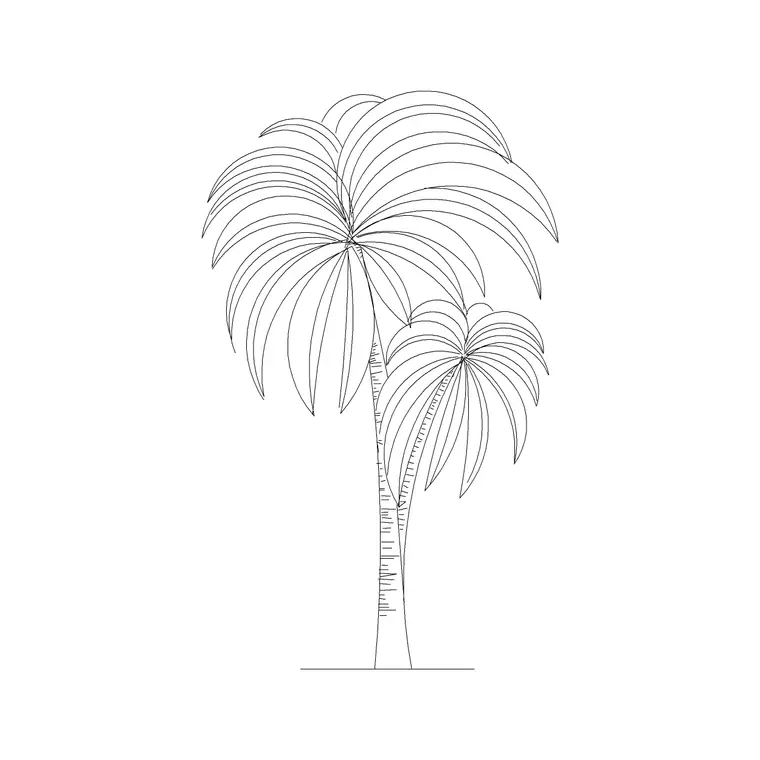
Download a free tall palm tree CAD block in DWG — a high, slender palm with a long clean trunk and a crown held well above eye level, drawn for boulevards, beachfronts and multi-storey resort facades. A tall palm gives an elevation real vertical drama, lifting the eye and setting a tropical or Mediterranean tone. Free for personal and commercial use, no signup, no watermark.
Line a boulevard, a promenade or a multi-storey resort facade with it, scaling the trunk so the high crown lands at the right level against the building. Keep the palms on a planting layer you can freeze, and line the trunks up with the bays of the facade for rhythm.
What a tall palm block adds
A tall palm is defined by its long, clean trunk: the crown of fronds sits high, often above the first or second storey of an adjacent building, so the tree carries the eye upward. This block captures that height — a slim, ringed trunk and a compact frond crown perched at the top — which is exactly the proportion you want lining a grand boulevard or a beachfront.
The trunk and crown are separate elements so you can keep the trunk crisp on a working drawing while simplifying or recolouring the fronds for presentation. The whole palm scales, copies and rotates as a single block reference.
Typical sizing to design around
Tall landscape and avenue palms commonly read in the 8-20 m height range, with some species and mature specimens going higher, the crown adding a little more above that. The trunk stays slim throughout, which is what gives a tall palm its elegant, soaring proportion. Scale to the species and maturity your scheme shows, treating these as ranges rather than fixed numbers.
Because the value of a tall palm is its height, scale from the trunk base so the palm rises from your ground line and the crown lands at the level you intend relative to nearby buildings.
Inserting and placing the tall palm
The block is drawn full size in millimetres. INSERT at scale 1 in a millimetre drawing, 0.001 in metres, or set INSUNITS so AutoCAD rescales on insertion. Snap the trunk base to your ground, kerb or planter line.
Tall palms are classic avenue trees, so copy or path-array them at even spacing down a boulevard, varying the scale a little between copies so the row looks planted. Keep them on a planting layer with a lighter lineweight than the building, and freeze that layer for a clean architectural elevation.
Where tall palms are used
Tall palms suit grand boulevards and promenades, beachfront and waterfront elevations, multi-storey resort and hotel facades, and civic avenues wanting a dramatic vertical rhythm. Their height lets them hold their own against tall buildings, where a short ornamental palm would look lost at the base of a facade.
Combine tall palms with shorter ornamental palms and palm clumps so a scheme has a range of heights and presence, giving the planting a layered, designed feel rather than a single repeated tree.
Tall palm vs shorter ornamental palm
Height changes the job a palm does. A tall palm with its high crown lines avenues and matches the scale of buildings; a shorter ornamental palm sits at human scale around courtyards, pools and entrances. Mixing the two on one scheme gives an elevation both grandeur and intimacy.
Keeping a tall and a short palm in your library means you can swap heights simply by inserting a different block on the same planting layer, with your linework and layer scheme staying consistent across the sheet.
Keeping tall palms tidy on the sheet
A row of tall palms can dominate an elevation if drawn at full lineweight, so give the planting layer a lighter weight or a halftone plot style so the palms frame rather than fight the architecture. A simplified frond crown keeps distant backdrop palms light on the drawing.
When the boulevard is finalised, WBLOCK one tall palm plus its spacing offset as a module and array it to lay out the whole avenue at once. A later change to the module restyles the entire run in a single edit.
Matching tall palms to building height
The reason to reach for a tall palm rather than a standard one is scale matching. Against a single-storey building a tall palm can look out of proportion, but along a multi-storey resort or apartment facade it finally has something to relate to, with its high crown sitting comfortably against the upper floors. Choosing the palm height to suit the building height is a real design decision the block lets you make by scaling.
A row of tall palms also creates a strong vertical rhythm that can echo the bays or columns of a facade. Lining the trunks up with structural features in the elevation ties the planting to the architecture rather than leaving it as unrelated decoration.
Free download
Browse the full library — DWG & DXF, no signup.
Questions
Frequently asked
What makes a tall palm block different?+
Its long, clean trunk holds the frond crown high — often above the first or second storey — giving an elevation vertical drama, unlike a short ornamental palm that sits at human scale.
Is the tall palm block free for commercial projects?+
Yes. It downloads free in DWG with no signup, no watermark and no attribution required, cleared for personal and commercial use.
How tall should I scale it?+
Match the species and maturity — tall avenue palms commonly read in the 8-20 m range. Scale from the trunk base so the crown lands at the right level against nearby buildings.
Will the DWG open in free CAD viewers?+
Yes. It targets AutoCAD 2004 and later, opening in AutoCAD, AutoCAD LT, BricsCAD, DraftSight and free online DWG viewers.
When is a tall palm better than a standard one?+
Use a tall palm against multi-storey buildings, where its high crown matches the upper floors. Against a single-storey building a tall palm can look out of proportion.
How do I lay out a whole boulevard of tall palms quickly?+
WBLOCK one tall palm plus its spacing offset as a module, then array that module along the boulevard. Editing the module later restyles the entire run in one step.
Related downloads
Blocks for this guide
Related categories
Related guides
Block landing
Free Flower Plant CAD Blocks — DWG Download
Free flower plant CAD blocks in DWG and DXF — flowering annuals and perennials in plan and elevation for AutoCAD landscape plans. No signup, commercial OK.
Block landing
Free Flowering Shrub CAD Blocks — DWG Download
Free flowering shrub CAD blocks in DWG and DXF — ornamental shrubs in plan and elevation for AutoCAD planting and site plans. No signup, commercial OK.
Block landing
Free Herb Plant CAD Blocks — DWG Download
Free herb plant CAD blocks in DWG and DXF — herbs for kitchen gardens, raised beds and planters, in plan and elevation for AutoCAD. No signup, commercial OK.