Block landing · silver oak tree cad block dwg
Free silver oak tree CAD block in DWG
By Saumyajit Maity · Published 4 Feb 2025 · Updated 6 Jan 2026
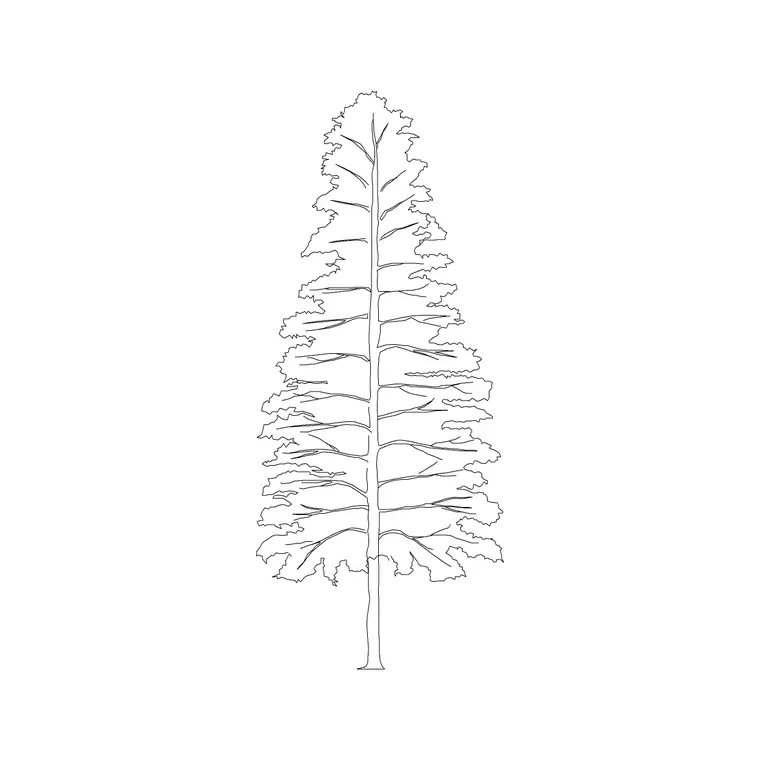
Download a free silver oak tree CAD block in DWG — a tall, upright tree with a noticeably narrow, feathery crown that sits very differently from a broad spreading oak. The silver oak is a fast-growing, slender specimen common in avenue planting and warm-climate landscapes, and this elevation block captures that upright, columnar habit. Free for personal and commercial use, no signup, no watermark.
Use it to line an avenue, fill a narrow verge or add height to a tight street section, scaling it to the height your scheme needs while keeping the crown slim. On a dedicated planting layer it freezes cleanly for a building-only elevation and thaws again for the planted view.
What makes a silver oak block distinct
Despite the name, a silver oak is not a true oak and does not look like one. It is a tall, narrow tree with a straight trunk and a relatively slim, feathery, upward-reaching crown. This block captures that columnar profile, which is exactly why a silver oak is chosen for avenues and tight verges where a broad oak would never fit.
The foliage is drawn lighter and more open than a dense broadleaf canopy, suggesting the fine, divided leaves of the species. Trunk and canopy are on separate elements so you can adjust colour and lineweight independently for presentation or working sheets.
Typical sizing to design around
Silver oaks grow fast and tall while staying narrow. In planted landscapes they commonly read in the 8-20 m height range, but the crown spread stays modest relative to that height — that slender ratio is the whole point of using one. Scale the block to the height your scheme needs while keeping the crown narrow, and treat these as ranges rather than fixed numbers.
Because the tree is so vertical, it is useful for adding height to an elevation without consuming horizontal space, which matters on a tight street section or a narrow planted strip.
Inserting and placing the silver oak
The block is drawn full size in millimetres. INSERT at scale 1 in a millimetre drawing, 0.001 in metres, or set INSUNITS so AutoCAD rescales on insertion. Snap the trunk base to your ground or kerb line.
Silver oaks are classic avenue trees, so copy or path-array them at regular spacing down a road or boulevard, then vary the scale slightly between instances so the avenue looks planted rather than printed. Keep them on a planting layer so you can freeze the trees for a clean street section.
Where silver oak blocks are used
Silver oaks turn up in avenue and boulevard planting, plantation and shelterbelt schemes in warm climates, narrow verge planting where width is limited, and estate or campus drawings looking for a tall, fast-establishing tree. Their slim form makes them a go-to where you want vertical structure without a wide canopy overhanging the carriageway.
Pair the silver oak with broader spreading trees in the same scheme to give an elevation a mix of heights and crown shapes, which reads far more naturally than a row of identical trees.
Silver oak vs true oak in a drawing
It is worth keeping the two clearly separate in your library, because they communicate completely different things. A true oak elevation says 'mature, broad, settled landmark'; a silver oak says 'tall, slim, fast-growing avenue tree'. Mislabelling one for the other on a planting plan can mislead the contractor about spacing and eventual spread.
Giving each its own block and its own schedule code keeps the planting plan honest, and lets you swap one for the other simply by inserting a different block on the same planting layer.
Keeping the avenue consistent
An avenue only works visually if the trees are consistent. Insert the same silver oak block at a fixed spacing, on the same planting layer, with only small random variation in scale, so the rhythm of the avenue reads cleanly on the elevation.
When the spacing is settled, WBLOCK one module — a single tree plus its spacing offset — and array that module to lay out the whole avenue at once. A later change to the module updates the entire run, which is far quicker than nudging trees one by one.
Why the slender form drives the layout
The narrow crown of a silver oak is not just a graphic quirk — it shapes how the whole avenue is laid out. Because the canopy stays slim, you can plant silver oaks closer together than a broad-crowned tree and still avoid the crowns clashing, which gives a denser, more rhythmic line of trees down a road.
That tight spacing is worth thinking through on the plan as well as the elevation, since the closer trunk spacing changes how the avenue reads from above. Keeping the silver oak as a distinct block, separate from broad trees, means your spacing decisions stay tied to the species you actually intend to plant.
Free download
Browse the full library — DWG & DXF, no signup.
Questions
Frequently asked
Is a silver oak the same as a regular oak?+
No. Despite the name, a silver oak is a tall, narrow, feathery-crowned tree, not a true oak. It is used where a slim avenue tree is wanted, whereas a true oak is broad and spreading.
Is the silver oak block free for commercial use?+
Yes. It downloads free in DWG with no signup, no watermark and no attribution required, cleared for personal and commercial work.
Why choose a silver oak for an avenue?+
Its narrow, upright crown adds height without spreading over the carriageway, so it suits tight verges and boulevard planting where a broad-crowned tree would not fit.
Will the DWG open in free CAD viewers?+
Yes. The file targets AutoCAD 2004 and later, opening in AutoCAD, AutoCAD LT, BricsCAD, DraftSight and free online DWG viewers.
Can I plant silver oaks closer together than broad trees?+
Yes. The narrow crown lets you space them tighter without the canopies clashing, giving a denser, more rhythmic avenue down a road or boulevard.
What formats does the silver oak download in?+
It downloads in DWG targeting AutoCAD 2004 and later. You can save it out to DXF from any DWG editor if a colleague needs an interchange format.
Related downloads
Blocks for this guide


Related categories
Related guides
Block landing
Free Flower Plant CAD Blocks — DWG Download
Free flower plant CAD blocks in DWG and DXF — flowering annuals and perennials in plan and elevation for AutoCAD landscape plans. No signup, commercial OK.
Block landing
Free Flowering Shrub CAD Blocks — DWG Download
Free flowering shrub CAD blocks in DWG and DXF — ornamental shrubs in plan and elevation for AutoCAD planting and site plans. No signup, commercial OK.
Block landing
Free Herb Plant CAD Blocks — DWG Download
Free herb plant CAD blocks in DWG and DXF — herbs for kitchen gardens, raised beds and planters, in plan and elevation for AutoCAD. No signup, commercial OK.