Block landing · palm tree elevation cad block dwg
Free palm tree elevation CAD block in DWG
By Saumyajit Maity · Published 18 Aug 2022 · Updated 19 Jan 2026
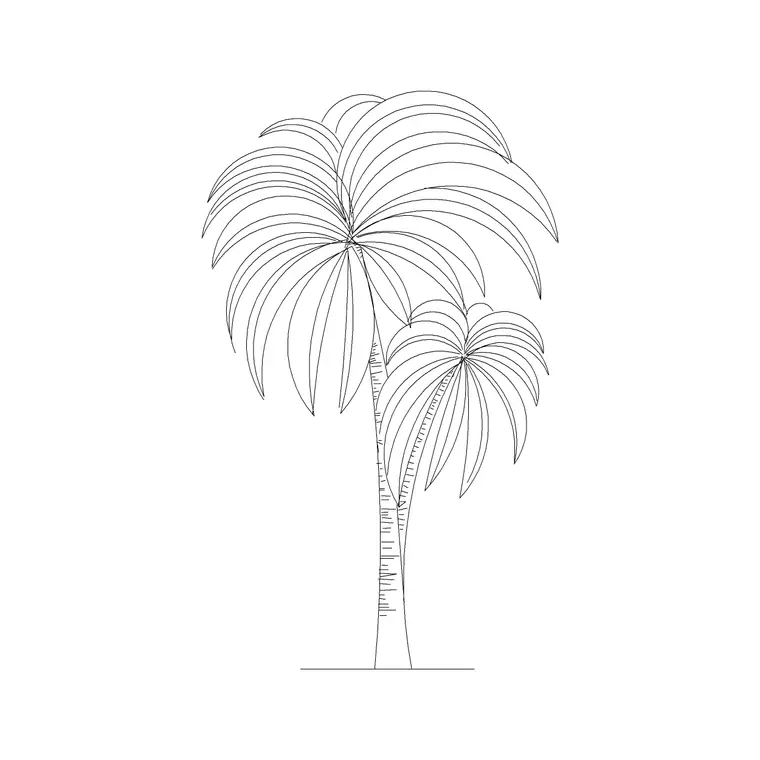
Download a free palm tree elevation CAD block in DWG — a single palm drawn front-on, with a slender trunk, frond-base rings and a fanned or feathered crown. It is the building block of any tropical, resort or Mediterranean elevation, dropping a believable palm onto a facade, poolside or boulevard section in seconds. Free for personal and commercial use, no signup, no watermark.
Use it to line a path, mark a corner or add height to a courtyard, scaling it to the palm species you are drawing. On a planting layer it freezes for a clean building elevation, and it sits happily close to glazing without hiding the storefront behind.
What the palm elevation shows
A single palm in elevation is unmistakable: a clean, slender trunk, often ringed with old frond scars, topped by a crown of arching fronds that fan or feather out from a single growing point. This block captures that silhouette so a palm reads immediately, without the lobed canopy of a broadleaf or the triangle of a conifer.
The trunk and the frond crown sit on separate elements, so you can recolour or simplify the fronds for a presentation while keeping the trunk crisp on a working drawing. As a single block reference, the palm moves, copies and rotates as one object.
Typical sizing to design around
Palms range enormously by species. Ornamental and courtyard palms might read at 3-6 m of trunk, while tall landscape and avenue palms reach into the 8-15 m range or higher, with the frond crown adding to that height. The trunk stays slim and the crown spread is modest relative to the height. Scale to the species and maturity you are showing, treating these as ranges rather than fixed figures.
Scale from the trunk base so the palm grows up from the ground line you already have, and the crown stays anchored where you placed it.
Inserting and placing the palm
The block is drawn full size in millimetres. INSERT at scale 1 in a millimetre drawing, 0.001 in metres, or set INSUNITS so AutoCAD rescales on insertion. Snap the trunk base to your ground, planter or paving line.
For an avenue of palms, copy or path-array them at regular spacing and vary the scale and crown rotation slightly between copies so the row looks planted rather than printed. Keep them on a planting layer with a lighter lineweight than the architecture, and freeze that layer for a clean building elevation.
Where palm elevations are used
Palm elevations belong in resort and hotel drawings, poolside and spa elevations, beachfront and promenade sections, and Mediterranean or tropical residential schemes. A single palm is the quiet accent in this family — useful for lining a path, marking a corner or adding height to a courtyard without the weight of a clump.
Combine the single palm with double and triple palm blocks so a scheme has a range of cluster sizes and a clear planting hierarchy rather than rows of identical lone palms.
Single palm vs palm clumps
A single palm is the lightest member of the palm family — an accent rather than a feature. Where you want more presence, a double palm flanks an entrance and a triple palm anchors a focal space. Keeping all three lets you tune the visual weight of the planting to each location.
Because they share a drawing style, you can mix single palms with clumps across one elevation and they will read as a consistent family, giving the planting variety without looking inconsistent.
Keeping palm elevations clean
Frond crowns carry a lot of fine linework, so on a busy sheet give the planting layer a lighter weight or a halftone plot style so the palms recede behind the building. A simplified frond outline is ideal for distant backdrop palms where full detail would only clutter the drawing.
When a frontage is finalised, WBLOCK a representative run of palms as a single 'palm avenue' block. Dropping that one reference in lays out a consistent row at once, and editing the definition restyles the whole avenue together.
Reading the palm against the building
A single palm is a precise instrument in an elevation because its slim trunk lets you place it close to a facade without hiding the architecture. Use it to mark the edge of an entrance, punctuate a long horizontal frontage, or add a vertical accent beside a window without the bulk of a broad canopy blocking the view of the building.
Because the crown sits at the top of a clear trunk, you can tuck the palm in front of glazing and still read the storefront or window behind it. That transparency at ground level is exactly why single palms are so useful on commercial and hospitality frontages where the building has to stay visible.
Free download
Browse the full library — DWG & DXF, no signup.
Questions
Frequently asked
Is this single palm elevation block free for commercial use?+
Yes. It downloads free in DWG with no signup, no watermark and no attribution required, cleared for personal and commercial work.
What view is the palm drawn in?+
It is an elevation — a front-on side view showing the trunk and frond crown against a ground line — suited to facades, poolside elevations and street sections.
How do I make a row of palms look natural?+
Copy or array the palm at regular spacing, then vary the scale and crown rotation slightly between copies so the avenue reads as planted rather than mechanically stamped.
Will the DWG open in older AutoCAD or free viewers?+
Yes. It targets AutoCAD 2004 and later, opening in AutoCAD, AutoCAD LT, BricsCAD, DraftSight and free online DWG viewers.
Can I place a single palm in front of a shopfront?+
Yes. The slim trunk and high crown let you put a palm close to glazing while still reading the storefront behind it, which is why single palms suit commercial frontages.
Can I combine the single palm with palm clumps in one scheme?+
Yes. Mixing single palms with the double and triple palm blocks gives a clear planting hierarchy, and because they share a drawing style they still read as one family.
Related downloads
Blocks for this guide

Related categories
Related guides
Block landing
Free Flower Plant CAD Blocks — DWG Download
Free flower plant CAD blocks in DWG and DXF — flowering annuals and perennials in plan and elevation for AutoCAD landscape plans. No signup, commercial OK.
Block landing
Free Flowering Shrub CAD Blocks — DWG Download
Free flowering shrub CAD blocks in DWG and DXF — ornamental shrubs in plan and elevation for AutoCAD planting and site plans. No signup, commercial OK.
Block landing
Free Herb Plant CAD Blocks — DWG Download
Free herb plant CAD blocks in DWG and DXF — herbs for kitchen gardens, raised beds and planters, in plan and elevation for AutoCAD. No signup, commercial OK.